
-
Content
Leasing always seems like an attractive option, doesn’t it? Why pay the full price for something upfront when you can spread out the cost and keep more cash on hand? That logic works in some situations, but with POS systems, the numbers don’t always play out the way you expect. Many business owners discover too late that renting a POS doesn’t actually save them money. Instead, they end up locked into multi-year contracts, higher monthly fees, and hardware they’ll never own.
Before you sign a POS rental agreement, it’s worth taking a closer look at what you’re really getting. This guide breaks down what’s included, what it costs, the advantages and drawbacks, and the red flags to watch for so you can make the choice that actually benefits your business.
What is included in a POS system rental?
When you rent a point-of-sale (POS) system, you typically receive a complete set of hardware and related services bundled together. The POS hardware normally includes a credit card reader or payment terminal, a touchscreen register or tablet, a cash drawer, a receipt printer, and a barcode scanner.
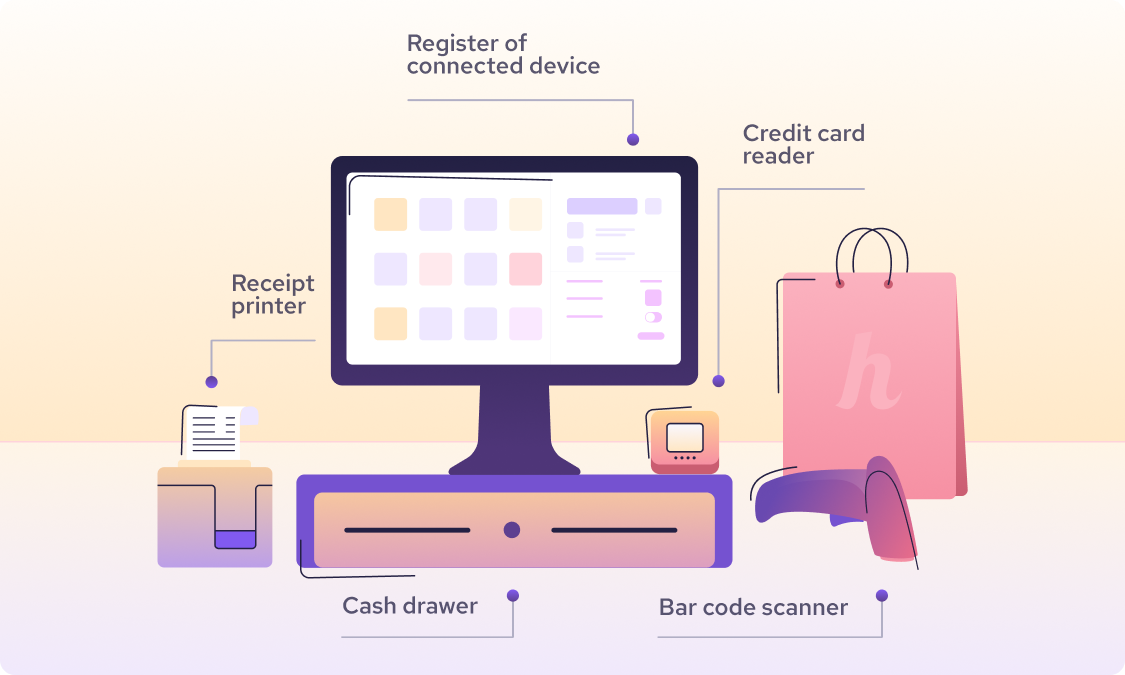
However, some POS providers offer terminal-only rentals without extra accessories like cash drawers or receipt printers. This option is usually cheaper than renting a full POS system bundle.
Other merchant services that aren’t part of the POS rental cost include credit card processing fees, installation costs, setup fees, onboarding fees, administration fees, PCI compliance fees, and other fees.
When you rent a POS system, there is usually a 3–5-year contract involved. These agreements often include extra fees such as early payment contract termination fees and special terms that outline what happens if you cancel the rental contract early, for example, fund holds for a set period, equipment return requirements, and other conditions.
What are the advantages and disadvantages of renting a POS system?
Renting a POS system comes with some clear upsides, especially if you're trying to keep startup costs low or want the freedom to use modern hardware without a big upfront investment. But over time, rental fees often exceed the cost of buying a POS outright, and most POS rental programs come with multi-year contracts that can be expensive to break. You also don’t build any resale value in the POS equipment and hardware.
Here’s a closer look at the main advantages and disadvantages to help you decide which option fits your business best.
1. Advantages of renting a POS system
Lower upfront cost: Instead of paying $600–$1,200 USD (or $840–$1,680 CAD) for a basic POS setup with a tablet, credit card reader, cash drawer, and receipt printer, businesses can significantly reduce their upfront costs by renting a POS system.
| POS hardware and accessories | U.S. price range (USD) | Canadian price range (CAD) |
|---|---|---|
| POS stations / registers | $329 – $1,900 | $460 – $2,660 CAD |
| Self-service kiosks | $149 – $3,499 | $210 – $4,900 CAD |
| Credit-card readers | $49 – $149 | $70 – $210 CAD |
| Payment terminals / mPOS | $299 – $699 | $420 – $980 CAD |
| Tap to Pay on iPhone / Android | $0 hardware cost | $0 hardware cost |
| Kitchen display systems (KDS) | Up to $899 | Up to $1,260 CAD |
| Cash drawers | $129 – $200 | $180 – $280 CAD |
| Receipt printers | $295 – $305 | $410 – $425 CAD |
| Barcode scanners | $149 – $399 | $210 – $560 CAD |
| Payment-terminal charging stations | $39 – $99 | $55 – $140 CAD |
Fast ROI and flexibility: Because the upfront investment is low, it creates a lower barrier to entry for businesses with limited initial capital. You can invest the money you save in other essential tools like business management software, shop equipment, or inventory.
Access to modern equipment: The most modern POS hardware and accessories can be expensive. By renting a POS system, you can access up-to-date, high-quality POS hardware at a more affordable monthly cost, even if you couldn’t afford to buy it outright. Some POS providers also let you upgrade to new POS models when they’re released.
Lower cost of replacement: If you work in an environment where POS hardware is more likely to be damaged; for example, customers often drop terminals or food and drinks are frequently spilled on devices, a POS rental can be a better option. The provider typically handles repairs or replacements, so you’re not paying full price every time something breaks.
2. Disadvantages of renting a POS system
Higher long-term cost: Renting a POS system may be cheap at the start, but the cost can add up quickly and often ends up costing more than buying the POS outright if you use it for two years or longer. For example, average POS rental prices range from $40/month for a simple terminal to $150/month for a full POS setup, usually tied to a 3–5-year contract. This means that by the end of your term, you’ve paid at least $1,440 for a single terminal and $5,400 for a full POS system. In comparison, a single payment terminal typically costs $100–$500 to buy outright and a full POS setup usually costs up to $1,500.
Ongoing obligation (contracts): Many POS rentals require a contract or term commitment of 3 to 5 years. If you want to exit early, you may face early termination fees or be required to pay the remaining balance. Long-term leases can also include interest or financing charges that inflate the overall cost.
No resale value: Because you don’t own the hardware, you have no way to resell it if you decide to switch providers. After the rental contract ends, you typically have to return the hardware, which means you can’t recover any of the money you’ve paid.
Potential for hidden fees: Some POS providers bundle “free” hardware with higher monthly POS software fees or higher payment processing costs to make up the difference. There may also be insurance fees, mandatory support fees, or other add-ons in the merchant service agreement. Always review the contract terms carefully to understand the catch behind “free” POS hardware.
What point of sale system rental options are available?
Businesses in the U.S. and Canada have a few different options for renting POS systems, ranging from short-term event rentals to long-term leasing arrangements. When exploring your POS rental options, make sure to consider how long you will need the equipment. If you only need it a few times during seasonal events, short-term POS rentals may be ideal.
If you’re a seasonal merchant who operates for an entire season, such as summer, buying the POS system outright is often cheaper. If you’re a Helcim merchant, there are no monthly fees, contracts, or inactivity fees, so you can pause after the season ends and start again the next year without extra costs.
For longer-term rentals, always compare the total rental costs over the entire contract to understand what you will actually pay. Be sure to also factor in any early cancellation fees in your calculation.
1. Short-term or event POS rentals
If you only need a POS system for a temporary period such as a weekend festival, pop-up shop, trade show, or seasonal market, many POS providers offer short-term rental options. These rentals are typically billed daily or weekly and may include on-site setup support and training. They’re great for one-off needs because there are no long-term, multi-year contracts. However, if you attend events multiple times during a season, such as throughout the summer, buying a POS system outright may be cheaper. Short-term rentals often cost more per day or week, so renting for several months can be as expensive as purchasing the equipment. Learn how to choose a payment processor for seasonal merchants.
2. Long-term POS rentals and leasing
This is the most common POS rental option. Providers often offer 3–5-year rental contracts. These leases usually bundle the monthly hardware cost with other merchant service fees. Replacement and warranty terms vary by provider, so you should review the agreement carefully to understand the details. The upside is the low or zero upfront cost, but the downside is being locked into a multi-year contract with penalties for early cancellation.

How much does it cost to rent a POS system?
The cost of renting a POS system can vary based on how many hardware components are included, the length of the rental, and the model of the POS hardware. You can expect to pay roughly $30 to $150 per month.

For credit card machine rentals specifically, the monthly fees tend to be lower than for a full POS system. In Canada, Moneris advertises terminal rentals at $29.95 CAD per month for a basic in-store payment machine. In the U.S., Clover offers several 36-month plans that bundle hardware and software. For example, $40/month for Starter, $70/month for Essentials, and $125/month for Services Growth. Generally, the higher the monthly fee, the more hardware you receive in your lease. Other providers, such as Heartland, charge a fixed $89 per month for each POS station.
It’s important to understand what’s included in your rental cost. In some cases, the monthly fee only covers the POS hardware and accessories, and you must pay a separate software subscription fee for the POS system.
How does POS system rental work for a multi-location business?
A business with multiple locations will need separate POS hardware for each store (and possibly multiple terminals per store). When renting, this means you’ll be paying a monthly fee for each unit. For example, if one terminal costs $50/month to rent, renting ten terminals across ten locations would cost $500/month.
If your POS provider also charges a monthly fee for POS software, then each location may have its own software subscription as well. For example, Lightspeed charges $109–$339 per month for each retail business location for its POS software.
The good news is that most modern POS systems support multi-location management. This means you can have one centralized account or dashboard that aggregates data from all your locations. Inventory, sales reports, and customer data can sync across all stores, making it easier to manage your business as a whole.
What questions should you ask before renting a POS system?
Before you sign a POS rental or lease agreement, make sure to ask these questions so that you don’t get any surprise terms or fees down the line:
What is the length of the rental term? Is it month-to-month, a 1-year lease, 3-year, or something else? Also ask what happens when the term ends—does it require renewal, or does it automatically renew?
Are there any early termination or cancellation fees? Even if the sales materials say “no hidden fees,” always confirm the fine print. Understand what, if anything, you owe if you stop using the system before the term ends. Check out common payment hidden fees to watch out for.
What happens if the hardware is damaged, lost, or stolen? If the rental POS device breaks down during normal use, some providers will replace it at no charge. But this isn’t true for every provider. Confirm the conditions under which your POS hardware will be replaced. Also ask what happens if the device is stolen.will you get a replacement, and at what cost? Some providers offer optional insurance for rented equipment, so check whether that’s available or included.
Are there inactive fees or minimum processing volume requirements? When you rent a POS system, you’re usually expected to use the provider’s merchant account for payment processing. Some providers charge inactive fees or enforce minimum processing volumes to ensure you don’t route transactions through another processor. Make sure to ask about these policies before signing.
Are setup, training, or installation services included? If you’re getting POS hardware for multiple locations, clarify whether installation support and onboarding are part of the contract. If not, ask how much these services cost.
Can I upgrade or swap equipment during the rental period? Don’t assume you can freely switch to a newer POS model. Confirm the terms and conditions for upgrades or equipment swaps. Ask whether you would need to sign a new contract or pay extra fees to replace your current rental hardware.
What are my options at the end of the term? Ask if there’s a buyout option to purchase the equipment at the end of the lease—and what that price would be. Some leases allow you to buy the hardware for a nominal amount, while others require you to return all rented equipment.
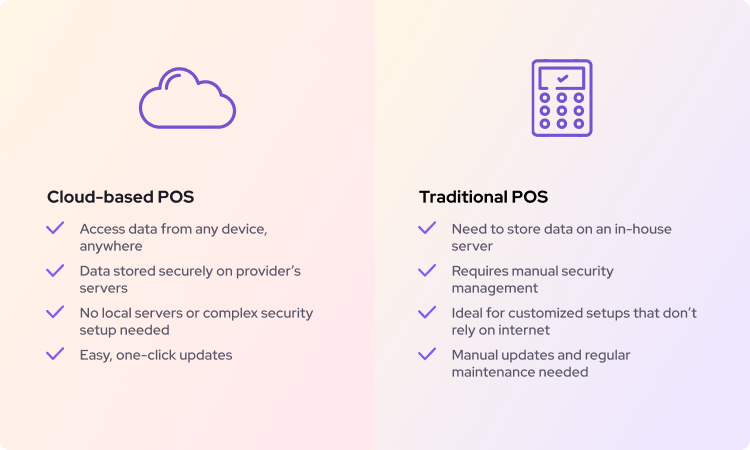
Are software updates and security updates provided? You want to ensure your POS software stays up to date for security and PCI compliance. If you rent a cloud-based POS system, updates are usually applied online. But if you rent a server-based POS system, updates may need to be installed manually on-site. In that case, ask whether the provider offers support for these updates.
How soon can I get the equipment, and how is it delivered? This is more logistical but still important if you’re on a tight timeline. If you sign today, when will the hardware arrive? Some providers keep inventory in stock for fast shipping, while others have lead times. Also clarify whether the equipment requires assembly or if it’s plug-and-play. Make sure to discuss shipping costs as well.
What should you look out for in a POS rental agreement?
POS rental or lease agreements can be dense with fine print. Here are some specific things to look out for before you sign:
Term length and auto-renewal: Make sure the contract term is clear. If it’s multi-year, note the exact end date. Check whether there is an auto-renewal clause if you don’t cancel in time, and confirm how much notice you must give to end the contract.
Early termination fees: Many POS leases include expensive cancellation fees—sometimes hundreds or even thousands of dollars—if you break the contract early. Also look out for extra charges if you don’t return the rental equipment on time.
Total cost of ownership disclosures: The agreement should ideally outline the total amount you’ll pay if you complete the full term. Add it up to see if you’re comfortable with the cost. Some contracts include a “fair market value” buyout option at the end. Check what that amount would be if you plan to keep the hardware. Always do the math to ensure you’re not overpaying.
Equipment condition and return policy: Look for clauses that explain when and how you must return the rental equipment. Typically, you must return the hardware within a set number of days after the contract ends, in good working order (minus normal wear). If you miss the return deadline or the device is damaged, you may be charged the full replacement value.
Damage and loss liability: Review what the contract says about damaged or lost equipment. Many providers will hold you liable if the rental POS hardware is damaged due to misuse or if it’s lost or stolen. Make sure you understand your responsibilities and whether optional insurance is available.
Included services and fees: If you’re renting a complete POS system for multiple locations, make sure the contract lists any training, installation, or onboarding support included. Also confirm whether these services cost extra—and if so, how much.
Payment processing requirements: Look out for any minimum processing volume requirements or monthly minimum fees tied to payment processing. Check whether the processing rates are fixed or if the provider can increase them during your contract. Some “free hardware” deals recover their costs through higher processing fees, so review this section carefully.
Warranty, upgrade, and exchange policy: Check the terms for equipment upgrades or replacements. The contract should state whether the provider is responsible for fixing or replacing malfunctioning hardware and under what conditions you are eligible for an upgrade.
Who is a POS system rental best suited for?
Renting a POS system isn’t the right fit for every business. Buying the hardware outright is almost always cheaper over the long run. But there are certain situations where a POS rental makes a lot of sense. Here are the types of businesses and scenarios that benefit most:
New and small businesses: If you’re just opening a store or restaurant, you may not have the cash to invest in a full POS setup right away. Renting lets you get up and running without draining your startup capital. It’s also a practical option for entrepreneurs testing a new business idea or early-stage companies watching every dollar. That said, pay close attention to the contract. Most POS rentals come with a 3–5-year term. The longer the contract, the higher your total cost ends up being, so weigh flexibility against long-term expense before signing.
Seasonal businesses and pop-up shops: Farmers’ market vendors, holiday shops, food trucks, tax prep services, and pop-up retailers often wonder if POS rentals make financial sense. If you only operate for a few days or short bursts during events, renting can be a cost-effective choice. You get the equipment you need without a big upfront cost. However, if you operate for several months every year, a rental can become extremely expensive. Most POS rentals come with multi-year contracts, and you’ll be paying the monthly fee even during your off-season. In these cases, buying the POS system outright is usually far more cost-effective.
Save 25% on payment processing fees with Helcim portable POS system.
Ready to take your business on the go and ditch those hefty processing fees? Here's how Helcim can help you save:
- Interchange-plus pricing: Helcim uses interchange-plus pricing, the most cost-effective payment processing model for your business.
- Automatic volume discounts: The more you process with Helcim, the lower your rates become.
- No hidden fees or contract: Get started with Helcim with no monthly fees, contract or surprise fees in your contract.
But Helcim offers more than just savings. You'll also get:
- Free Tap to Pay on iPhone: Turn your iPhone into a POS terminal and accept contactless mobile payments anywhere. We charge extra $0.60 per processed transaction using this feature.
- Advanced POS features: Manage inventory, track sales, and generate reports with Helcim's intuitive software.
- Human customer support: Helcim's in-house support team is available to answer your questions and help you troubleshoot any issues.
If you get stuck in a contract, we'll waive up to $500 of your processing fees to cover your contract cancellation and hardware costs when you switch to Helcim.

Break up with bad rates.
Feeling stuck with your provider? We'll waive $500 of your processing fees when you switch to Helcim.
FAQ
What happens if the rented POS hardware is damaged or stops working?
It depends on your POS rental contract. Some providers will replace the device if it stops working during normal use, since that’s usually considered a hardware issue. Damage caused by accidents, spills, or misuse is often not covered, and you may be charged a repair or replacement fee. If the damage is your fault, you’ll likely be responsible for the cost. Always check your POS lease agreement so you fully understand the warranty and replacement policy.
How does renting a POS system compare to buying one?
Renting has a much lower upfront cost and gives you access to modern hardware with built-in support, but it becomes more expensive the longer you use it—often three to five times more expensive than buying. Purchasing a new POS requires a higher upfront investment, but you pay far less over time because you own the equipment. Rentals also come with contracts and potential cancellation fees, while owning gives you full control. If you plan to use the POS for several years, buying is usually the cheaper option.
How much does it cost to rent a card machine?
Card machine rentals typically range from $30 to $150 per month depending on how much POS hardware you need. Some short-term rentals charge daily or weekly rates instead. Always compare the rental cost with the one-time purchase price, since basic terminals often cost only $100–$500 to buy outright.
Is hardware support included with POS rentals?
Yes, most POS rentals include hardware support as part of the monthly fee. This usually covers troubleshooting, repairs, and replacement for equipment that fails under normal use. Some providers offer 24/7 customer support, while others have limited hours, so confirm what your contract includes. Support for accidental damage or theft may cost extra unless you have an insurance add-on.
Can you rent a POS machine?
Yes, you can rent both full POS systems and standalone payment terminals. Many providers offer short-term event rentals as well as long-term leasing options. This is useful for businesses that only need a POS for temporary setups, seasonal operations, or testing a new concept. Depending on the provider, your rental may include setup help, software access, and ongoing support.
Is it cheaper to lease or buy a POS system and hardware?
Buying is almost always cheaper in the long run because you pay once and own the hardware. Leasing or renting spreads the cost out monthly, which helps cash flow, but the total paid over a 3–5-year contract is usually 3-5 times higher than the purchase price. Rentals also come with fees and strict contract terms that can add to the cost. If you plan to use the hardware for more than two years, buying is usually the most cost-effective choice.
Related Articles
-
iPad POS Systems: The Ultimate Guide for Business Owners
Robert Luong | October 31, 2025
-

POS system pricing: costs, fees and ROI calculation (US and Canada)
Robert Luong | October 30, 2025
-
What is the best portable POS system for small business?
Robert Luong | March 24, 2025
-

POS Software: Everything you need to know.
Kaitie Weaver | December 20, 2024
-
Free POS systems uncovered: Everything you need to consider
Feyi Oladipo | August 26, 2024