

























If you’re considering Wave, or already using it, you’ve probably asked this at some point: How do I actually get paid through Wave App?
The short answer is that Wave makes it easy to send invoices. But when it comes to accepting payments, your options aren’t always as flexible as they first appear. And that’s where things start to matter.
Most businesses don’t start with a complicated tech stack. You begin with something simple. A tool to send invoices. A spreadsheet to track payments. Maybe accounting software like Wave App to keep everything organized. And for a while, it works. Wave is popular for a reason. It’s easy to use, free to get started, and built for small businesses that need a clean way to manage invoicing and accounting. But as your business grows, the focus shifts.
Invoices go out… but payments take longer to come in. Customers start asking for more ways to pay. And the cost of accepting payments becomes more noticeable. Because while Wave invoicing is free, payment processing isn’t. And once your volume increases, whether that’s 20 invoices a month or 1,000, those fees quietly become part of your margins.
At that point, most businesses start wondering: Do I have to use Wave’s built-in payment processing? The answer is no. You can keep using Wave for invoicing while choosing a different way to accept payments. That’s where payment processing integrations for Wave App come in.
Where Wave’s built-in payments start to fall short
Wave does offer built-in payment processing, and for many businesses, it’s enough to get started. But over time, a few limitations become more noticeable:
- You don’t have much control over pricing models
- Fees are typically flat-rate, which may not scale well
- Payment options and workflows can feel limited
- Payments are primarily designed for online invoices
That last point is easy to overlook. If your business ever needs to accept payments in person, at events, retail locations, or client meetings, Wave’s native setup may not fully support that. For businesses processing higher volumes or handling different types of payments, these limitations start to matter.
What payment processing integrations for Wave actually do
Payment processing integrations for Wave App allow you to connect Wave with third-party payment processors like Helcim, Stripe, or Square so customers can pay invoices online. But more importantly, they give you flexibility. Instead of relying on a single built-in option, you can control:
- How you accept payments
- What you pay in processing fees
- How payments flow back into your records
So while Wave continues to handle invoicing, the payment processor handles how transactions actually happen.
How Wave payment integrations change your workflow
On the surface, the difference is simple.
Without payment integrations:
- You send an invoice
- Wait for payment
- Manually confirm and update records
With the right payment integration setup:
- You send an invoice
- The customer pays
- Everything updates automatically
Behind the scenes, the integration syncs key data—invoice details, payment status, customer information, and transaction records—so your books stay accurate without extra work.
At the same time, the payment processor handles security, including encrypted transactions, tokenized data, and fraud protection. The result is a workflow that feels lighter, faster, and easier to manage as volume grows.
Choosing the right payment integration for Wave
There are several ways to connect payment processing to Wave, and each one takes a slightly different approach. The most common options include Helcim, Stripe, Square, and Shopify.
Helcim (via payment extension)
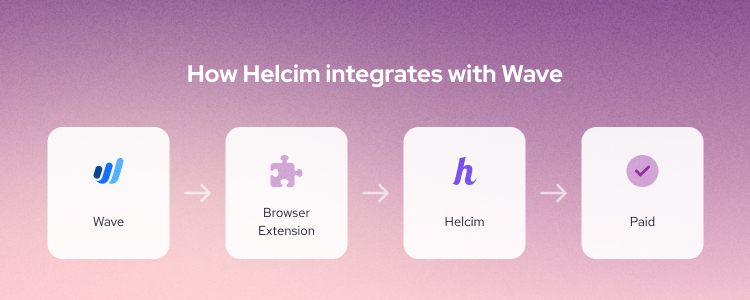
Helcim connects to Wave through a Helcim Payment Extension, allowing you to keep your existing invoicing workflow while expanding how you accept payments.
Instead of routing everything through a third-party tool, the extension works alongside Wave. What makes this approach different is the added flexibility:
- Interchange-plus pricing instead of flat rates
- No need for Zapier or additional connectors
- Payments sync directly with your invoice workflow
- Ability to accept both online and in-person payments
That last point can be especially useful. Wave’s built-in payments are designed primarily for online invoices. But as your business grows, you may also need to accept payments in person.
With a payment extension, you can:
- Continue invoicing through Wave
- Accept payments online
- Handle in-person transactions when needed
All within the same workflow. One thing to note is that Helcim’s payment extension currently doesn’t support ACH transfers or recurring payments, so if those features are essential, you may want to explore other options.
Stripe (via Zapier)
Stripe is a flexible option for businesses that operate primarily online or need subscription billing. It connects to Wave through Zapier, allowing you to automate payment workflows between systems. It’s a strong fit if you need:
- Global payment support
- Subscription capabilities
- Customizable payment experiences
The trade-off is added complexity and cost from using Zapier.
Square (via Zapier)
Square is often used by businesses that handle both in-person and online payments. It works well for:
- Retail environments
- POS systems
- Simple payment setups
However, when used with Wave, it typically relies on Zapier, which adds another layer to manage.
Shopify (via Zapier)
Shopify is best suited for ecommerce businesses that want to connect their online store with their accounting in Wave. It’s less focused on invoicing specifically and more about aligning your broader sales workflow.
How integrations are typically set up
Most payment integrations for Wave fall into two categories:
- Automation tools (like Zapier): flexible, but require an extra layer to connect systems
- Payment extensions: more directly embedded payment into your workflow
Both approaches work—the difference comes down to how much complexity you’re comfortable managing and how closely you want payments tied to your invoicing process.
How much do Wave payment processing integrations cost?
Wave payment processing integration fees vary depending on the provider, but most fall between 2.4% and 3.5% per transaction. Here’s a general comparison:
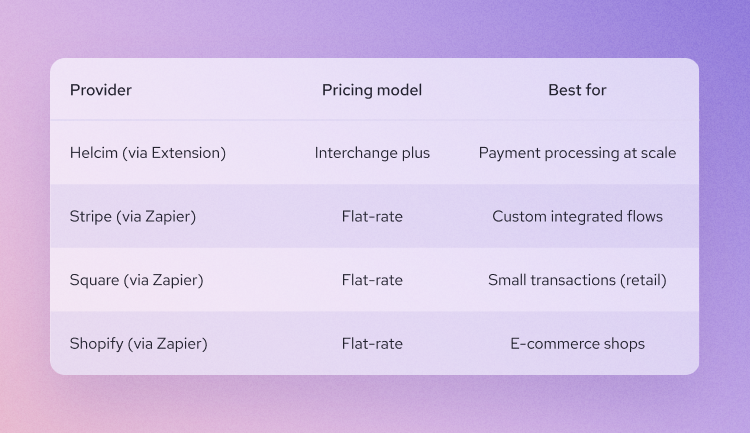
Flat-rate pricing is simple, but interchange-based models can be more cost-efficient as your volume increases.
What this means as your business grows
Early on, almost any setup works. But as your business scales, small differences start to matter:
- How much you pay per transaction
- How quickly payments are reconciled
- Whether you can support both online and in-person payments
That’s why many businesses start with Wave’s built-in payments, then gradually move toward a more flexible setup over time.
Not because Wave stops working—but because their payment needs evolve.
Final thoughts
Wave is a great starting point for invoicing. But as your business grows, the way you accept payments becomes just as important as how you send invoices. The good news is—you don’t have to replace what’s already working. You can keep the simplicity of Wave while adjusting how payments are handled behind the scenes. And for many businesses, that shift—from a fixed setup to a more flexible one—is where you start to see real improvements in both efficiency and cost.
Ready to add Helcim to your payment flow with Wave?
Stop choosing between the accounting tools you love and the fair, transparent payment rates your business deserves. By adding the Helcim Payment Extension to your browser, you can keep your existing Wave invoicing workflow exactly as it is—while gaining the ability to process payments at lower rates, accept in-person transactions, and enjoy automatic, volume-based savings. Visit the Helcim Payment Extension page to learn more and get started.
FAQs
What happens when you connect Wave to a payment processor?
Connecting Wave to a payment processor allows invoices, payments, and customer data to sync automatically while the processor securely handles transactions in the background.
What payment options can you offer customers?
With a Wave payment integration, you can typically accept credit cards, debit cards, bank transfers (ACH/EFT), and sometimes digital wallets.
How complex is it to set up a payment integration?
Most Wave payment integrations are easy to set up using prebuilt connections, Zapier, or payment extensions—no API or technical experience required.
What payment processors work with Wave?
Wave can integrate with payment processors like Helcim, Stripe, Square, and Shopify, with differences in setup, pricing, and flexibility.