
-
Content
Project management software is no longer optional for contractors and home service businesses. Whether you’re running HVAC installs, remodels, roofing jobs, or electrical work, you need scheduling, job costing, dispatching, and invoicing all in one place.
But while most providers advertise straightforward monthly pricing, the real project management software cost often includes more than the subscription. Seat pricing, invoicing add-ons, and payment processing fees can significantly increase total spend over time.
This guide explains what project management software does, how pricing works for contractors, and how some businesses are quietly reducing project management software cost — without switching platforms.
What is project management software for home services and construction?
Project management software for home services and construction is a digital platform that helps contractors plan, schedule, track, and manage jobs from start to finish.
Instead of juggling spreadsheets, paper files, and text messages, contractors use project management software to centralize operations in one system. It typically allows businesses to:
- Schedule jobs and crews
- Assign tasks to field teams
- Track labor and material costs
- Manage subcontractors
- Store contracts and permits
- Send invoices and collect payments
- Monitor job profitability
For growing home services businesses, project management software becomes the operational backbone of the company.
What are examples of contractor project management software?
Examples of contractor-focused project management software include Housecall Pro, Jobber, ServiceTitan, and Procore.
These platforms differ in size and complexity:
- Housecall Pro – popular with small to mid-sized home service businesses
- Jobber – flexible for field service contractors
- ServiceTitan – enterprise-level home services platform
- Procore – large-scale construction management software
Each platform handles operations well. But when evaluating project management software pricing, it’s important to look beyond scheduling features.
How much does project management software cost for contractors?
Project management software cost for contractors typically ranges from $29 to $300+ per month, depending on platform size, users, and features. General ranges look like this:
| Cost category | Typical range |
|---|---|
| Subscription fee |
|
| Seat pricing |
|
| Invoicing add-ons |
|
| Credit card processing |
|
| ACH payments |
|
| Chargebacks |
|
While subscription pricing is predictable, payment processing often becomes the largest variable component of total project management software cost.
Why is project management software cost higher than expected?
Project management software cost is often higher than expected because payment processing fees scale with revenue. Contractors send large invoices:
- $8,000 HVAC installs
- $15,000 roofing jobs
- $25,000 kitchen remodels
At 2.9%, a $20,000 invoice costs $580 in credit card processing fees. Multiply that by multiple jobs per month, and payment processing can quietly exceed your subscription fee.
Many platforms:
- Use flat-rate pricing
- Offer limited negotiation
- Lock businesses into built-in processors
- Provide no automatic volume discounts
For growing contractors, payments — not software — become the biggest cost driver.
Can contractors use separate payment providers alongside their project management software?
Yes — and many do. Contractors often keep their project management software for scheduling and job management but add a second payment provider to lower processing rates.
The workflow typically looks like this:
- Generate invoice inside project management software
- Process payment in a separate payment portal
- Manually reconcile transactions
- Update invoice status
It reduces processing rates — but introduces operational friction. This creates:
- Switching between tabs
- Manual re-entry of invoice amounts
- Increased accounting risk
- More back-office time
Contractors save on fees but increase administrative burden.
How can contractors reduce project management software cost without switching platforms?
You might think: Is there a world where contractors can reduce project management software cost by improving payment processing while keeping their existing software? Short answer: Yes.
There are a few ways to approach this.
Option 1: Status quo - Use a separate payment provider and manually reconcile. Some contractors process payments through a lower-cost payment processor and then manually update invoices inside their project management software. This reduces processing fees but increases administrative work and reconciliation effort.
Option 2: Build a custom API integration. If the contractor’s software allows API access, a business can connect a different payment processor with lower rates and automate the payment workflow. This approach typically requires developer resources, setup time, and ongoing maintenance. Learn more about integrated payments here.
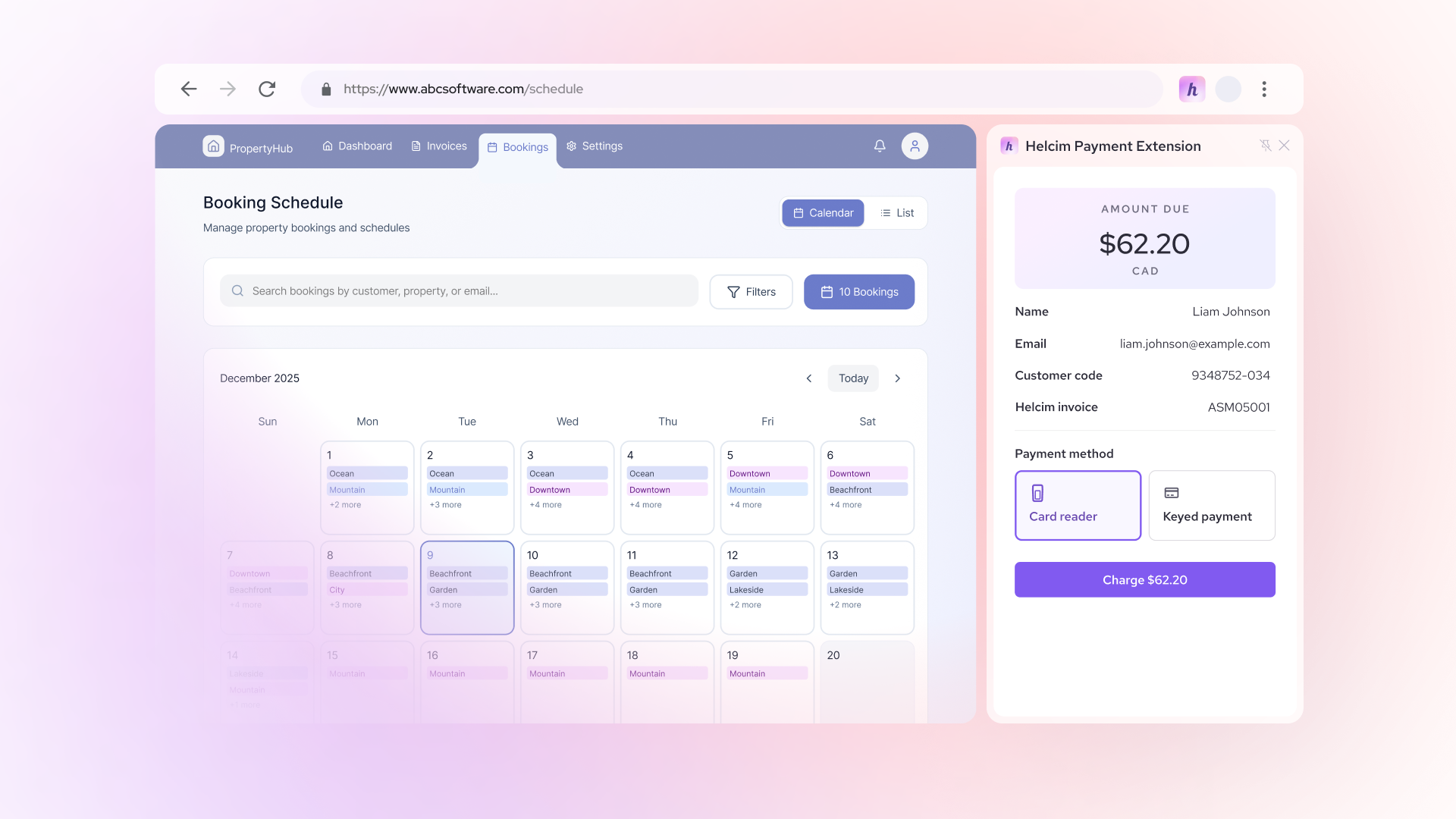
Option 3: Use a no-code integration tool. For contractors who want automation without development work, tools like Helcim Payment Extension provide a browser-based option. The extension allows contractors to process payments through Helcim while staying inside their existing project management software interface. Payments run on interchange-plus pricing, and invoice status updates without manual copy-paste or tab switching.
While all three approaches can reduce project management software cost, they vary in setup complexity and ongoing administrative effort. Most contractors aren’t looking to rebuild their systems — they’re looking for a practical way to lower payment processing costs without disrupting daily operations. That’s where a no-code payment integration like Helcim Payment Extension fits into the picture.
How does Helcim Payment Extension reduce project management software cost?
Helcim Payment Extension allows contractors to process payments directly within their existing project management software interface — without switching tabs. Here’s the typical workflow:
| Feature | Built-in flat-rate payments | Keep your software + Helcim |
|---|---|---|
| Scheduling & job management |
|
|
| Invoice creation |
|
|
| Interchange-plus pricing |
|
|
| Option to surcharge |
|
|
| Swivel-chair reconciliation |
|
|
| Potential annual savings |
|
|
1. Create the invoice normally
You generate an invoice inside Housecall Pro, Jobber, ServiceTitan, Procore, or another contractor project management platform.
2. The extension detects invoice details
When the invoice is open, Helcim Payment Extension automatically detects the total amount and relevant details.No copy-paste. No manual re-entry.
3. Process the payment through Helcim
The payment can be processed through Helcim in the way that best fits your workflow — either by pushing the invoice total directly to a connected Helcim Smart Terminal or Helcim Card Reader for in-person payments, or by using Helcim Virtual Terminal if you have the customer’s card information for remote transactions.
In both cases, the payment runs on Helcim’s interchange-plus pricing model instead of the flat-rate pricing often built into contractor project management software. This means you pay the true card network cost plus a transparent markup, which can lower overall processing expenses — and if desired, you can enable a compliant surcharge to pass credit card fees to customers, further reducing your total project management software cost without changing the software you already use.
4. The invoice updates
After payment approval, the invoice reflects as paid — eliminating manual reconciliation or swivel-chair updates.
- No duplicate data entry.
- No switching between dashboards.
- No reconciliation headaches.
Project management software payment processing fees reduction example
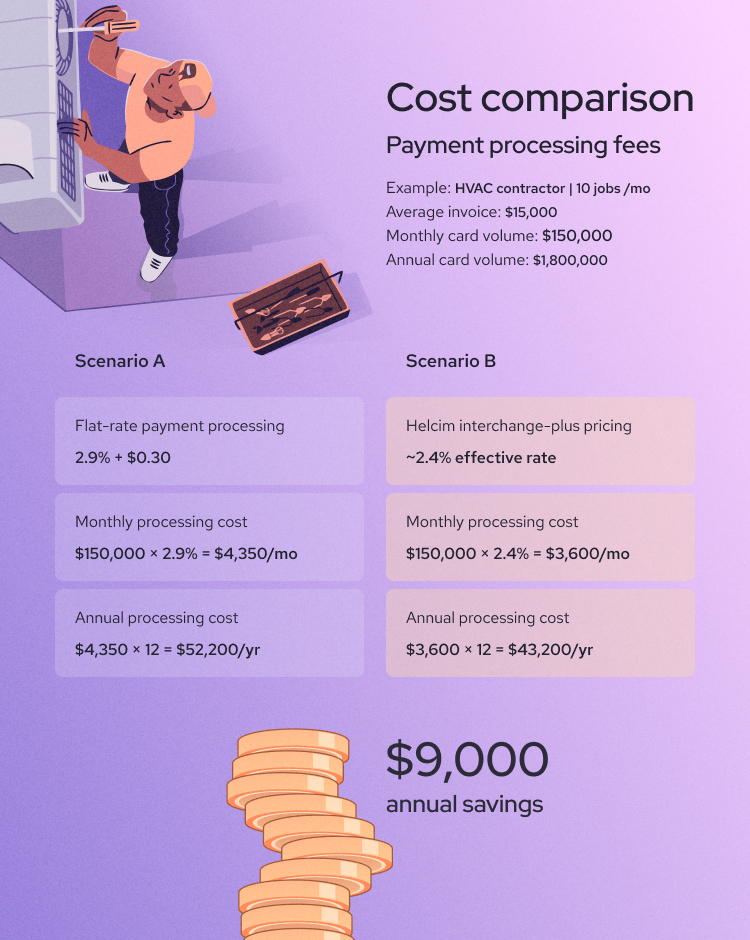
To understand how payment processing affects total project management software cost, let’s compare a realistic contractor scenario. Example: HVAC contractor
- 10 jobs per month
- Average invoice: $15,000
- Monthly card volume: $150,000
- Annual card volume: $1,800,000
Now compare two common setups:
Scenario A: Using built-in flat-rate payment processing (typical 2.9% + $0.30)
- Monthly processing cost: $150,000 × 2.9% = $4,350 per month
- Annual processing cost: $4,350 × 12 = $52,200 per year
Scenario B: Using interchange-plus pricing through Helcim (example effective rate ~2.4%): Let’s assume a blended effective rate of 2.4% (actual rate varies by card mix).
- Monthly processing cost: $150,000 × 2.4% = $3,600 per month
- Annual processing cost: $3,600 × 12 = $43,200 per year
Annual difference: $52,200 – $43,200 = $9,000 in annual savings
And that’s without enabling surcharging.
How much can surcharging reduce the cost of project management software?
If the contractor enables a compliant credit card surcharge, a portion (or all) of the credit card processing fee can be passed to customers who choose to pay by credit card. In that case:
- Effective credit card cost could approach near-zero
- Annual savings could exceed $40,000+
- Debit and ACH payments remain unsurcharged
That dramatically changes total project management software cost — without switching software platforms.
Keep your system, improve your margins
Most contractors evaluate project management software pricing based on subscription tiers.
But at scale, payment processing — not subscription fees — drives the majority of total project management software cost. Switching software is disruptive. Retraining staff is expensive. Migrating systems is risky.
Improving the payment layer underneath your existing platform is often the simplest, lowest-risk way to reduce overall cost. You keep the system that runs your operations. You optimize the part that impacts your margins.
If you’re happy with your contractor software but not your payment fees, Helcim Payment Extension may be the simplest upgrade you can make.
- You don’t need to switch platforms.
- You don’t need to retrain your team.
- You just improve how payments are processed.
Explore the Helcim Payment Extension to see how it fits into your current workflow
FAQ
Does contractor project management software include payment processing fees?
No. Most contractor project management software platforms separate subscription pricing from payment processing fees. Your monthly plan typically covers scheduling, dispatching, estimating, and job management features. When you enable payment functionality, transaction fees are charged separately — usually as a flat percentage (for example, around 2.5%–3.5% + a fixed per-transaction fee). In some cases, payment features may also require a higher-tier plan or an additional monthly add-on.
Can I use a different payment processor with my project management software?
It depends on the platform. Some contractor software allows API integrations, which means you can connect a different payment processor — often requiring developer setup and maintenance. Others require manual reconciliation if you process payments outside their built-in system. There are also no-code options, such as browser-based integration tools, that allow contractors to process payments through a different provider while staying inside their existing workflow — reducing both processing costs and administrative effort. Before choosing a solution, it’s important to confirm what integration options your software supports.