























Every credit card payment you accept comes with a credit card processing fee, and those fees add up faster than most business owners expect. A difference of less than one percent sounds small, but on $10,000 a month in card sales it can mean $1,000 or more a year leaving your account.
We compared seven popular payment processors that serve U.S. and Canadian businesses: Helcim, Square, Stripe, Clover, SumUp, and Authorize.net. For each one, we looked at how it prices transactions, what it charges, which fees are easy to miss, and what tools you get for the money. Yes, we're Helcim, so we have a horse in this race. We've tried to be straight about where our competitors do well and where Helcim falls short.
TL;DR: which credit card processor should you choose?
- Choose Helcim if you want the lowest overall cost without giving up tools. Helcim interchange-plus pricing averages about 1.78% + 8¢ in person in the U.S. (1.72% + 8¢ in Canada), with no monthly fee, and the rate drops automatically as your sales grow. POS, invoicing, recurring billing, a virtual terminal and an online store are all included at no extra monthly cost.
- Square, SumUp and Stripe can make sense when you're very small or very new. Their flat rates are simple to understand and you can start taking payments quickly. Once you pass roughly $5,000 to $10,000 a month in card sales, their flat rates usually cost more than Helcim interchange-plus.
- Clover may suit busy full-service restaurants that need advanced table and kitchen tools, but only if you buy the hardware outright and read the contract carefully. Leases and multi-year agreements sold through resellers can cost far more than the hardware itself.
- Authorize.net fits narrower needs. Authorize.net works as a gateway for businesses that already have a merchant account and need its large shopping cart library.
| Helcim | Square | Stripe | Clover | SumUp | Authorize.net | |
|---|---|---|---|---|---|---|
| Pricing model | Interchange-plus | Flat rate | Flat rate (custom pricing over $1M/year) | Flat rate (varies by reseller) | Flat rate | Flat rate (All-in-One plan) |
| Monthly fee | $0 | $0 (Plus $49, Premium $149 for lower U.S. rates) | $0 | $14.95 to $114.85+ software fee | $0 on free plan | $25 |
| U.S. in-person rate | 1.78% + 8¢ average (Interchange + 0.40% + 8¢) | 2.6% + 15¢ | 2.7% + 5¢ | 2.3% to 2.6% + 10¢ | 2.60% + 10¢ | 2.9% + 30¢ |
| U.S. online rate | 2.29% + 25¢ average (Interchange + 0.50% + 25¢) | 3.3% + 30¢ | 2.9% + 30¢ | 3.5% + 10¢ | 3.50% + 15¢ | 2.9% + 30¢ |
| Canada in-person rate | 1.72% + 8¢ average | 2.50% | 2.7% + 5¢ | 2.3% to 2.6% + 10¢ | 2.50% | 2.9% + 30¢ |
| Canada online rate | 2.38% + 25¢ average (Interchange + 0.50% + 25¢) | 2.80% + 30¢ | 2.9% + 30¢ | 3.5% + 10¢ | 3% (payment links) | 2.9% + 30¢ |
| Automatic volume discounts | Yes, up to 70% off Helcim margin | No (custom pricing over $250K/year) | No (custom pricing over $1M/year) | No (negotiated through reseller) | No | No |
| Chargeback fee | $15, refunded if you win | $0 | $15, non-refundable (+$15 to dispute) | $20 to $50, non-refundable | No internal fee | $25, non-refundable |
| Contract | None, month-to-month | None | None | Often 36 months through resellers ($300 to $500+ exit fee) | None | None |
| Level 2/3 optimization | Yes, as low as 1.45% | No | Supported (savings need custom pricing) | Supported (savings need interchange-plus) | No | Via API (savings need separate interchange-plus account) |
| Surcharging tool | Yes (Fee Saver), U.S. and Canada | U.S. only | No built-in tool | Yes | No | Via API |
| Hardware | Card Reader $199, Smart Terminal $349, owned outright | $59 to $899, Square POS only | $59 to $299 | Software plan required to use terminals; leases common | $99 to $249 | Third-party readers only |
| Free built-in tools | POS, virtual terminal, invoicing, recurring billing, online store, inventory | POS app, virtual terminal, invoicing (advanced features on paid plans) | Checkout, payment links, invoicing (no POS app) | Tools tied to paid software plan; extra apps cost more | POS app, invoicing, payment links (no recurring billing) | Virtual terminal, invoicing, recurring (within $25/month) |
Helcim rates are averages for common credit cards (excluding American Express) with a $300 average transaction, at the entry volume tier. Competitor rates are standard published rates and may change.
Cheapest credit card processors for U.S. and Canadian businesses
Helcim
Helcim pricing model
Helcim uses interchange-plus pricing that passes exactly what banks and payment network charges to merchants. Every time a customer pays by card, the customer's bank charges a fee called interchange fee, and the card network (Visa, Mastercard and so on) adds a small network fee. Helcim passes those costs to you at what they actually are, then adds one transparent margin on top. Your statement shows both parts separately, so you can see exactly what Helcim earns.
Helcim doesn’t charge any monthly fee, setup fee, PCI compliance fee, statement fee or cancellation fee. Helcim also offers automatic credit card processing fee discounts that lower your fees by up to 70% as your credit card volume increases. You don't have to call anyone or negotiate for better rates.
Helcim credit card processing fees
Helcim interchange-plus fees start from Interchange + 0.40% + 8¢ (for in-person transactions) and Interchange + 0.50% + 25¢ (for online transactions), which gradually decreases up to Interchange + 0.15% + 6¢ as business volume increases. Explore Helcim full pricing here.
| Monthly Card Processing Volume | In-Person Card-Present Margin | Keyed & Online Card-Not-Present Margin |
|---|---|---|
| Tier 1: $0 – $50,000 | Interchange + 0.40% + 8¢ | Interchange + 0.50% + 25¢ |
| Tier 2: $50,001 – $100,000 | Interchange + 0.35% + 7¢ | Interchange + 0.45% + 20¢ |
| Tier 3: $100,001 – $500,000 | Interchange + 0.25% + 7¢ | Interchange + 0.35% + 20¢ |
| Tier 4: $500,001 – $1,000,000 | Interchange + 0.20% + 6¢ | Interchange + 0.25% + 15¢ |
| Tier 5: $1,000,001 – $5,000,000 | Interchange + 0.15% + 6¢ | Interchange + 0.15% + 15¢ |
| Enterprise: Over $5,000,000 | Custom Enterprise Pricing (Contact Sales) | Custom Enterprise Pricing (Contact Sales) |
For businesses that have an average transaction of $300, below are the average Helcim credit card processing fees at different tiers of monthly volume for common credit cards (excluding American Express).
| Monthly card volume | U.S. in person | U.S. keyed and online | Canada in person | Canada keyed and online |
|---|---|---|---|---|
| $0 to $50K | 1.78% + 8¢ | 2.29% + 25¢ | 1.72% + 8¢ | 2.38% + 25¢ |
| $50K to $100K | 1.73% + 7¢ | 2.24% + 20¢ | 1.67% + 7¢ | 2.33% + 20¢ |
| $100K to $500K | 1.63% + 7¢ | 2.14% + 20¢ | 1.57% + 7¢ | 2.24% + 20¢ |
| $500K to $1M | 1.58% + 6¢ | 2.04% + 15¢ | 1.52% + 6¢ | 2.14% + 15¢ |
| $1M to $5M | 1.53% + 6¢ | 1.94% + 15¢ | 1.47% + 6¢ | 2.04% + 15¢ |
For businesses that use Helcim Recurring Payments for credit card processing, Helcim charges 0.4% per recurring transaction. Besides, if customers use business or corporate credit cards, businesses can use Helcim level 2/3 credit card optimization to lower the rate to as low as 1.45%. If U.S. merchants use Helcim Tap to Pay on iPhone, Helcim charges an extra 10¢ fee per transaction.
If you’re interested in how much Helcim can save you, visit the Helcim pricing page or use the Helcim comparison tool for savings estimation.

Other Helcim fees
Helcim doesn't charge monthly, PCI, statement, setup, cancellation, hidden fees or data migration fees. Helcim charges a $15 credit card chargeback fee, but it’s refundable if the merchant wins the chargeback dispute. Helcim offers a free chargeback management tool for merchants to submit evidence and counter the chargeback. Besides, merchants can subscribe to an optional monthly mobile data plan of $7 USD / $9 CAD per month to process in-person credit card payments without Wi-Fi when using the Helcim Smart Terminal or Helcim Card Reader.
Helcim credit card processing tools
Merchants can accept credit card payments in person using the Helcim Smart Terminal and Helcim Card Reader, with no contract or monthly software fees required. The Helcim Card Reader costs $199 USD / $239 CAD and the Helcim Smart Terminal costs $349 USD / $429 CAD.
Businesses can also use different free Helcim online tools to collect credit card payments online and save even more on credit card processing fees:
- Helcim Fee Saver lets merchants in eligible regions pass the credit card processing fees to the customers.
- Helcim level 2/3 credit card optimization lets you lower the credit card processing fees of qualified business and corporate cards to as low as 1.45%.
- Helcim Virtual Terminal allows you to process online credit card payments on your phone, laptop, desktop or tablet. It’s also useful for setting up pre-authorized funds, accepting partial credit card payments, or collecting outstanding or past-due invoices faster.
- Helcim Invoicing allows businesses to create, send (via SMS or email), and track unlimited professional invoices from your account at no extra cost.
- Helcim Payment Pages lets you create a Payment Page and share it with your customers as a payment link to collect payments for reusable, fixed, or editable amounts, no website required.
- Helcim Payment Extension can connect Helcim to more than 60 (and counting) external eCommerce, accounting, business management, billing, or EHR software applications so that businesses can lower credit card fees without leaving their software.
- Helcim Inventory Management lets businesses manage products and services with variations and add-ons easily. Helcim automatically updates the inventory across all sales channels.
- Helcim Customer Management helps you store customer contact information, saved payment methods, payment history, product preferences, buying behavior, and important documents.
Businesses can access all Helcim payment tools with no monthly fees, no contracts, and no hidden fees so that they don’t have to sacrifice operational needs for lower credit card processing fees.

Helcim Strengths
- Helcim interchange-plus pricing gets wholesale credit card rates instead of paying flat, expensive fees on every credit card transaction. Helcim's rates also drop automatically as businesses grow, so high-volume or growing businesses can get the cheapest credit card fees without negotiating. Compare your rates with Helcim’s rates.
- Helcim POS software and payment tools are included at no monthly cost and with no per-user fees. You can give each staff member their own login without paying more.
- Helcim Level 2/3 optimization helps you lower the credit card processing fees as low as 1.45% for qualified business and corporate cards. This feature helps businesses get the most affordable credit card rates automatically for qualified transactions.
- Helcim Fee Saver lets merchants pass credit card processing fees to customers when they choose to pay with credit cards. Many other processors don’t offer this feature, so it’s a true saver for businesses with thin margins.
Helcim Weaknesses
- Interchange-plus pricing means the credit card processing fee fluctuates with every transaction. In some rare scenarios, the true cost can be more expensive than the flat rate of other payment processors. For businesses with low credit card processing volumes, Helcim savings may not be significant. Helcim credit card fee savings are most visible and significant for businesses with moderate or high volumes—at least a couple thousand dollars per month.
- Helcim interchange-plus pricing means there is no one flat credit card processing rate. Therefore, it’s harder to forecast the credit card processing costs.
- Helcim only serves businesses in the U.S. and Canada. Businesses outside North America cannot use Helcim's credit card processing service.
- Helcim doesn’t offer kitchen display screens or self-order kiosks, so restaurants that need this hardware may not see Helcim as a great fit.
Who should use Helcim
Helcim offers one of the most affordable credit card processing fees for businesses in the U.S. and Canada that process at least a few thousand dollars a month. Helcim also offers low credit card fees for businesses with lots of business or corporate card transactions thanks to Helcim Level 2/3 credit card optimization. Growing businesses can also get low credit card processing fees with Helcim's automatic volume discounts.
Square
Square pricing model
Square uses flat-rate pricing, which means businesses pay a flat credit card processing fee on every transaction no matter how low the true costs are. In the U.S., Square's in-person rate drops slightly if you pay for a higher software plan. In Canada, Square has one standard rate for all software subscription plans.
Square credit card processing fees
| Payment type | U.S. (Free plan) | U.S. (Plus) | U.S. (Premium) | Canada |
|---|---|---|---|---|
| In person | 2.6% + 15¢ | 2.5% + 15¢ | 2.4% + 15¢ | 2.50% |
| Online | 3.3% + 30¢ | 2.9% + 30¢ | 2.9% + 30¢ | 2.80% + 30¢ |
| Keyed / virtual terminal | 3.5% + 15¢ | 3.5% + 15¢ | 3.5% + 15¢ | 3.30% + 15¢ |
How Square credit card processing fees compare to Helcim: On $10,000 a month in U.S. in-person sales (200 transactions of $50), Square's Free plan costs about $290 versus about $194 with Helcim. That's around $96 more a month, or roughly $1,150 a year. For online transactions, the online credit card processing fees are about $360 on Square's Free plan versus about $254 with Helcim on $10,000 in sales. In the U.S., Square also charges debit cards the full credit card rate, while Helcim charges 1.00% + 8¢ for in-person debit.
Other Square fees
Similar to Helcim, Square doesn't charge PCI fees or require a contract. However, some business management features are locked behind Square’s monthly subscription plans. For example, Square Invoices Plus is $20/month and Square Kiosk needs an add-on monthly app subscription on top of the hardware you've already bought. Besides, in the U.S., if businesses want lower credit card processing fees, they need to subscribe to the Plus or Premium plans, which cost $49/month and $149/month, respectively.
Square credit card processing tools
Square makes its own hardware, sold outright or with monthly financing:
| Device | U.S. | Canada |
|---|---|---|
| Square Reader | $59 | $69 CAD |
| Square Stand | $149 | $249 CAD |
| Square Terminal | $299 | $399 CAD |
| Square Handheld | $399 | $449 CAD |
| Square Register | $899 | $999 CAD |
The free Square POS app covers basic checkout, item catalogs and sales reports. Square also offers a virtual terminal, invoicing, an online store builder, developer APIs. Industry-specific tools for restaurants, retail and appointments are available, with the more advanced features on paid plans.
Strengths
- Square is quick to set up, and Square's credit card processing fee is easier to understand and forecast compared to Helcim's interchange-plus pricing.
- Square offers large payment hardware selections such as dual-screen registers, POS stands, or self-checkout kiosks, which are suitable for restaurants, coffee shops, or retailers.
- Square doesn't charge a chargeback fee, while most credit card processors charge a chargeback fee from $15 to $30.
Weaknesses
- Square doesn’t offer volume discounts like Helcim, so businesses cannot get cheaper credit card processing fees automatically as they grow. U.S. businesses have to upgrade to higher-tier subscription plans for slightly lower credit card processing fees.
- In the U.S., Square charges the same expensive credit card fees for debit card transactions while Helcim charges 1.00% + 8¢ for in-person debit in the U.S.
- Square doesn’t support Level 2/3 optimization, so businesses have to pay the same expensive rates for corporate card transactions. In contrast, Helcim Level 2/3 credit card processing can bring credit card fees down to as low as 1.45%.
- Square only supports credit card surcharging in the U.S., while Helcim Fee Saver supports surcharging in both the U.S. and Canada.
- Square hardware only works with the Square POS system, while Helcim offers an API that merchants can use to connect Helcim Smart Terminal to external POS systems.
Who should use Square?
Square can work for very new or very small businesses, pop-ups and market sellers who want to start quickly and don't process much each month. Restaurants and retailers that need its deeper industry software may also find it worth the Square subscription fees. Once your card sales pass roughly $10,000 a month, Square’s flat rate usually costs noticeably more than Helcim interchange-plus pricing.
Read Helcim vs Square in more detail.
Stripe
Stripe pricing model
Similar to Square, Stripe also uses flat-rate pricing, with the same headline rates in the U.S. and Canada. Businesses processing more than $1,000,000 a year can negotiate a custom interchange-plus agreement. Stripe's real strength is its developer tools. It's built for businesses that want to code the unique credit card processing flow for their websites, app or platform.
Stripe credit card processing fees
| Payment type | U.S. | Canada |
|---|---|---|
| Online (domestic cards) | 2.9% + 30¢ | 2.9% + 30¢ CAD |
| Manually keyed | 3.4% + 30¢ | 3.4% + 30¢ CAD |
| In person | 2.7% + 5¢ | 2.7% + 5¢ CAD |
If merchants use Stripe's recurring payment feature, they have to pay an extra 0.7% per transaction. Besides, Stripe Tap to Pay on phone costs 10¢ extra per transaction.
Compared with Helcim: On $10,000 a month in U.S. in-person sales (200 transactions of $50), Stripe costs about $280 versus about $194 with Helcim. On $10,000 in online sales (100 transactions of $100), Stripe costs about $320 (or $370 if the cards are keyed in), versus about $254 with Helcim.
Other Stripe fees
Similar to Helcim and Square, Stripe has no setup, monthly or cancellation fees, but there are several costs that businesses need to keep in mind:
- Chargeback fees are non-refundable: Stripe charges $15 when a customer files a credit card chargeback, and this fee is non-refundable regardless of whether the merchant wins or loses the dispute. To counter the credit card chargeback, merchants must pay another $15 per dispute, which is refundable if the merchant wins the dispute.
- Different credit card processing fees for other features: Some Stripe products have different processing fees. For example, Buy Now Pay Later fees start at 5.99% + $0.30 per transaction.
Stripe credit card processing tools
Stripe's hardware includes the Stripe Reader M2 ($59 USD for U.S. only), the BBPOS WisePad 3 (about 59forCanadaandinternational),andtheStripeReaderS700andS710smartterminals(299 USD). The BBPOS WisePOS E is also available in both countries.
For online credit card processing, you get Stripe Checkout (a hosted payment page), Stripe Elements (custom checkout components), Payment Links, Stripe Invoicing and Stripe Billing for subscriptions, plus the Radar fraud tool and a payment API. There's no full POS app with inventory management built in, so in-person retailers usually need third-party software.
Stripe strengths
- Similar to Square, Stripe's pricing model is easier to understand and forecast compared to Helcim's interchange-plus pricing model.
- Stripe's payment APIs are powerful. They let businesses with developers build a highly customized checkout experience for their websites, apps, or platforms.
- Stripe supports 135+ currencies and many local payment methods, which helps international customers pay more easily.
- Stripe Level 2/3 credit card processing is supported through its PaymentIntent API, Stripe Checkout, or Stripe Billing and Invoicing.
Stripe weaknesses
- Stripe's flat rate doesn't drop as you grow unless you negotiate custom pricing. In contrast, Helcim's rates fall automatically as businesses grow.
- Stripe doesn’t have POS software with built-in features like inventory management, so retailers or brick-and-mortar businesses must rely on external POS systems or code their own POS software.
- Stripe doesn’t offer a ready-to-use surcharging tool, while Helcim's Fee Saver is a simple toggle.
Who should use Stripe
Stripe suits businesses with developers who can build their own checkout or billing system. Businesses selling globally in many currencies may also find Stripe to be the best fit. If you mostly sell in person or want ready-to-use tools without writing code, you'll likely pay more with Stripe.
Read Helcim vs Stripe in more detail.
Clover
Clover pricing model
Clover uses the flat-rate pricing model and is owned by Fiserv. Clover sells its payment system through different subscription plans. Banks and independent sales organizations (ISOs) also sell Clover, often with tiered pricing, marked-up interchange-plus pricing, long contracts and equipment leases. Two businesses with the exact same Clover terminal can end up paying very different amounts. Clover also requires a monthly software subscription to use any of its terminals, even if you've paid for the hardware in full.
Clover credit card processing fees
| Payment type | U.S. | Canada |
|---|---|---|
| In person | 2.3%–2.6% + 10¢ | 2.3%–2.6% + 10¢ |
| Online | 3.5% + 10¢ | 3.5% + 10¢ |
| Manually keyed | 3.5% + 10¢ | 3.5% + 10¢ |
Compared with Helcim: On $10,000 a month in U.S. in-person sales (200 transactions of $50), Clover costs about $250 to $280 in processing, plus a software fee of $14.95 to $114.85 or more each month. Helcim costs about $194 with no software fee. Online, Clover's 3.5% + 10¢ works out to about $360 on $10,000 in sales versus about $254 with Helcim.
Other Clover fees
This is where Clover can get expensive, especially if you buy through a reseller:
- Monthly software fees on hardware you already own: You need a software plan ($14.95 to $114.85+ per month) to use the Clover payment terminal, plus about $14.95/month for each extra register and $25/month per kitchen display screen.
- Equipment leases that cost several times the hardware price: Reseller leases typically run 36 months at $35 to $180 a month. Leasing a Clover Station Duo can total $4,860 to $6,480 over three years, compared with a purchase price of $1,799 to $1,899.
- Long contracts with steep exit fees: Clover reseller agreements commonly last 36 months. Early termination fees range from $300 to $500, and some contracts charge "liquidated damages" based on your remaining months, which can exceed $2,000.
- Non-refundable chargeback fees: Clover charges $20 to $50 per credit card chargeback, which is non-refundable even when you win the dispute.
- Other fees that may appear on a statement: PCI non-compliance fees of $19.95 to $99 a month, account minimums of $25 to $50 a month, paper statement fees of $5 to $15, batch fees of 20¢ to 30¢, and 1.75% for Rapid Deposit.
Clover credit card processing tools
Clover offers many payment hardware options for businesses to accept payments in person, like POS stations, kiosks, or kitchen display systems. Clover also offers a virtual terminal, online invoicing with payment links, recurring billing, e-commerce plugins, built-in surcharging, and Level 2/3 credit card processing support. In addition, Clover offers more than 200 apps in the Clover App Market.
Clover strengths
- Clover payment hardware like kitchen display systems or POS stations are suitable for busy restaurants or retailers.
- Clover offers many restaurant management tools like table layouts, bar tabs, split checks and course timing, which full-service restaurants may find useful.
- Clover provides employee scheduling and biometric time tracking, so you can manage shifts and timekeeping in the same system.
Clover weaknesses
- Clover credit card fees and pricing depend on who sold you Clover (resellers, Clover, banks, etc.). In contrast, Helcim offers low credit card processing rates for everyone, with no contract and no cancellation fee.
- You can't use Clover terminals without paying monthly software fees, and reseller leases can cost thousands more than the hardware. With Helcim, you buy the hardware outright and the POS software is free.
- Clover requires businesses to sign multi-year contracts with expensive cancellation fees from $300 to $500, as well as liquidated damages fees.
- Clover charges many hidden fees that aren’t easy to find on their website like PCI non-compliance fees, account minimum fees, paper statement fees, and batch settlement fees.
Who should use Clover
Clover is best suited to full-service restaurants, bars, and large retail stores that need advanced hardware like kitchen displays, kiosks, or dual-screen stations. However, Clover's long-term contracts, expensive credit card processing fees, and hidden fees make it unsuitable for businesses that want affordable credit card processing, especially those that don’t need restaurant management features.
Read Helcim vs Clover in more detail.
SumUp
SumUp pricing model
Like Square and Stripe, SumUp uses flat-rate pricing with no monthly fee on its free plan. Paying for a higher software tier adds features but doesn't lower your processing rate. SumUp has limited credit card processing tools for Canadian businesses.
SumUp credit card processing fees
| Payment type | U.S. | Canada |
|---|---|---|
| In person | 2.60% + 10¢ | 2.50% |
| Online | 3.50% + 15¢ | 3% |
| Manually keyed | 3.50% + 15¢ | Unavailable in Canada |
SumUp credit card processing tools
SumUp Solo costs $99 USD, and the SumUp Terminal costs 249USD.InCanada,themaindeviceistheSumUpGo(125 CAD on sale, regularly $249 CAD), which pairs with an Android tablet. SumUp software includes a product catalog, invoicing with automatic overdue reminders, and payment links. In the U.S., SumUp also offers loyalty marketing and a business bank account with next-morning payouts.
SumUp strengths
- Even though SumUp credit card processing fees aren’t cheap, its card reader (SumUp Solo) costs only $99.
- The card readers include free cellular data, so you don't need a phone or a data plan to take payments on the go.
- Similar to Helcim, Stripe and Square, SumUp doesn’t require a contract for merchants to get started.
SumUp weaknesses
- SumUp's keyed-in credit card processing fee of 3.50% + 15¢ is expensive for businesses that take phone orders or online payments. In contrast, Helcim's online credit card rate averages around 2.29% + 25¢ in the U.S.
- Unlike Helcim, SumUp doesn’t offer any surcharging tools and has no Level 2/3 optimization, so businesses can't offset credit card processing fees or lower costs on business cards.
- Canadian merchants cannot access the Virtual Terminal to accept payments online. In contrast, Helcim offers the same full set of payment tools in Canada as in the U.S.
- SumUp doesn't offer recurring billing, so businesses cannot set up recurring payment or installment payment plans.
Who should use SumUp
SumUp makes sense for very small U.S. businesses, such as market vendors, food trucks, and mobile service providers, who want the lowest hardware cost. SumUp's flat credit card processing fees are as expensive as Square's. If businesses are looking for the cheapest credit card processing fees, Helcim is the better option, especially for businesses with a couple thousand dollars in volume per month.
Read Helcim vs SumUp in more detail.
Authorize.net
Authorize.net Pricing model
Authorize.net offers two plans depending on your need. The All-in-One plan bundles the payment gateway with a merchant account at a flat rate. The Gateway Only plan connects to a merchant account you already have from another provider. Both plans charge a $25 monthly fee. In Canada, the All-in-One plan isn't available, so you'd need a separate Canadian merchant account plus the Gateway Only plan.
Authorize.net credit card processing fees
| Payment type | U.S. | Canada |
|---|---|---|
| In person | 2.9% + 30¢ | 2.9% + 30¢ |
| Online | 2.9% + 30¢ | 2.9% + 30¢ |
| Manually keyed | 2.9% + 30¢ | 2.9% + 30¢ |
Other Authorize.net fees
- Authorize.net charges a 10¢ gateway fee applied to declines, voids, and refunds.
- Authorize.net charges a $25 credit card chargeback fee that is non-refundable, even if merchants win.
- Authorize.net charges many hidden fees, such as a $20 late-payment fee, $10 abandoned-account fee, $0.25 authorization fee, $0.25 batch fee, and $1.20 verbal authorization fee.
Authorize.net credit card processing tools
Authorize.net's $25 monthly fee includes a virtual terminal, digital invoicing, recurring billing, a customer card vault and its Advanced Fraud Detection Suite. Authorize.net connects to more than 170 shopping carts, including Shopify, WooCommerce, Magento and BigCommerce.
In contrast, in-person payment tools are limited. Authorize.net doesn't make its own hardware. You buy certified third-party readers like the BBPOS Chipper 3X through its partner. Chip and tap payments in its mobile app only work with certain processors, and the app isn't available in Canada.
Authorize.net strengths
- Authorize.net connects with a very wide range of shopping carts and business software, which can save development work for eCommerce stores.
- The Gateway Only plan lets you keep a merchant account you already have and switch credit card processors without rebuilding your checkout.
- Its fraud tools and pre-dispute alerts can help you refund a disputed charge early and avoid the $25 chargeback fee.
Authorize.net weaknesses
- Authorize.net's credit card fee of 2.9% + 30¢ also applies to debit transactions. In contrast, Helcim's in-person debit fee is 1.00% + 8¢ in the U.S. and around 9¢ in Canada.
- Unlike Helcim, Authorize.net doesn’t offer automatic volume discounts for high-volume and growing businesses.
- The $25 monthly fee applies even in months you don't sell anything.
- In-person tools are limited and depend on which processor you use. Helcim makes its own card reader and smart terminal, and its POS app works in both countries.
Who should use Authorize.net
Authorize.net fits online businesses that already have a merchant account and need a gateway that plugs into their shopping cart or enterprise software. If you sell in person, are in Canada, or want an all-in-one setup without a monthly fee, other providers will likely cost less.
Read Helcim vs Authorize.net in more detail.
What makes credit card processing fees low?
The pricing model offered by credit card processors is what keeps credit card processing fees low. Helcim uses interchange-plus pricing that passes wholesale credit card processing rates directly to merchants. Combined with volume discounts and Level 2/3 optimization, Helcim offers some of the cheapest credit card processing fees.
But what is Helcim interchange-plus pricing? And why is Helcim interchange-plus so affordable?
Did you know: Every credit card transaction fee has three parts:
- Interchange fee: This is the wholesale fee the customer's bank charges. It's set by the card networks and depends on the type of card (debit, rewards, business), how it's used (in person or online) and your industry.
- Network fees (assessments): A small fee charged by Visa, Mastercard, Discover or American Express.
- The processor's markup. This is the only part that changes depending on what credit card processor you pick.
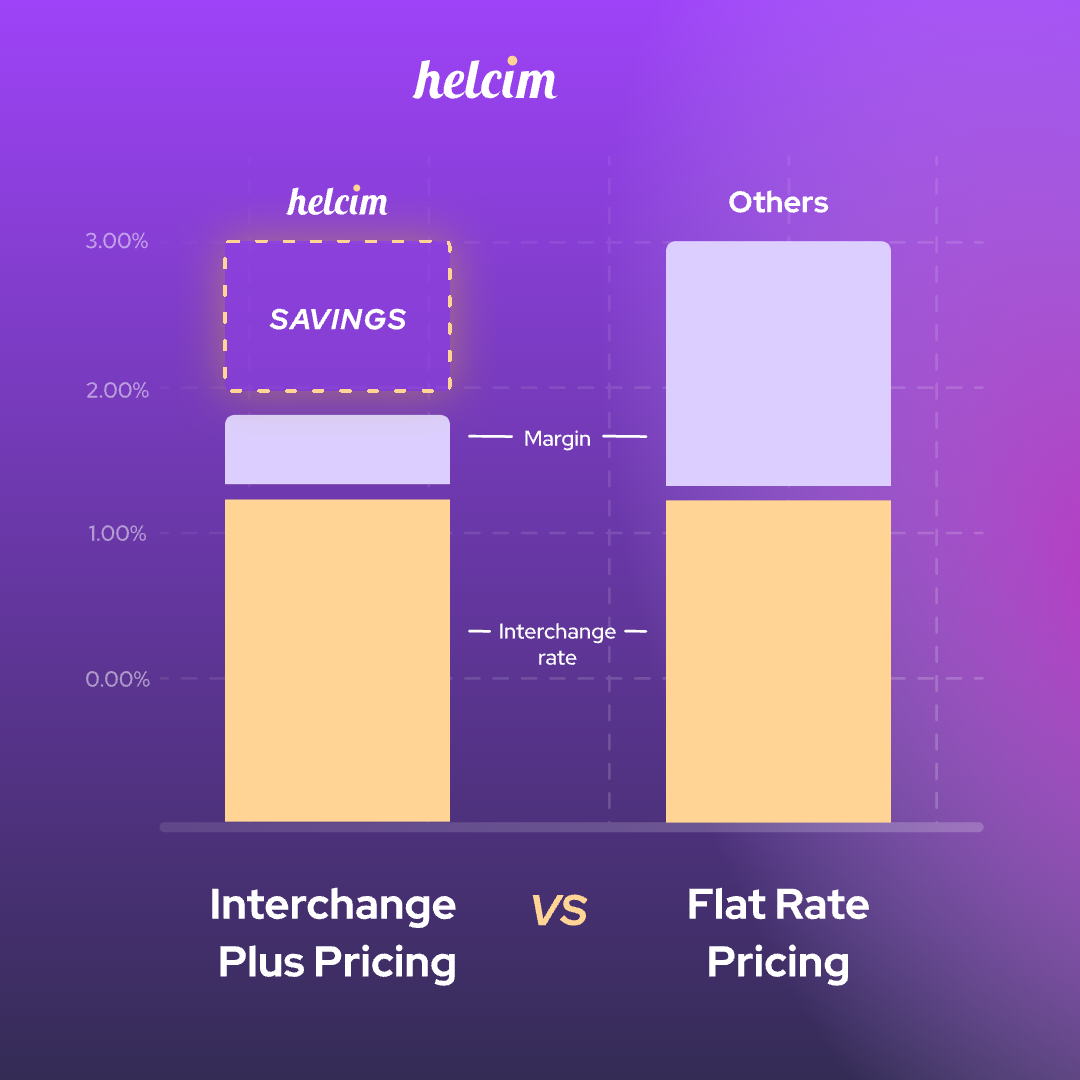
Since the interchange fee and network fee are non-negotiable, it’s the processor margin that ultimately determines whether your fees are high or low. The two most common pricing models that credit card processing companies use are flat-rate and interchange-plus pricing.
- Flat-Rate Pricing: Since interchange fees fluctuate with each transaction, your actual costs can vary. To simplify this, most processors charge a fixed rate, such as 3% + 25¢ per transaction. However, this rate needs to be high enough to ensure profit margins on all transactions, meaning you often overpay for most of the transactions.
- Interchange-Plus Pricing: Processors like Helcim use interchange-plus pricing, which passes the true cost of each transaction directly to you, along with a transparent, fixed margin. For example, Helcim charges Interchange + 0.40% + 8¢. This model helps merchants save, on average, 25% compared to flat-rate pricing.
A few other factors also make a difference. In-person payments cost less than online or keyed payments because chip and tap transactions carry less fraud risk. Debit card processing fee is lower than credit card one, and rewards or business cards cost more than consumer cards.
How to get the lowest credit card processing fees
If this is the first time you get a credit card processor, you can skip steps 1 and 2.
Step 1: Find your real effective rate. Pull your last monthly merchant statement and add up every fee on it: processing fees, monthly software fees, PCI fees, statement fees, chargeback fees, and anything else. Divide that total by your total card sales for the month. The result is your effective rate, and it's often higher than the rate your processor advertises.
Step 2: Check your pricing model and contract. Look for whether you're on flat-rate, tiered or interchange-plus pricing. Then check your contract for its length, auto-renewal terms, early termination fees and any equipment lease. These tell you how much it will cost to leave and when you can do it.
Step 3: Compare your rate against interchange-plus pricing. Interchange-plus offers the cheapest credit card processing fees once you're processing more than a few thousand dollars a month. If you need help, Helcim's Merchant Statement Comparison Tool lets you upload a recent statement and see how much you will save with Helcim.
Step 4: Check if a credit card processor offers a volume discount. You should look for automatic volume discounts, so your rate drops as your sales grow without any negotiation.
Step 5: You can use a surcharging tool like Helcim's Fee Saver to pass credit card processing fees to customers. Helcim will let you turn on surcharging if it is allowed in your region.
Step 6: Turn on Level 2/3 optimization for corporate and business transactions to further lower your credit card processing fees. Helcim Level 2/3 optimization helps you submit transaction data to the payment network and lower your fees to as low as 1.45% for eligible transactions.
Can I negotiate better credit card transaction fees?
Usually, credit card processors like Stripe or Square require a minimum credit card processing volume to open negotiations. For example, Square only offers custom pricing above $250,000 a year in card sales, and Stripe opens negotiations if a business meets at least $1,000,000 in volume a year.
In contrast, credit card processors like Helcim offer automatic volume discounts that lower your credit card processing fees as your business grows. So if businesses don’t want to go through the negotiation process or want to have low credit card processing fees from day one, they can choose Helcim.
FAQ
Is Helcim the cheapest credit card processor?
For most small and medium businesses in the U.S. and Canada, Helcim offers one of the cheapest credit card processing fees because it uses interchange-plus pricing with no monthly fees and offers volume discounts. For example, for $10,000 of monthly in-person sales, Helcim costs $194, compared with $250 to $466 for other processors. Businesses with high credit card processing volume get the most significant savings with Helcim.
What types of businesses can save the most with Helcim interchange-plus pricing?
Businesses processing more than about $10,000 a month tend to see the biggest savings. Besides, Helcim’s credit card processing fees drop with volume, so high-volume businesses can save even more as they grow. B2B sellers can also benefit from Helcim Level 2/3 optimization because it brings credit card rates down to as low as 1.45%.
Why are my credit card processing fees so high?
The most common reasons are flat-rate or tiered pricing models that overcharge on low-cost card transactions. Because the true credit card processing fees fluctuate with every transaction (due to interchange and assessment fees), most credit card processors with flat rates charge credit card fees much higher than the true rates to stay profitable. Besides, if your credit card processor doesn't offer volume discounts, your rate may not have gone down as your business grew.
What credit card processing fee is considered good?
Wholesale interchange on a typical mix of consumer debit and credit cards often falls between about 1.15% and 1.80%, so a fair all-in rate sits not far above that. For in-person sales, an average effective rate under about 2% is generally good, and online rates are typically a bit higher because of fraud risk. Helcim's averages are 1.78% + 8¢ in person and 2.29% + 25¢ online in the U.S. If your effective rate is close to 3% or higher on mostly in-person sales, you're likely overpaying.
Can I pass credit card fees to the customers?
In most cases, yes. Surcharging is allowed in most U.S. states and in Canada (except Québec), as long as you only apply it to credit cards, disclose it before payment, and stay within the card network caps (3% in the U.S. under Visa rules, and 2.40% in Canada). Surcharging debit and prepaid cards isn't allowed, and some U.S. jurisdictions, including Connecticut, Massachusetts, and Puerto Rico, restrict it. Helcim's Fee Saver handles these rules for you, turning off automatically in restricted regions and showing the fee to customers before they pay.