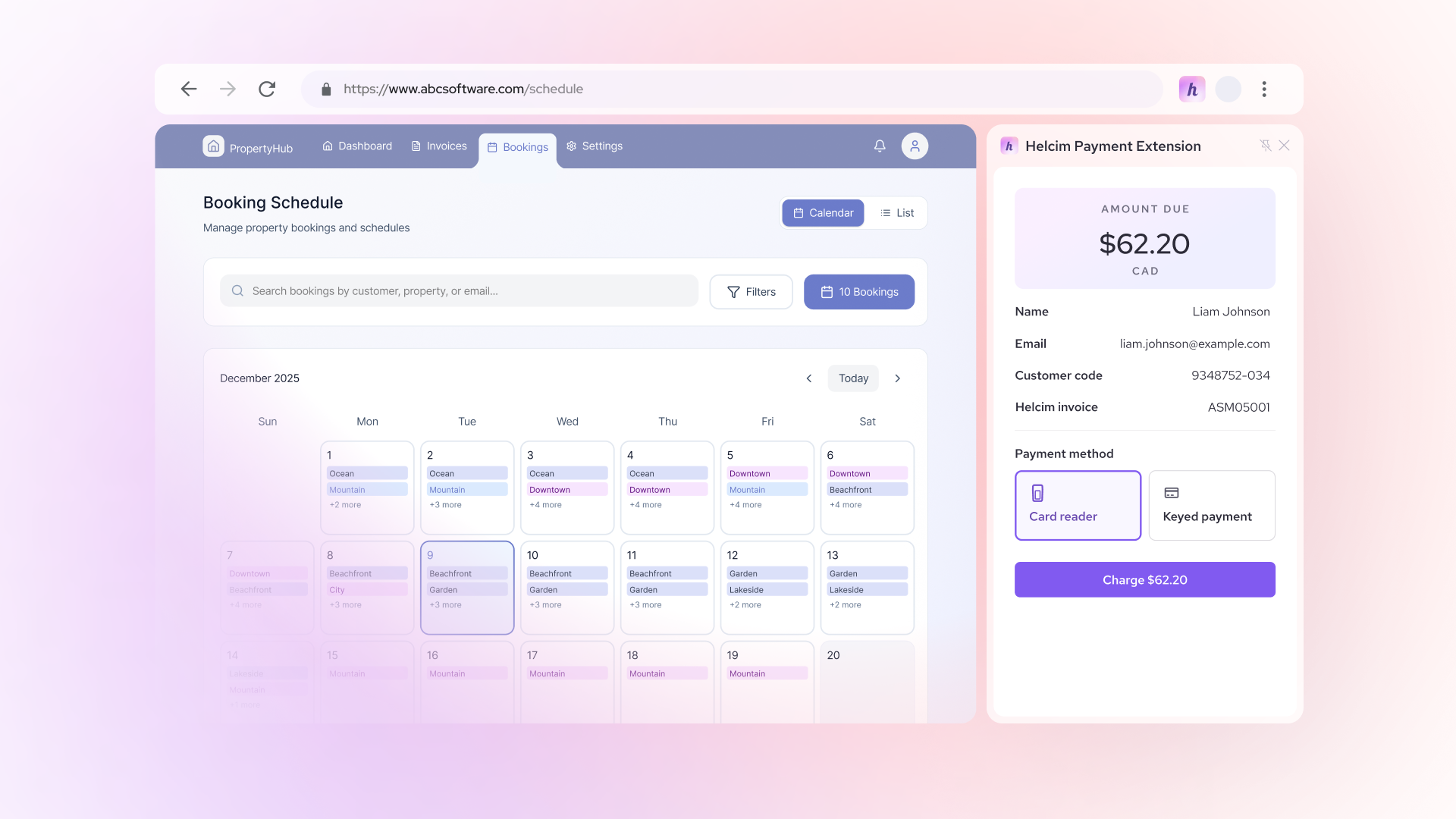

























Embedded payments are becoming a core feature of modern software platforms.
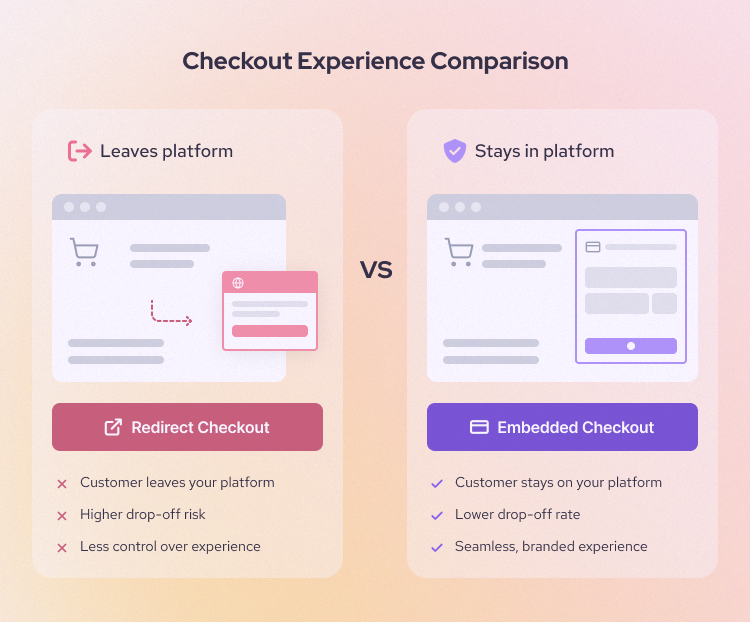
Instead of redirecting users to a third-party checkout, embedded payments allow businesses to accept and manage payments directly inside their platform, app, or software. This shift is changing how platforms operate, monetize, and deliver value.
For SaaS companies, marketplaces, and vertical software providers, payments are no longer just a backend function. They are becoming a core part of the product experience and a meaningful revenue driver.
Software platforms are increasingly becoming the primary distribution channel for financial services. Payments are often the first step.
What are embedded payments?
Embedded payments refer to the ability to accept and manage payments directly within a software platform, without redirecting users to a third-party experience. This shift is part of a broader trend toward integrating financial services into everyday software tools.
At a high level, embedded payments remove friction from the payment process by keeping users within the same environment. This improves both user experience and operational efficiency for businesses.
Embedded payments are payment processing capabilities built directly into a software platform. Users can complete transactions without leaving the experience, which creates a more seamless and cohesive workflow.
How embedded payments work
To understand the value of embedded payments, it helps to look at what happens behind the scenes during a transaction. While the experience feels simple to the user, multiple systems and stakeholders are involved in processing each payment.
Embedded payments streamline this complexity by abstracting it into a single platform experience.
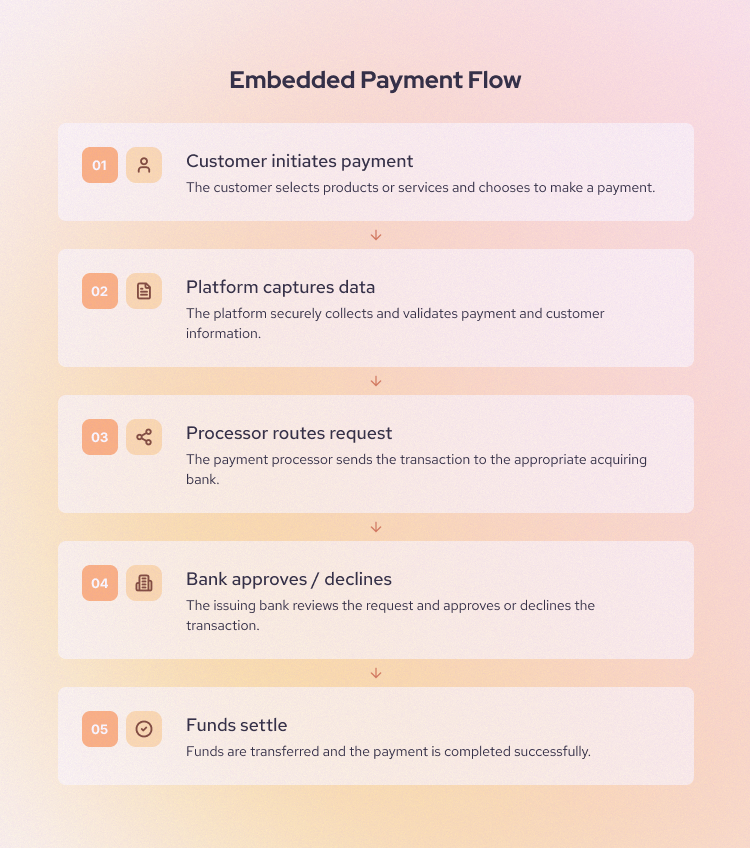
At a high level, every embedded payment follows the same pattern:
- Customer initiates payment inside the platform
- Payment details are securely captured
- Data is encrypted and tokenized
- Authorization is sent to the processor and issuing bank
- The bank approves or declines the transaction
- Funds are captured
- Funds settle to the merchant account
- The platform records and reports the transaction
If you want to better understand the roles involved, see our guide to understanding payment gateways.
How funds actually move in embedded payments
Beyond the surface-level transaction flow, it is important to understand how money actually moves between different parties. This is especially critical for platforms and marketplaces that manage payments on behalf of others.
Fund flow determines how revenue is distributed, how quickly funds are received, and how responsibilities are shared between the platform and payment processor.
The exact flow depends on whether the platform acts as a facilitator, intermediary, or simply passes payments through to a provider.
Standard payment flow
- Customer pays through the platform
- Payment processor routes the transaction
- Funds move through card networks
- Settlement occurs to the merchant account
Marketplace payment flow
- Customer pays the platform
- Payment provider processes the transaction
- Platform takes a fee
- Remaining funds are paid out to the seller
Embedded payments vs integrated payments vs embedded finance
These terms are often used interchangeably, but they represent different levels of integration and control. Understanding the differences is important when evaluating payment strategies.
Embedded payments focus specifically on the payment experience, while embedded finance includes a broader set of financial services such as lending and banking.
At a high level:
- Embedded payments: Embedded payments allow users to complete transactions directly inside your platform without leaving the interface. This means you control the full payment flow within your product experience.
- Integrated payments: Integrated payments connect your platform to a payment provider using payment APIs.
- Embedded finance: Embedded finance includes embedded payments but goes further by adding financial services like lending, banking, or issuing cards.
- Hosted checkout: Hosted checkout is a type of integrated payment where users are redirected to a third-party payment page. It is easy to set up, but you have minimal control over the experience.
| Term | Definition | Key difference |
|---|---|---|
| Embedded payments | Payments built into a platform | Full UX control |
| Integrated payments | API-connected payments | Partial control |
| Hosted checkout | External payment page | Minimal control |
| Embedded finance | Payments + financial services | Broader category |
Real-world examples of embedded payments
Embedded payments are used across industries and business models. The specific implementation depends on how payments fit into the user workflow.
Below are common examples, along with how they are used and why they matter.
Example 1: SaaS invoicing platforms
Embedded payments helps for Saas companies that accept B2B payments and manage client relationships. Saas platforms allow users to create an invoice, send it to a client, and accept payment from the same dashboard. The client clicks a payment link, pays by card or ACH/EFT bank transfer, and the platform marks the invoice as paid automatically.
For example, a design agency may send a $3,000 invoice to a client after completing a branding project. Instead of asking the client to mail a check or pay through a separate portal, the invoice includes a built-in payment button. Once the client pays, the agency can see the payment status, update its records, and reconcile the transaction without switching tools.
Benefit: Faster payments, reduced admin work, improved cash flow visibility. It also reduces manual follow-up and lowers reconciliation work.
Example 2: Field service software
Contractors and on-site businesses can collect payments on-site through a mobile payment app. After completing the work, the technician can open the mobile app, show the final invoice, and let the customer pay by card, digital wallet, or saved card-on-file payment method.
For example, an HVAC technician finishing an emergency repair at a customer’s home. The customer approves the job, signs off in the app, and pays before the technician leaves the driveway. The receipt is sent by email, and the office can see that the job is complete and paid.
Benefit: Immediate payment collection and better customer experience. It also helps the business avoid manual follow-up, collect past due invoices, and back-office delays.
Example 3: Healthcare platforms
Clinics and healthcare providers can embed payments into patient portals, appointment booking systems, and billing workflows. Patients can pay co-pays, outstanding balances, or recurring payment plans without calling the office or mailing a check. 76% of patient billings go uncollected, this is why embedded payment inside patient portals are so important.
For example, a patient books a physical therapy appointment online. Before the appointment, the portal shows the expected co-pay and allows the patient to pay in advance. For a larger balance, the clinic may offer a monthly payment plan through the same portal.
Benefit: This helps healthcare providers collect payments with less administrative work. Staff do not need to spend as much time making reminder calls or processing payments over the phone.
Example 4: Education platforms
Schools, childcare centers, tutoring businesses, training providers, and online learning platforms use embedded payments to collect tuition, registration fees, activity fees, deposits, and recurring payments. Parents or students can pay directly inside the school portal or learning management system.
For example, a childcare center may use its management software to send monthly tuition bills to parents. Parents can set up autopay, pay one-time fees for field trips, and download receipts from the same account they already use to check schedules and messages.
Benefit: Embedded payments help schools track who has paid, which balances are overdue, and which payments need follow-up.
Example 5: Marketplaces
Platforms that connect buyers and sellers, such as service marketplaces, creator platforms, delivery platforms, and multi-vendor ecommerce sites use embedded payments to collect money from buyers, take a platform fee, and pay the remaining balance to sellers.
For example, a customer books a local photographer through a marketplace. The customer pays $500 through the platform. The marketplace keeps a 10% service fee and pays the rest to the photographer after the job is completed.
Benefit: Embedded payments give the seller a cleaner way to manage transactions, payouts, refunds, and platform revenue. Embedded payments also affect seller trust. Visa’s 2025 research found that more than 70% of entrepreneurs would consider switching platforms if they were offered better payout solutions.
Example 6: Property management systems
Landlords, property managers, real estate operators, and homeowner associations use embedded payments to collect rent, deposits, late fees, utility charges, and recurring property-related payments. Tenants can log into a resident portal, view their balance, and pay online.
For example, a tenant receives a rent reminder before the first of the month. They pay through the portal using a bank account or card. The system records the payment, updates the tenant ledger, and gives the property manager a clear view of paid and overdue balances.
Benefit: This creates a more predictable rent collection. It also reduces manual work for property managers who would otherwise need to process checks, update spreadsheets, and send payment reminders.
How embedded payments generate revenue
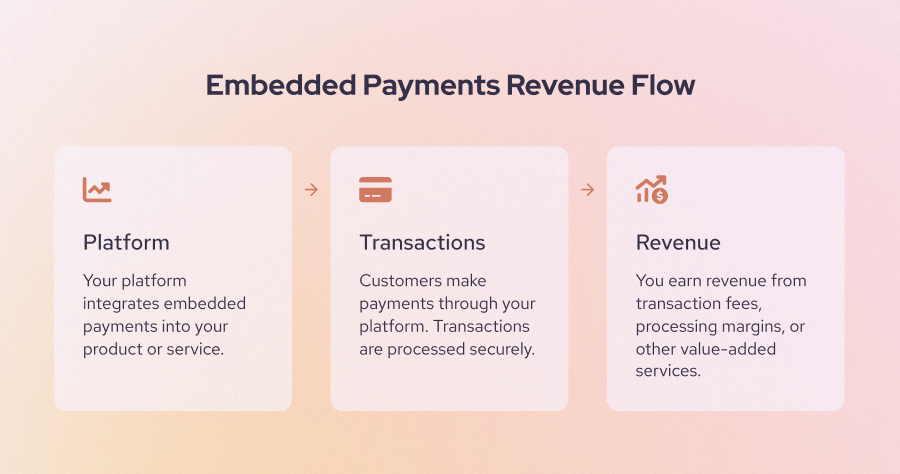
One of the biggest advantages of embedded payments is monetization. Payments can evolve from a supporting feature into a meaningful revenue stream for platforms. Platforms can generate revenue in several ways depending on their business model and provider setup.
| Revenue model | How it works |
|---|---|
| Transaction margin | Mark up fees |
| Revenue share | Split processing revenue |
| Bundled pricing | Include payments in SaaS plans |
| Value-added services | Charge for premium features |
Who should use embedded payments?
Embedded payments are not necessary for every business, but they are highly effective when payments are already part of the user workflow.
If your platform helps users invoice, transact, or manage money, embedding payments can simplify operations while unlocking additional revenue:
- SaaS platforms: SaaS platforms should use embedded payments when billing, invoicing, subscriptions, or bookings are part of the product workflow. By letting users accept payments inside the same platform, they reduce manual follow-up, simplify reconciliation, and create a new revenue stream through transaction fees or revenue sharing.
- Marketplaces: Embedded payments allow the platform to collect funds, take a commission, manage refunds, and pay sellers without forcing users outside the marketplace experience.
- Vertical software: Embedded payments work well for software in different industries like healthcare, education, fitness, home services, or property management because it is usually tied to industry workflows, such as appointment billing, tuition collection, rent payments, or service invoices.
- B2B platforms: B2B platforms should consider embedded payments when they help businesses buy, sell, invoice, or manage financial transactions.
- Mobile apps: Mobile apps should use embedded payments when users need to pay quickly inside the app, such as booking a ride, ordering food, paying for parking, or upgrading a subscription.
What are embedded payments UX best practices?
Baymard’s 2025 checkout UX benchmark found that 64% of desktop sites and 63% of mobile sites had “mediocre” or worse checkout UX performance. Because embedded payments let users accept and manage payments inside the platform, you need to make sure the experience is simple so that the user can complete their tasks quickly.
To make sure that your customers can pay seamlessly. You need to follow the best practices below:
- Keep payments in context
- Minimize checkout form fields
- Support saved payment methods
- Clearly display totals and fees
- Optimize embedded payment page for mobile
- Make sure users feel safe checking out
1. Keep payments in context
Payments should happen where the user already is instead of on an unfamiliar page. For example, a customer should be able to pay an invoice from the invoice screen or book and pay for an appointment in the same checkout flow. For embedded payments, the goal is to remove unnecessary handoffs. Keep the amount due, payment method, confirmation, receipt, and next step inside the same workflow so users do not have to guess whether the payment went through.
2. Minimize checkout form fields
The embedded checkout page should only ask for the information needed to complete the payment. Long forms create hesitation, especially on mobile, where typing card details, addresses, and billing information takes more effort.
The study from Baymard found that 18% of U.S. online shoppers have abandoned an order because checkout was too long or complicated. An ideal checkout flow can be as short as 7 to 8 form fields.
Businesses can add features like autofill, address lookup, digital wallets, saved customer profiles, and smart defaults where possible.
3. Support saved payment methods
Saved payment methods help users pay faster the next time they return. This is especially useful when payments happen often, such as monthly rent, weekly childcare fees, subscription billing, or repeat service appointments.
Businesses with embedded checkout pages that support digital wallets like Apple Pay or Google Pay can help mobile users check out faster. Some businesses also use Link to let customers autofill their payment details and save time. Others add “Check out with PayPal” buttons to help PayPal users complete payment more quickly.
4. Clearly display totals and fees
The embedded checkout page should show the full amount before they click “pay.” This includes the subtotal, taxes, platform fees, convenience fees, tips, discounts, late fees, and recurring payment schedule when relevant.
Research from Baymard found that 14% cart abandonment is due to the fact that users cannot see or calculate the total cost upfront. This is a clear sign that surprise costs damage trust.
5. Optimize embedded payment page for mobile
Capitalone reported that 79% of smartphone owners use their device to shop. A technician may collect payment at a customer’s home. A tenant may pay rent from their phone. A customer may book and pay for a service online.
This data shows a clear UX direction: mobile payment flows should be short, touch-friendly, and wallet-ready. Businesses should use large buttons, mobile wallets, numeric keyboards for card fields, address autofill, and clear error messages. Avoid tiny text, multi-column forms, and steps that force users to pinch, zoom, or leave the app.
6. Make sure users feel safe checking out
The embedded payment page should help users feel safe entering payment details. The checkout page can include secure payment messaging, recognizable payment method logos, clear refund policies, branded confirmation pages, receipts, and support contact information. A short line such as “Your payment is encrypted and securely processed” near the payment form can reassure users without slowing them down.
What are the challenges of implementing embedded payments?
Embedded payments can improve the payment experience, but they also add new responsibilities for your business. Since your platform is no longer just sending users to a third-party checkout, you may need to think about compliance, onboarding, fraud, disputes, support, engineering work, and long-term provider flexibility.
The right payment provider, risk controls, and support process can help you offer embedded payments without creating unnecessary work for your team.
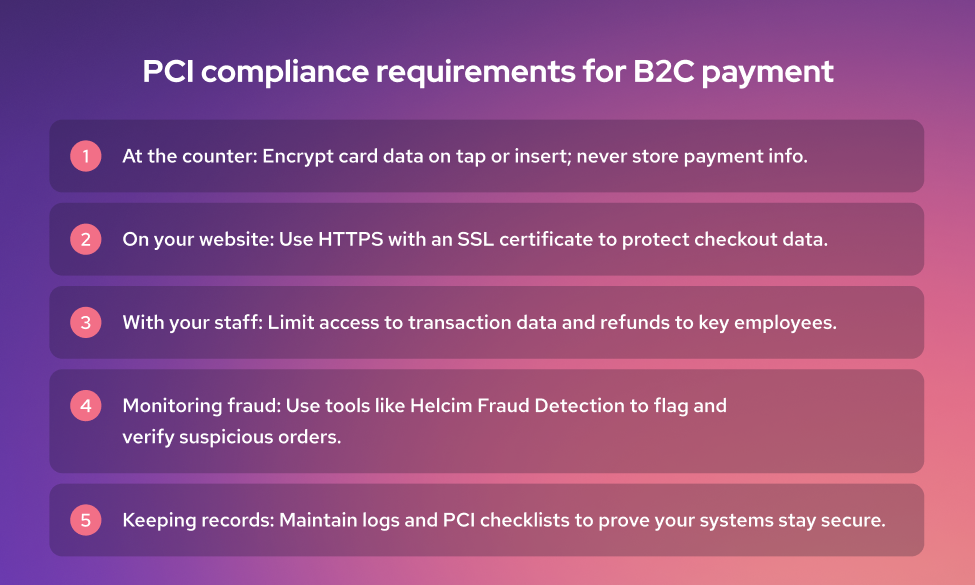
1. Compliance requirements
You need to choose a PCI-compliant payment provider so they can handle payment data and user verification securely. For platforms that onboard sellers, contractors, clinics, or other businesses, compliance may also include KYC and KYB checks.
These checks help verify who the platform is doing business with, but they can add more steps to onboarding. The best approach is to keep the process clear, ask only for required information, and use a provider that can reduce the compliance burden through hosted fields, tokenization, and automated verification.
2. Onboarding friction
For some businesses, the checkout process also includes onboarding. For example, users may need to provide personal information, payment details, and identity documents to create an account before they can start paying.
Long onboarding flows can cause users to drop off. To reduce friction, you can add a progress bar to clearly show users how far they are in the process. You can also simplify onboarding by collecting only basic information upfront, then asking for more detailed information after the user has created an account.
3. Support overhead
If your customers have questions about their orders or transactions, they may come to your team for help. These questions may involve failed payments, refunds, payout delays, chargebacks, duplicate charges, or billing issues. Your business should make sure the support team has enough payment knowledge to resolve customer questions and complaints.
Your business should also create a clear refund and dispute policy. This helps your team handle payment support, refunds, and disputes more easily.
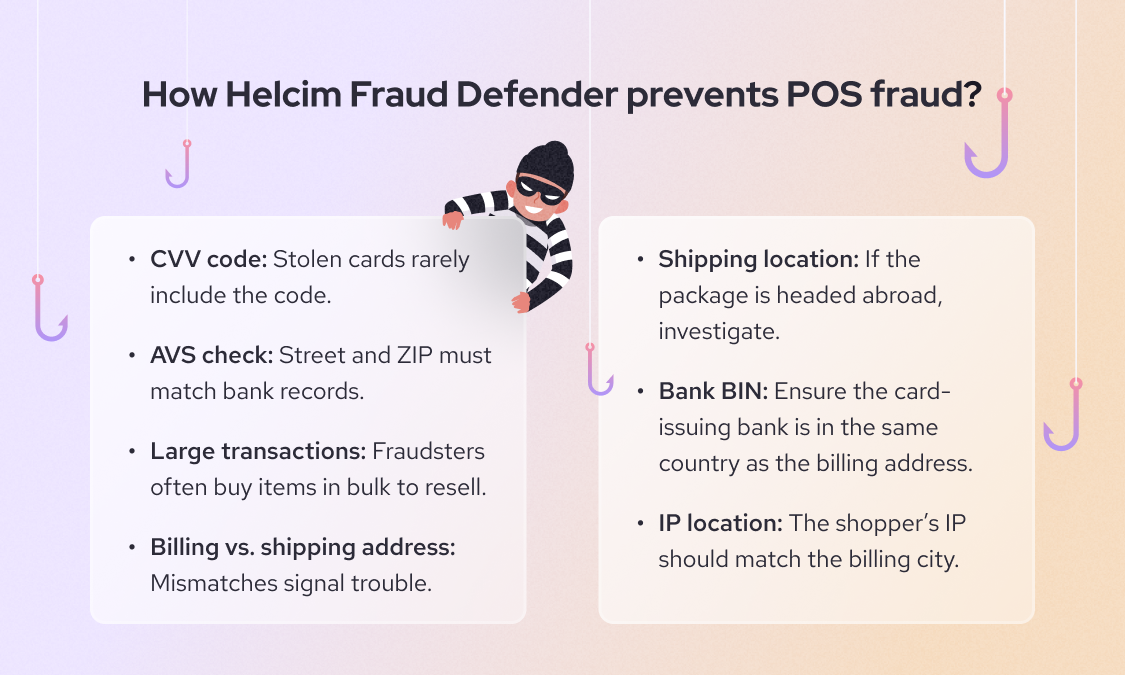
4. Fraud and risk exposure
Because you need to partner with a payment processor to embed payments on your website or platform, an increase in fraudulent transactions can hurt that partnership. Learn how to prevent online fraudulent payments.
Your business should use the risk management and fraud detection tools provided by payment processors to detect common online fraud, such as stolen cards, fake accounts, refund abuse, account takeover, and first-party fraud. This is especially important for marketplaces and platforms that move money between buyers and sellers.
5. Engineering effort
To embed payments on your platform or website, you may need a development team to set up the payment flow and customize the payment experience to fit your business operations and services.
Developers may need to build payment forms, connect APIs, manage webhooks, handle payment statuses, support refunds, display transaction history, and sync payment data with invoices, ledgers, or user accounts. The implementation timeline can take 3 to 6 months.
How much do embedded payments cost?
Embedded payments cost includes payment processing fees, platform tools, payouts, compliance support, fraud tools, and hardware. The exact cost depends on your provider, transaction volume, payment methods, country, risk level, and whether you need marketplace-style payouts.
| Cost type | Average or typical rate | What it covers |
|---|---|---|
| Transaction fees | Usually 1.5% to 4% per card transaction; common online rate is around 2.9% + 30¢ | The cost of processing card, wallet, ACH, or bank payments |
| Revenue share | Usually custom or negotiated | A portion of payment revenue shared between the payment provider and platform |
| Monthly or platform fees | Often $0 to $149+ per month, depending on plan and provider | Access to payment software, dashboards, billing tools, support, or advanced features |
| Chargeback fees | Around $15 to $20. Some processors like Helcim refund this fee if merchants dispute chargebacks successfully | Fees charged when customers dispute a transaction |
| Payout fees | Standard payouts are often free; instant payouts are often around 1% to 1.5%; platform payouts may cost around 0.25% + 25¢ | Moving funds to merchants, sellers, contractors, or platform users |
| Cross-border fees | Additional fees from 0.5% to 1.5% for currency conversion | Extra cost for accepting international cards or settling in another currency |
| Hardware costs | Basic readers often start around $59, payment terminals can cost around $299 to $399+ and full registers can cost $899 | Card readers, terminals, POS devices, kiosks, or in-person payment equipment |
FAQ
Is embedded payment secure?
Yes, embedded payment can be secure when it is built with the right payment provider and security controls. Most platforms reduce risk by using tools such as tokenization, encryption, hosted payment fields, fraud monitoring, and authentication tools like 3D Secure. These features help protect sensitive payment data while keeping the payment experience simple for users.
What is the difference between embedded and integrated payments?
Embedded payments are built directly into a platform, so users can complete payment without leaving the product experience. Integrated payments connect your platform to a payment provider, but they may still involve redirects, hosted checkout pages, or a less native experience. The main difference is control: embedded payments give the platform more control over the user experience, payment flow, and data visibility.
Are embedded payments part of embedded finance?
Yes, embedded payments are part of embedded finance. Embedded finance refers to financial services built into non-financial platforms, such as payments, lending, banking, insurance, or card issuing. Embedded payments are often the first step because payment acceptance is one of the most common financial services platforms.
Can small businesses use embedded payments?
Yes, small businesses can use embedded payments, usually through the software tools they already rely on. For example, a small clinic may accept patient payments through its healthcare portal, while a contractor may collect payments through field service software.
Can embedded payments be added to a mobile app?
Yes, embedded payments can be added to a mobile app using payment APIs, SDKs, or in-app checkout tools from a payment provider. This allows users to pay inside the app with cards, bank payments, digital wallets, or saved payment methods.
How do embedded payment providers make money?
Embedded payment providers usually make money through transaction fees, platform fees, revenue sharing, and value-added services.
What industries use embedded payments?
Embedded payments are used in SaaS, marketplaces, healthcare, education, home services, fitness, logistics, property management, legal services, and B2B platforms.
Are embedded payments secure?
Yes, payment providers often use tokenization to replace sensitive card data with secure tokens, while encryption protects payment data during transmission. Platforms should also use fraud detection, access controls, and clear payment policies to reduce risk.
Do embedded payments require PCI compliance?
Yes, embedded payments require PCI compliance if the platform accepts, processes, stores, or transmits cardholder data. Many payment providers reduce the platform’s PCI burden by offering hosted fields, tokenization, and secure checkout components. Even then, platforms should understand their responsibilities and choose a provider that supports PCI-compliant payment flows.
How long does it take to implement embedded payments?
Implementation time depends on the payment model and the complexity of the platform. A simple embedded payment setup may take a few weeks, while a direct integration can take 3 to 6 months.
Can you use embedded payments internationally?
Yes, embedded payments can be used internationally, but global payments add more complexity. Your payment providers may need to support local payment methods, multiple currencies, cross-border fees, tax rules, and regional compliance requirements.