
-
Content
Getting paid on time shouldn’t require chasing customers or awkward follow-up emails. With pre-authorized payments, your customers give you permission to charge them automatically, whether it’s every month, per session, or on a custom schedule you agree on.
In this guide, we’ll walk you through everything you need to know to set up pre-authorized payments properly, avoid mistakes, and handle things like failed payments, refunds, and chargebacks. Here’s what you’ll learn:
- What pre-authorized payments are and how they work
- The difference between credit card, ACH, and Canada EFT payment methods
- Legal requirements and compliance rules in the U.S. and Canada
- How to set up, manage, and communicate pre-authorized payments
- What to do when a payment fails, is disputed, or needs to be refunded
Let’s dive in.
What is a pre-authorized payment?
A pre-authorized payment is a billing arrangement where your customers give your business permission to automatically charge for the services or products. The pre-authorized payments can be collected weekly, bi-weekly, yearly, monthly, or when you meet a billing condition. The pre-authorized payments are common for businesses and services like hotels, gas stations, memberships, insurance premiums, utility bills, loan repayments, and subscription products.
What are the benefits of pre-authorized payments for the merchants?
The biggest benefit of pre-authorized payments is cash flow predictability. Instead of waiting for customers to manually pay each time (which they often delay or forget), pre-authorized transactions are automatic. You don’t need to constantly follow up, send reminder emails, or make awkward phone calls where you feel pushy.
But that’s not the only benefit, below are other benefits of pre-authorized payments for the merchants:
- Recurring or automatic billing: Pre-authorized payments happen on a predictable schedule (e.g. monthly) or are triggered by specific conditions (like after an order is delivered). This saves you administrative time and helps ensure every payment goes through without needing constant oversight.
- Merchant-initiated execution: Unlike one-time purchases where the customer must enter their payment information every time, a pre-authorized setup allows you to automate the process. This reduces the chances of procrastination or past due payments and increases your likelihood of getting paid on time.
- Multiple payment methods supported: You can set up pre-authorized payments using credit cards, debit cards, or direct transfers from bank accounts (ACH in the U.S. or Canada EFT in Canada). If your business prefers low processing fees from ACH or PAD, but customers are lazy to use them manually as it’s too convenient to gather payment information, pre-authorized payment setups make it easier for both sides.
- Cancellation and control remain with the customer: If customers are concerned about being locked into payments, reassure them that they can cancel the pre-authorized arrangement at any time. We’ll explain how that works later in this article.
What are the benefits of pre-authorized payments for the customers?
For customers, the biggest benefit of pre-authorized payments is a peace of mind. They don’t need to remember to make payments each month, and they’re less likely to incur late fees. As a result, it boosts your customer satisfaction. In Canada and the U.S., the systems that govern these payments (PAD and ACH respectively) also give consumers strong legal protections. For example, if a customer believes a payment was withdrawn without proper authorization, they can typically file a dispute and request a refund within a defined timeframe.
Pre-authorized debit vs. pre-authorized credit: What's the difference?
The main difference between pre-authorized debit vs. pre-authorized credit comes down to where the money is pulled from:
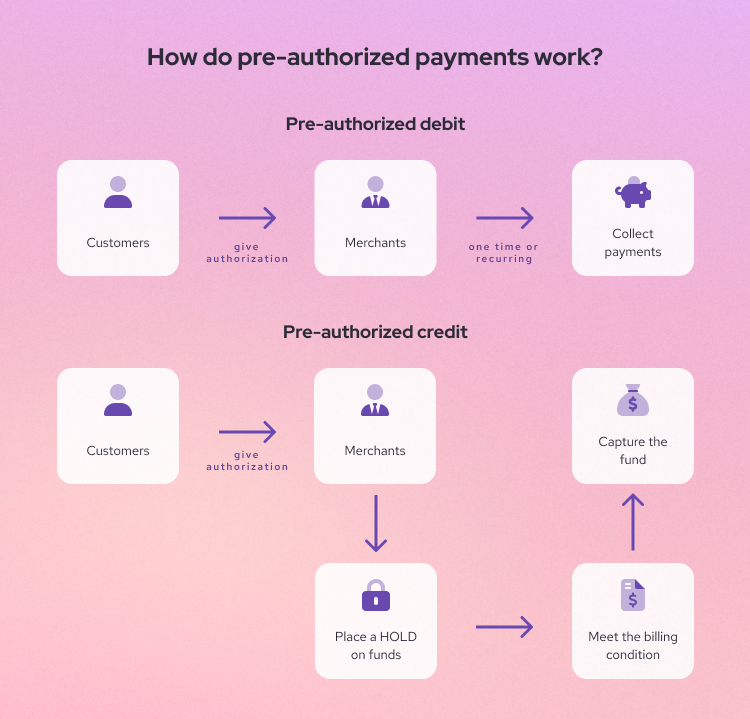
- A pre-authorized debit (PAD) can be understood as you have permission to withdraw funds directly from a customer’s bank account (checking or savings account). It can be done either manually or automatically through recurring payment software.
- A pre-authorized credit is when you temporarily HOLD funds on a customer’s credit card and then CAPTURE the amount once you deliver the product or complete the service. For example, let’s say a hotel places a $300 hold as a security deposit when you check in. If everything looks good at checkout, the hotel releases the hold and no charge appears. But if there’s damage to the room, the hotel captures that $300, and you’ll see the charge on your statement.
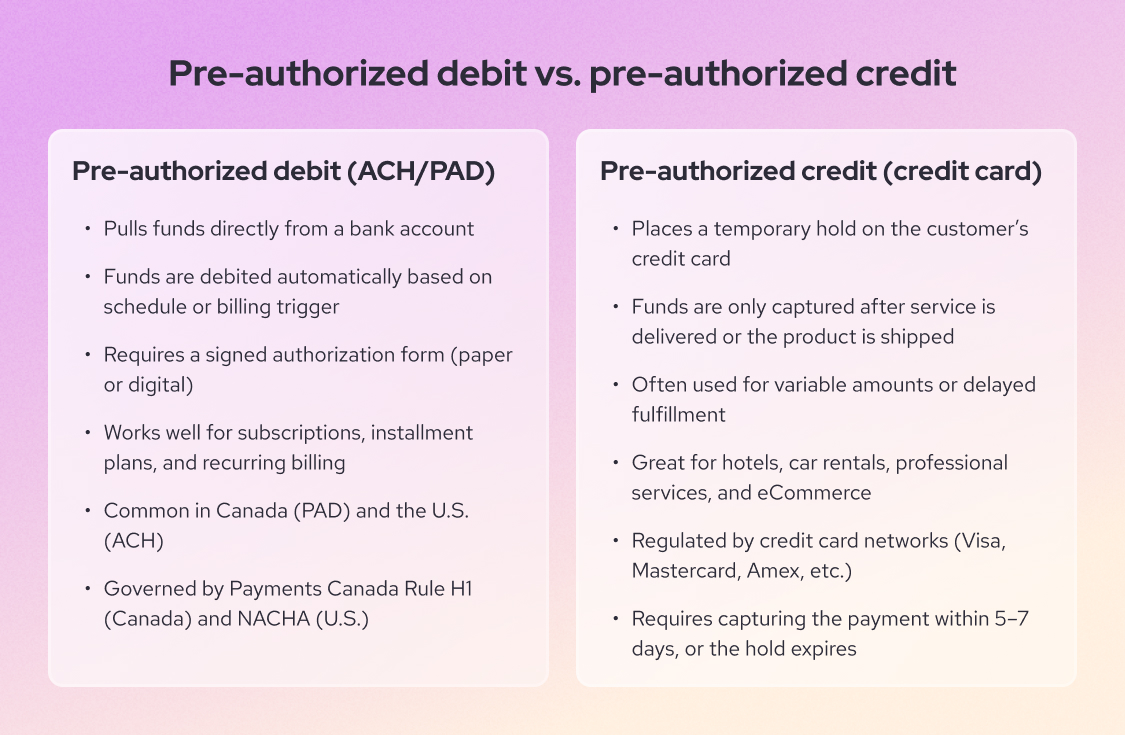
In the United States, PAD payments are processed through the ACH network (Automated Clearing House) and it’s regulated by NACHA. In Canada, it’s handled through the Canadian EFT system and governed by Payments Canada under Rule H1. In contrast, the pre-authorized credit payments are regulated by the credit card networks (Visa, Mastercard, American Express, etc.)
What payment methods are used for pre-authorized payments?
When it comes to collecting pre-authorized payments, there are two two payment methods that merchants can use:
- Credit card (pre-authorized credit)
- ACH transfer (pre-authorized debit for U.S.)
- Canadian EFT (pre-authorized debit for Canada)
| Key aspect | Credit card pre-authorization | ACH (U.S.) / EFT (Canada) pre-authorization |
|---|---|---|
| Ideal for | Placing an upfront hold and capturing (charging) later. | Recurring billing and higher-volume scheduled payments. |
| Speed | Faster funding: typically 1–2 business days. | Slower funding: typically 3–5 business days. |
| Payment processing fees | ~2%–3% per transaction (plus a fixed fee, if applicable). | ~0.5%–1% per transaction (often capped). |
| Chargeback / return fees | $15 per chargeback. Helcim refunds this fee if the merchant wins the dispute. | $5 per return (Helcim) or up to $30 per return (others). Non-refundable. |
1. Credit card pre-authorization
As we explained in the previous section, credit card pre-authorization is placing a temporary hold on a customer’s card (it appears as a pending transaction in the banking app) before charging them when a certain condition is met.
Below are real life examples on how credit card pre-authorization is often used:
- Utility companies: If you’ve ever set a pre-authorized payment to pay a mobile bill using a credit card, you’ll notice the provider places a hold on your card a few days before the billing cycle. When the payment is due, the hold is captured, and your bill is paid on time.
- Hospitality (hotels, car rentals): Hotels, Airbnb or rental businesses place holds for security deposits, then capture the final charge after checkout or vehicle return.
- Online food ordering: If you've used apps like Uber Eats, SkipTheDishes, or DoorDash, you've probably noticed they place a temporary hold on your credit card when you order. Once your food arrives, the app captures the hold and processes the final payment.
- Fuel stations (pay-at-the-pump): A gas station places a pre-auth hold to ensure that customers pay before fueling begins.
- E-commerce (high-ticket items or out-of-stock inventory): Merchants place a hold when an order is placed but wait to capture until the item ships or is confirmed to be in stock.
- Professional services (where final invoice amounts may vary): Service-based businesses can collect pre-authorized payments as deposits before delivering their services.
One major benefit of credit card pre-authorization is flexibility. The customers use credit cards for 32% of their monthly purchases. Besides, you can adjust the final amount before capturing funds. For example, let’s say you place a $500 hold for a large order, but once it’s ready to ship, you realize only $400 worth of products are available. You can update the amount, capture only $400, and the credit card processors will release the remaining $100 back to the customer’s account.
A downside of pre-authorized credit payments is that the processing fees of pre-authorized credit are expensive, ranging from 2% to 3%. In addition, the customers can also issue a credit card chargeback if they don’t recognize the charge or believe that the payment is captured incorrectly according to the billing agreement.

Aside from the payment processing fees, if your customers file a credit card chargeback, you have to pay $15 as a fee for each chargeback. If you're a Helcim merchant, this fee is refunded if you dispute the chargeback successfully.
2. ACH pre-authorization (US) and Canada EFT pre-authorization (Canada)
ACH pre-authorization (US) and PAD pre-authorization (Canada) let you pull funds directly from a customer’s bank account. Where it’s used:
- Subscriptions (e.g. software, gym memberships): Gyms or SaaS businesses can automatically charge clients each month without requiring them to re-enter payment info.
- B2B recurring billing: B2B companies can use ACH or Canadian EFT for repeat billing cycles like franchise fees, service retainers, or supply agreements.
- Installment plans: For large projects or purchases, businesses can break payments into milestones or chunks, helping customers spread costs over time.
- Payment plans: These are ideal when customers are paying off a balance over several months, especially for high-ticket items or services they can’t pay for in one lump sum.
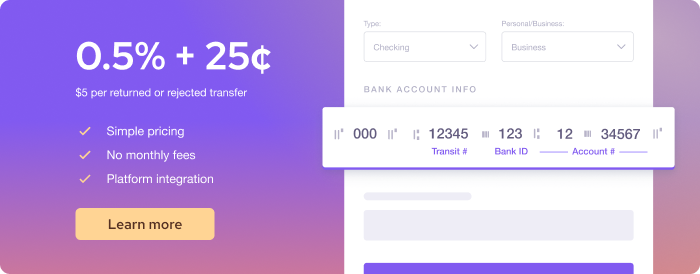
One major benefit of ACH and Canada EFT pre-authorization is automation. Once a customer provides their bank information and signs authorization form, you can set up automatic payments for subscriptions, installment plans, or other recurring charges. It is also much more affordable than credit card processing. For example, Helcim charges 0.5% + 25¢ per transaction, capped at $6 for payments under $25,000. Because of low fees, the ACH Network processed 18.82 billion debit payments in 2024, an annual increase of 6.08%
A downside of ACH and Canada EFT pre-authorization is that it’s slow. Transactions typically take 3 to 5 business days to settle, and you may not find out about failed payments until the next business day.
Aside from the payment processing fees, if your customers’ banks return the pre-authorized debit payment request, you have to pay $5 (Helcim) or up to $30 (others) as a fee for each chargeback.
How do pre-authorized payments work?
The way that pre-authorized payments work begins with an authorization that your customers give you to collect payments every billing cycle. With this permission, you can collect payments automatically, as long as you follow the terms of that agreement. The concept may sound simple but there are mechanics behind it. Below is the high-level view of how pre-authorized payments work:
- Step 1 - Customer authorization: The customer agrees to the amount, schedule, and payment method.
- Step 2 - Storing the payment details: Their card or bank info is securely saved by your payment processor.
- Step 3 - Payment initiation and collection: The system charges the card or pulls from the bank on the agreed schedule.
- Step 4 - Payment processing: Funds move through the card network or banking system to your account.
Step 1: Customer authorization
Before anything happens, you need the customer's clear consent. This authorization includes the payment amount, the frequency, and the payment method.
For credit cards, this might happen either when the customer enters their card during checkout using a credit card machine. Or, you can use tools like Virtual Terminal to set up pre-authorized transactions on behalf of your customers. This is like saying: “I’m not charging my customer’s credit card just yet, but I want to make sure you can actually pay when the time comes.”
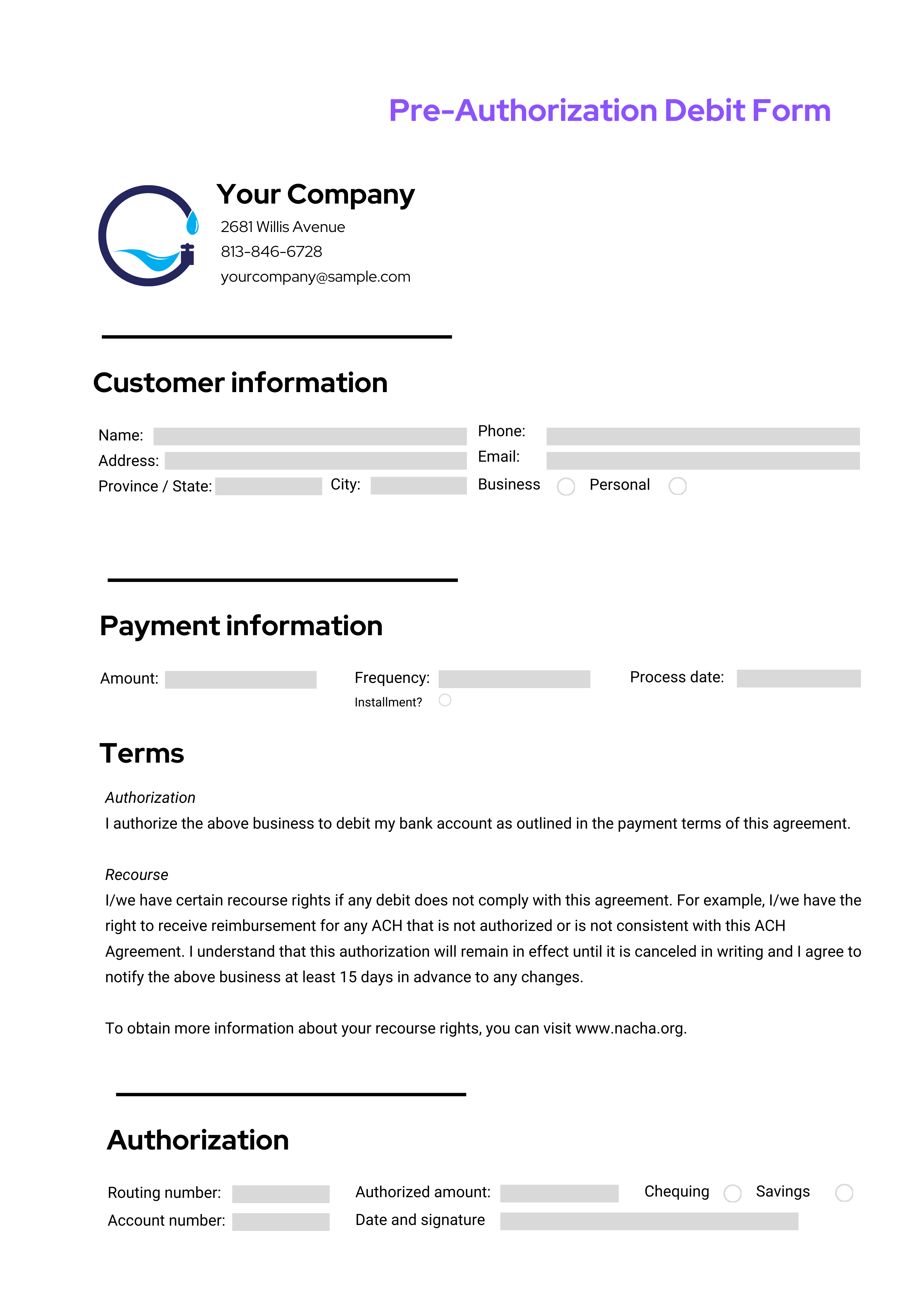
For ACH or PAD, this often requires a signed authorization form, whether paper or digital. This form will prove that your charge is legal if a customer disputes a payment.
Step 2: Storing the payment details
Once the customer authorizes payment, your payment processor securely stores their payment details. For example, Helcim Card Vault uses AES-256 encryption for all sensitive customer data. This helps the payment system retrieve the payment information when the billing is due.
- For credit cards, credit/debit card numbers are typically stored as encrypted tokens to comply with PCI DSS (Payment Card Industry Data Security Standard).
- For ACH or PAD, bank account info (like routing and account numbers) is stored for ACH or PAD transactions.
Step 3: Payment initiation and collection
After setup, payments are collected based on the agreed schedule or billing agreement:
For credit cards, you have a limited number of days to capture the transaction, usually 5 to 7 days. If you don’t capture the payment in time, the pre-authorized credit expires and the funds are released.
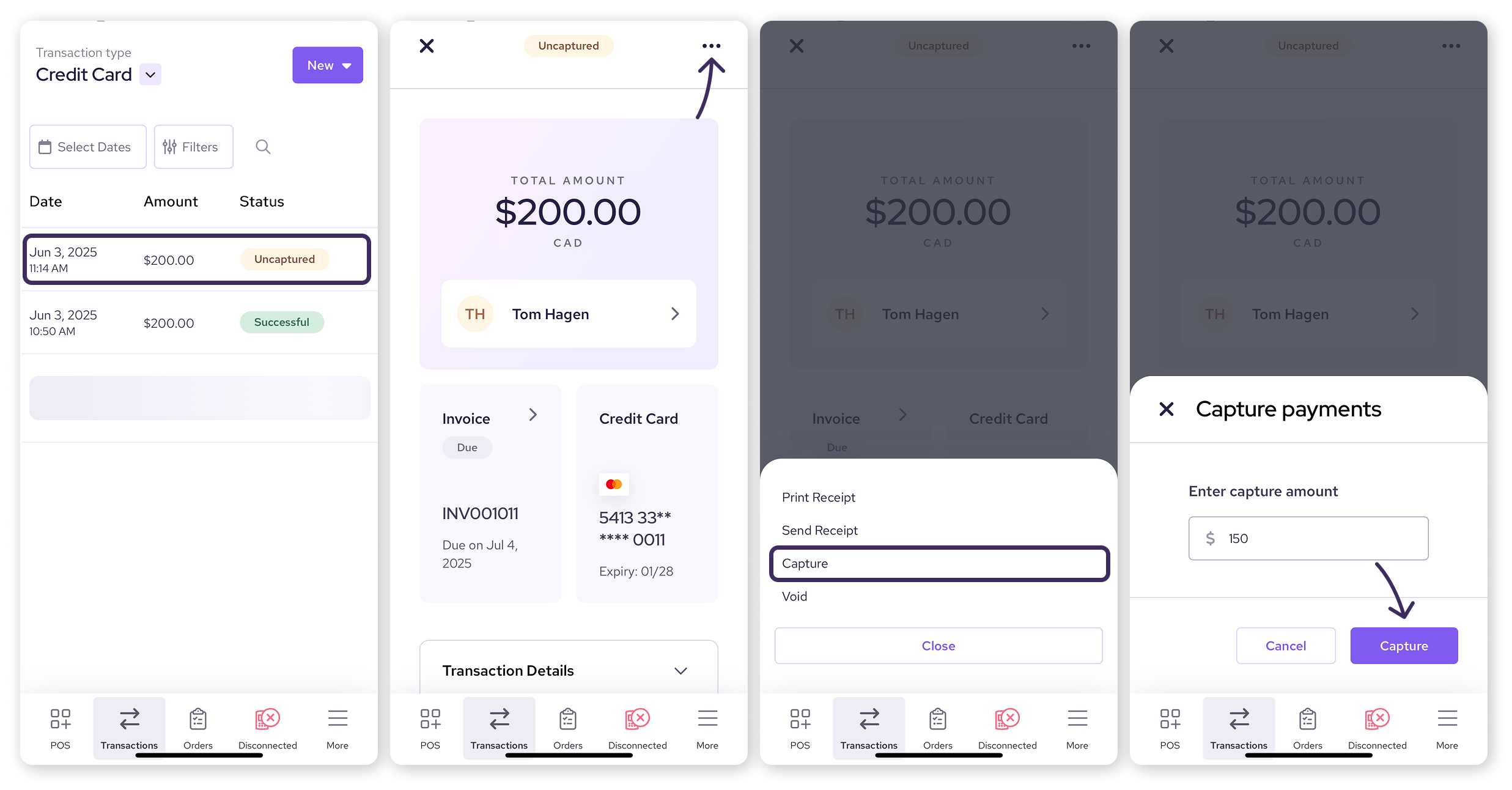
For ACH or PAD, it works differently. Once the customer signs the authorization form, you’re allowed to charge their bank account using different tools. You can process these payments manually using a Virtual Terminal on behalf of your customers, or set up automatic payments for installment plans, recurring services, or subscription billing. Depending on your setup, payments can be collected manually or automatically for each billing cycle.
Step 4. Payment processing
After the pre-authorized payments are initiated, the payment processors will move money by working with your customer’s bank and payment network.
For credit cards: The system sends a real-time authorization request to the card issuer (the customer’s bank) through the credit card network (e.g. Visa, Mastercard). If the customer has enough available credit, the funds are held and then captured when the billing agreement is fulfilled, typically within 1 to 2 business days.

For ACH (U.S.) or PAD (Canada): The system sends a batch instruction to the bank network (ACH or EFT). These payments are processed within 3 to 5 business days.
How do you set up pre-authorized payments?
Setting up pre-authorized payments isn’t complicated, but it does require you to follow a clear process to stay compliant. Below are high-level overview of the steps to set up pre-authorized payments:
- Step 1: Choose a payment processor or platform
- Step 2: Sign up for a merchant account
- Step 3: Get customer authorization
Step 1. Choose a payment processor or platform
Before anything else, you need a payment processor or software that supports pre-authorized payments. Make sure your processor offers the tools you need to set up and manage these payments efficiently. For example, Helcim allows merchants to accept pre-authorized payments using free tools like:
- Virtual Terminal: Use saved payment data to process payments on behalf of customers. It’s ideal for over-the-phone orders, mail orders, or collecting late invoices.
- Recurring payments: Set up automatic payments for subscriptions, installment plans, and payment agreements.
- Hosted payment pages: Create a checkout page and embed it on your website to collect pre-authorized payments seamlessly.
- Invoicing: Send an invoice and collect pre-authorized payments directly from your customers.
Step 2. Sign up for a merchant account
After choosing a payment processor, you need to sign up for a merchant account. This is a special type of account that receives the payments from your customers then routes the funds into your business bank account.
Step 3. Get customer authorization
Authorization is a legal requirement to accept pre-authorized payments.
- Credit card authorization: A checkbox during checkout, signed service agreement, or verbal/text authorization will be enough. It should clearly state the amount and when the pre-authorized credit payments are captured. After the customer clicks “pay” or you click “charge”, the payment will be HOLD.
- ACH transfers (U.S.): Your customers need to sign an NACHA-compliant authorization form. Then, you need to store this form for at least two years.
- Canada EFT (Canada): Your customers need to sign a written or electronic PAD agreement, which includes changing amount terms, cancellation terms and other agreement terms and conditions.

How do you communicate pre-authorized payments to your customers?
Now, it’s great that you get the authorization to process payments, but people can forget it. So, communicating about pre-authorized payments not only at the beginning but throughout your business relationship is a good practice to maintain trust and transparency.
When customers know exactly what they're agreeing to, when they’ll be charged, and how to cancel, they’re far less likely to dispute a payment, cancel unexpectedly, or file chargebacks.
Here’s the quick overview on how you can communicate pre-authorized payments to your customers. We will discuss it in more detail below.
- Be upfront at the point of agreement: Be upfront about the amount, schedule, and payment method when customers sign up
- Make cancellation clear and easy: Simple and visible options for canceling or updating payment information
- Send a confirmation after sign-up: Once your customer agrees to pre-authorized billing, send a confirmation via email or a paper or PDF copy of the billing agreement and authorization form.
- Provide ongoing visibility: Send a reminder email or advance notice before the billing (at least 10 days for usage-based billing). Provide receipts or confirmation showing card hold/capture or bank debit after payments.
1. Be upfront at the point of agreement
Your customer should never be surprised by an automatic charge. At the moment of authorization, whether that’s a contract, checkout form, or invoice, be clear about:
- The amount (fixed or variable)
- The frequency (weekly, monthly, per invoice, etc.)
- The start date and duration of the agreement. If it’s a pre-authorized credit, then be specific about when the payment is captured.
- The payment method (credit card, bank account)
- How they can cancel or update their information
Avoid burying this in fine print. Use plain language and display key terms before they hit submit or sign.
2. Make cancellation clear and easy
Be clear about how customers can cancel the pre-authorized payments. It should be:
- For recurring billing, the cancellation terms and conditions should be clearly written in the ACH/Canada EFT authorization form.
- Customers should be able to cancel the pre-authorized payments easily — whether through an online form, phone call, or email.
- If customers reach out to cancel, your team should process it quickly, as long as it doesn’t violate the billing agreement or service terms. Customers who know they’re in control are more likely to stay with you, and less likely to hit “dispute” on their bank statement.
3. Send a confirmation after sign-up
Once your customer agrees to pre-authorized billing, send a confirmation via email or a paper or PDF copy of the billing agreement and authorization form.
Make sure to keep your copy of the authorization form so that you can protect yourself when the customer disputes a payment or files a chargeback. This is especially important for Canada pre-authorized debit (PAD), where you may be required to provide proof of agreement up to 90 days after a payment.
4. Provide ongoing visibility
Even if customers authorize you to pull funds from their account, you should remind them about this a couple of days before the billing time.
For example, if you set up a pre-authorized credit and place a HOLD on their funds, make sure to send a receipt with confirmation that highlights the HOLD and when it’s captured.
If you use a pre-authorized debit to set up recurring payments, make sure to send reminders so they know when the next charge is happening. For Canada merchants using usage-based billing or variable charges, the regulation requires you to give customers at least 10 days’ notice before the charge. Also, send a receipt right after each payment. A customer portal where they can review past and upcoming charges is also helpful.
How do you handle returns, disputes, chargebacks, and refunds related to pre-authorized payments?
Even when you do everything right, things can still go sideways. A customer might forget they signed up, change their mind, or claim a charge wasn’t authorized. That’s why it’s important to have a clear plan for handling disputes, chargebacks, and refunds related to pre-authorized payments.
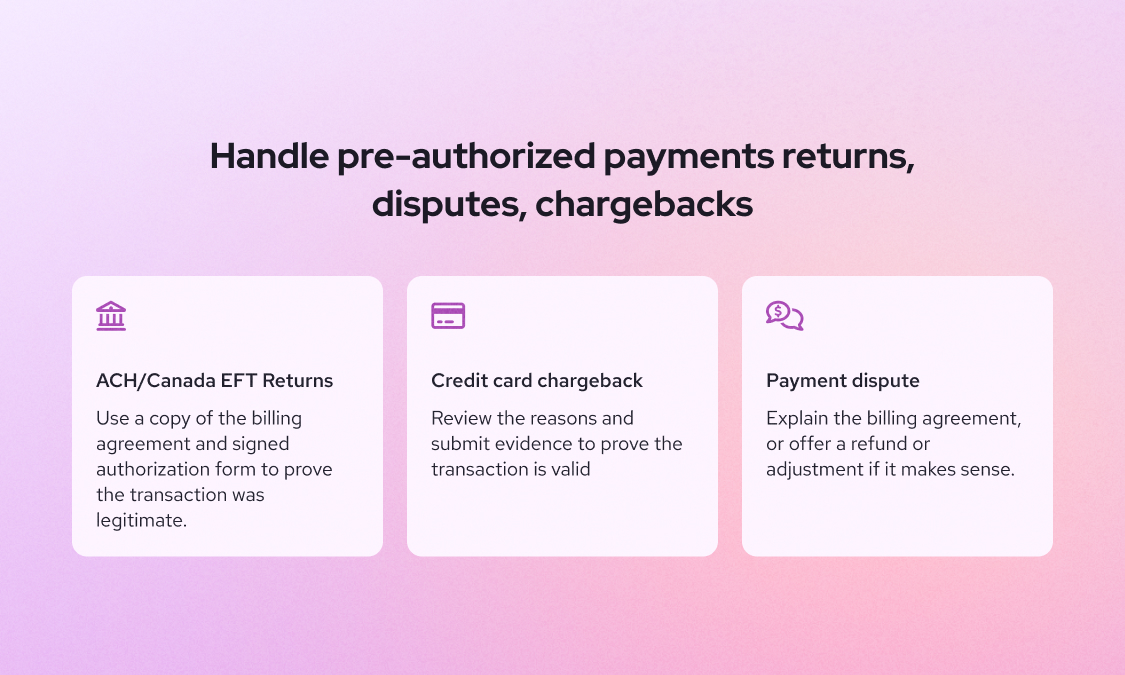
1. How do you handle pre-authorized ACH or Canada EFT returns
ACH and Canada EFT returns happen when your pre-authorized debit request is rejected by the customer’s bank, either due to insufficient funds or because the transaction is flagged as unauthorized or fraudulent (learn more about ACH return codes here).
If you’re a Helcim merchant, the platform will tell you why the return occurred and walk you through step-by-step instructions on how to resolve it. As a rule of thumb, always keep a copy of the billing agreement and signed authorization form. You’ll need it as evidence to prove the transaction was legitimate.
If the return is due to insufficient funds, reach out to the customer and offer a temporary alternative, such as paying by credit card, to avoid service interruption.
2. How do you resolve pre-authorized credit card chargeback
If you accept credit card pre-authorized payments, chargebacks can happen when a customer contacts their bank or card issuer to forcibly reverse a transaction.
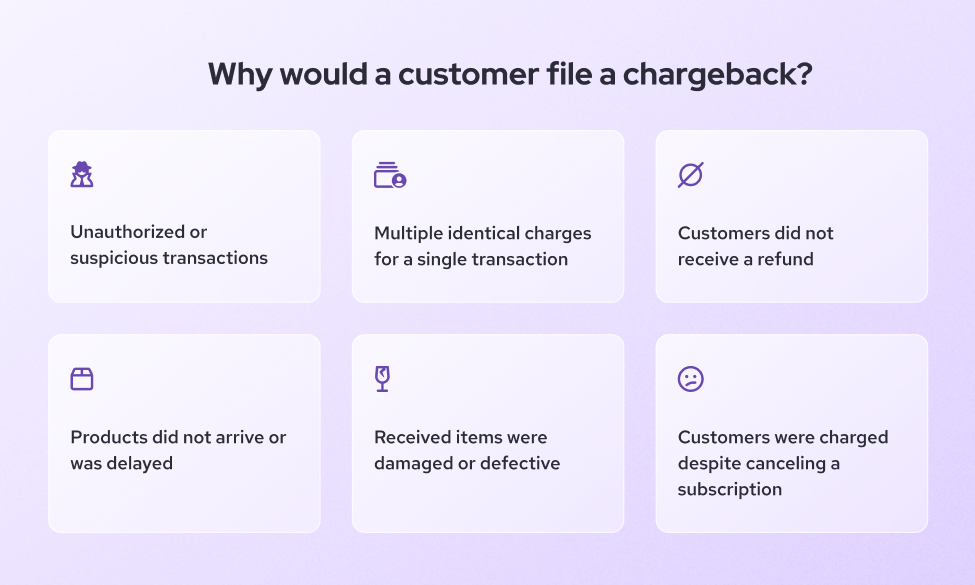
Two common reasons for pre-authorized credit card chargeback:
- The customer believes funds were captured unfairly, for example, you didn’t meet the terms of the billing agreement.
- The purchase was made using a stolen credit card.
If you’re a Helcim merchant, you can respond to chargebacks through Helcim Chargeback Dispute Tool by submitting the signed agreement, receipts, and other supporting documentation to prove the transaction is valid. Learn more about disputing credit card chargeback here.
If the chargeback occurs because of stolen credit cards, unfortunately you can’t do anything about it. But, fortunately, Helcim’s Fraud Defender can help you catch future suspicious transactions early so you can pause and investigate before fulfilling the order.
3. How to handle pre-authorized payment dispute
A dispute happens when the customer reaches out to you directly about a charge they don’t recognize or agree with. This is much better than a chargeback or a rejected payment as it gives you a chance to fix the issue before it escalates.
Many disputes come from confusion or miscommunication. Be ready to:
- Explain the billing agreement
- Provide receipts or transaction history
- Offer a refund or adjustment if it makes sense
For credit card pre-authorization, if you haven’t captured the funds yet, and the customer complains about the service or product, you can choose to partially capture the amount instead of charging the full amount, based on what you and the customer agree on.
4. How do you issue pre-authorized payment refunds
If a customer disputes a pre-authorized payment and doesn’t agree to a partial charge or other resolution (and their reasoning is fair), it's often best to issue a refund. Even if you’re technically in the right, a refund can help preserve trust and maintain a good relationship with the customer.
If you're a Helcim merchant, issuing a refund is simple. Just head to your transaction history dashboard, find the transaction in question, and click “Refund.” The system will process the return, and the customer will receive the funds back to their original payment method.
What happens if a pre-authorized payment fails?
Even with the best setup, not every pre-authorized payment will go through. Below are the common reasons that pre-authorized payment fails.
Why do pre-authorized credit payments fail?
Pre-authorized credit card payments can fail for a few different reasons. Here are some common ones , and what you can do about them:
- Insufficient credit balance: The payment will fail if the charge exceeds the customer's credit limit or their remaining credit. If this happens, ask if they can use a temporary alternative payment method like ACH (U.S.), Canada EFT, or a debit card.
- Fraud detection blocks the transaction: Sometimes, the customer’s bank or card network flags a payment as suspicious and blocks it automatically.
- The customer doesn’t verify the transaction: If the bank or card network flags the transaction, the customer may need to approve it. Some banks send a text asking the customer to reply with “YES” to verify the charge. If they miss or ignore it, the payment won’t go through.
- The customer has a per-transaction credit limit: Some cardholders set a maximum amount allowed per transaction to help control their spending. If your charge exceeds that cardholder's credit limit, the transaction will fail. In this case, suggest splitting the charge or switching payment methods.
- International transactions are disabled: This is common if you serve international customers. Some banks let users toggle international transactions on or off in their banking app. If the payment fails, ask the customer to check if international transactions are enabled.
Why do pre-authorized debit payments fail?
If the pre-authorized debits fail, your payment processor will provide a return code that explains why. These codes help you understand what went wrong and what to do next.
Below are the common reasons for pre-authorized debit payment to fail and how to deal with them:
- Insufficient Funds: Contact the customer and ask them to either retry the payment on a later date or switch to a temporary method like a credit card or debit card.
- No account or unable to locate account: The bank account details entered are invalid or don’t match an existing account. Ask the customer to double-check their account and routing numbers.
- Customer advises not authorized, improper, or ineligible: The customer’s bank claims the authorization wasn't valid. Make sure you have a signed or digital authorization form. If you're confident the charge is legitimate, reach out to the customer to clarify and, if needed, have them sign a new agreement.
- Account closed: The bank account has been closed since the authorization was set up. Contact the customer to provide a new account or an alternate payment method.
- Payment Stopped: The customer placed a stop payment order with their bank. Reach out to the customer to understand why they stopped the payment. This might signal a dispute or cancellation, so approach the conversation carefully and respectfully.
- Invalid Account Number: The account number submitted doesn’t follow standard formatting or contains typos. Ask the customer to confirm and re-enter their account information.
- Account frozen or returned per OFAC instruction: The account is frozen or restricted by federal regulation (e.g. sanctions or fraud). Do not retry the payment. Let the customer know their bank rejected the payment and ask them to contact their bank directly.
- Corporate customer advises not authorized (CCD only): For business-to-business ACH transactions, the receiving company claims they didn’t authorize the charge. Review your agreement and authorization record. In B2B cases, CCD authorization rules are stricter. Contact the customer’s accounting or finance department for clarification or new approval.
- Invalid ACH routing number: The bank routing number entered is incorrect or doesn’t exist. Have the customer confirm their bank’s routing number and update it.
- Non-transaction account: The account provided doesn’t allow withdrawals (e.g., it’s a savings account or restricted-use account). Ask the customer to provide a checking account or another account that supports direct debits.
Save 25% on processing fees with Helcim
If you're accepting pre-authorized payments, processing fees can quickly eat into your margins, especially with credit cards. That’s where Helcim comes in.
With Helcim, merchants save up to 25% on average compared to traditional payment processors. There are no monthly fees, no hidden markups, and you get affordable interchange-plus pricing by default.
Whether you're collecting payments through credit cards, ACH (U.S.), or PAD (Canada), Helcim gives you access to:
- Free tools like Virtual Terminal, Recurring Payments, and Hosted Payment Pages
- Lower rates on bank payments (ACH/PAD), as low as 0.5% + 25¢, capped at $6
- A built-in card vault for secure, PCI-compliant payment storage
If you're currently paying 2.9% + 30¢ or more per transaction, switching to Helcim could mean significant savings, especially if you're billing customers on a recurring basis.
FAQ
What is a pre-authorization hold?
A pre-authorization hold is a temporary freeze on a specific amount of money on a customer’s credit card. It’s not an actual charge, it simply reserves the funds to ensure the customer has enough available credit when the final transaction is captured. You often see this in places like hotels or car rentals, where the exact total isn’t known upfront. Once the service is complete, the business either captures the final amount or releases the hold if no charge is needed. If you don’t capture the funds within a set time (usually 5–7 days), the hold expires and the money becomes available to the customer again.
What are the legal requirements to set up pre-authorized payments?
To legally set up pre-authorized payments, you must first obtain the customer’s clear authorization. This usually means a signed agreement or digital consent that outlines the payment amount, schedule, and method. In the U.S., ACH payments are governed by NACHA, which requires proper record-keeping of authorization forms. In Canada, Canada EFT Pre-authorization/PADs are regulated by Payments Canada under Rule H1, which also requires advance notice for variable payments unless waived. Always store authorization records securely in case of disputes or audits.
Which industries use pre-authorized payments the most?
Industries that rely on recurring billing or installment plans tend to use pre-authorized payments the most. These include healthcare, fitness (like gyms), software subscriptions, professional services, utilities, and property management. B2B companies also use them for retainer agreements or franchise fees. The benefits of pre authorization is helping businesses ensure predictable cash flow and reduce the need for manual invoicing and follow-ups.
What are the fees associated with pre-authorized payment processing?
Fees vary depending on the payment method. Credit card pre-authorization transaction cost 2–3% per transaction, depending on your processor and card type. ACH (U.S.) and PAD (Canada) are much cheaper, often around $0.25 to $1.50 per transaction, or 0.5% capped at $5–$6 for high-value payments. There may also be fees for NSF returns, chargebacks, or monthly platform usage, depending on your provider.
Can a pre-authorized payment be declined?
Yes, pre-authorized payments can be declined. For credit cards, this might happen due to insufficient credit, expired cards, fraud flags, or customer-imposed limits. For ACH and PAD payments, it could be due to NSF (non-sufficient customer funds), closed accounts, or invalid account numbers. Most processors will give you a decline code or return reason so you know what went wrong and how to follow up.
Can customers cancel a pre-authorized payment?
Yes, customers can cancel pre-authorized payments at any time. In Canada, PAD rules require that customers be allowed to cancel with proper written notice, and merchants must make cancellation instructions clear in the agreement. In the U.S., customers can revoke ACH authorizations by notifying you and their bank. Make it easy for customers to cancel — it helps avoid disputes and keeps the process compliant.
What happens if customers don't have enough money for a pre-authorized payment?
If a customer doesn’t have enough funds, the payment will usually fail or bounce. For credit cards, the transaction is declined immediately. For ACH and PAD, you’ll receive a return notification after a few days showing a "NSF" (Non-Sufficient Funds) code. In this case, you can retry the payment, offer a different payment method, or contact the customer to resolve it manually.
Can you accept pre-authorized payments internationally?
Yes, but it depends on your payment processor. Credit card pre-authorizations can be accepted from international customers as long as you enable cross-border transactions. For bank payments, ACH is U.S.-only and PAD is Canada-only, so for international bank transfers, you’ll need to use wire payments or a global provider like SEPA (Europe). Always verify that your processor supports the currencies and regions you serve.
Related Articles
-
ACH Disputes: A complete guide for merchants
May Montenegro | January 10, 2025
-

How to create a NACHA-compliant ACH authorization form
May Montenegro | August 20, 2024
-
Setting up ACH payments for your small business
May Montenegro | August 19, 2024