
-
Content
Most businesses don’t set out to build a complicated software stack. They just want tools that help them run the business.
- A CRM to track customers.
- Something to send invoices.
- Maybe a project manager.
- Maybe accounting software.
But as the business grows, those tools multiply. Suddenly you’re juggling five platforms, three logins you forgot, and one spreadsheet that everyone swears is “temporary.” This is exactly the problem platforms like Zoho try to solve. Zoho isn’t just one application. It’s an ecosystem of business tools designed to work together through integrations. Sales, operations, finance, and customer management can all live inside the same platform.
But even in a well-connected ecosystem, there’s still one important step that requires integration: getting paid. Because tracking customers is great. Sending invoices is helpful. But actually collecting the money… That's the part that keeps the lights on. That’s where Zoho integration with payment processors becomes important.
But first, what is Zoho?
You may be new here and considering Zoho might be one of your “im a mature business now” move. Zoho is a cloud-based platform that provides a suite of business applications designed to help companies manage their operations in one ecosystem.
Instead of using separate vendors for CRM, accounting, project management, marketing, and operations, businesses can run many workflows inside the Zoho ecosystem.
Some of the most widely used applications include:
- Zoho CRM – customer relationship management and sales pipelines
- Zoho Books – accounting and financial tracking
- Zoho Inventory – product and order management
- Zoho Projects – project and task management
- Zoho Expense – expense tracking and reimbursements
- Zoho Billing – subscription billing and recurring invoices
Because these tools are designed to work together, Zoho allows businesses to automate workflows across departments.
For example: A lead is managed in Zoho CRM. When a deal closes, an invoice is generated. Through a payment integration, the customer can pay instantly. This is what turns Zoho from a collection of apps into a connected business platform.
What makes Zoho different from other business software?
Many businesses build their software stack from multiple vendors.
- A CRM from one company.
- Accounting from another.
- Project management from somewhere else.
While this works at first, it often creates data silos where systems don’t communicate well with each other. Zoho takes a different approach. Instead of offering one standalone product, Zoho provides a business ecosystem where applications integrate with each other by default. That means businesses can:
- Sync customer data across applications
- Automate workflows between sales and finance
- Generate invoices directly from CRM deals
- Connect third-party integrations like payment gateways
This ecosystem model is one of the main reasons companies adopt Zoho as their central business platform. Payments are often the missing link in an otherwise smooth Zoho workflow. Businesses may already manage:
- Leads and deals in Zoho CRM
- Invoices and billing
- Financial reporting
- Customer records
Why do Zoho users use third-party payment integrations?
Zoho users use third-party payment integrations to avoid paying the expensive Zoho credit card processing fees up to 2.90% + 30¢. Some users choose to use the external tool to collect money, but it can lead to problems like:
- Manual payment tracking
- Reconciliation headaches
- Delayed payments
- Fragmented financial data
When payment processing is integrated with Zoho, several things improve immediately.
- Faster payments: Invoices that include online payment options tend to be paid much faster than invoices that require manual bank transfers.
- Automated accounting updates: Payments can automatically update invoices and financial records, reducing bookkeeping work.
- Better revenue visibility: Because payments are connected to customers and invoices, businesses gain clearer insight into revenue performance.
In other words, Zoho payment integrations help complete the end-to-end revenue workflow inside Zoho.
What payment integrations are available for Zoho today?
Businesses using Zoho generally have three main options for accepting payments. Each approach has different advantages depending on how the company operates.
| Payment option | Best for | Tradeoffs |
|---|---|---|
| Zoho Payments |
|
|
| Stripe / PayPal |
|
|
| Helcim Payment Extension |
|
|
Option 1: Zoho Payments (Native payment processor)
Zoho offers its own payment processor called Zoho Payments, which integrates directly with several Zoho finance applications. Because it’s built by Zoho, the setup is extremely straightforward. Businesses can accept:
- Credit card payments
- ACH bank transfers
- Recurring payments
Payments automatically sync with Zoho invoices and accounting reports.
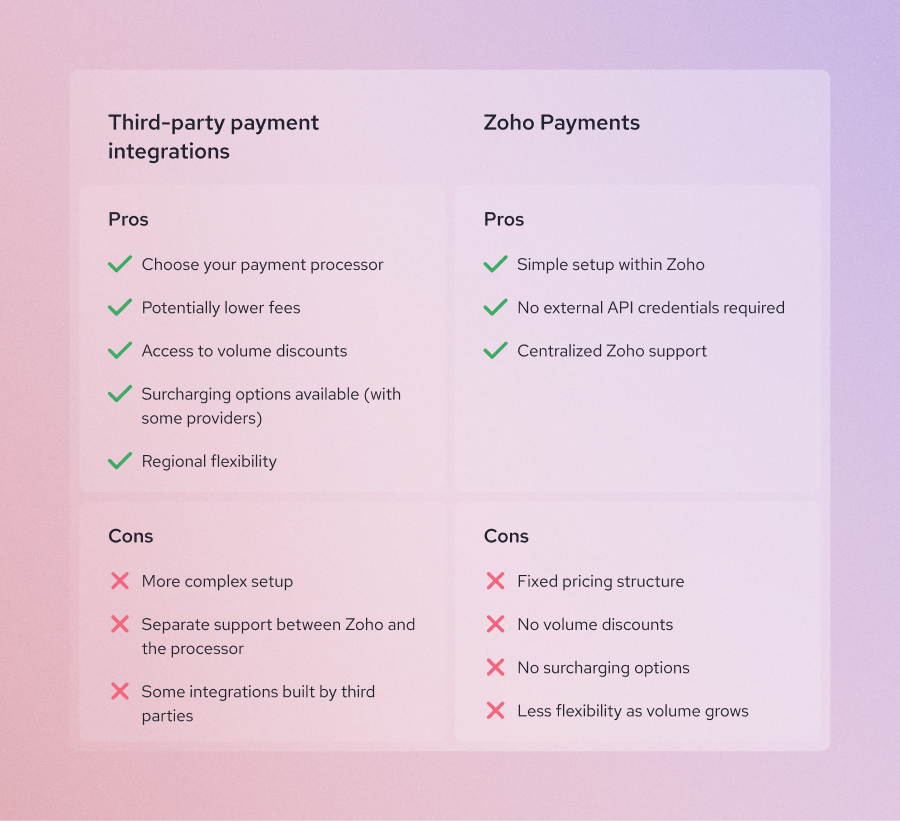
Pros of Zoho Payments:
- Seamless native integration
- Automatic reconciliation inside Zoho
- Simple setup
Cons of Zoho Payments:
- Limited geographic availability
- Fewer pricing options
- Less flexibility compared with independent processors
- Flat rates don’t offer much savings for scaling businesses
For businesses already deeply invested in the Zoho ecosystem, Zoho Payments can be the easiest starting point. This may be sufficient if your business isn’t processing a high volume of payments. But as invoice volume grows, processing fees can quickly add up, which is why many businesses eventually explore third-party payment integrations.
Option 2: Built-in gateway integrations (Stripe, PayPal, Authorize.net)
Zoho also integrates with several well-known third-party payment gateways. Common options include:
- Stripe
- PayPal
- Authorize.net
- Square
- Braintree
These providers allow businesses to accept online payments directly from invoices. The workflow usually looks like this:
- Step 1: Zoho CRM tracks the customer
- Step 2: Zoho generates the invoice
- Step 3: Stripe or PayPal processes the payment
- Step 4: Zoho records the transaction.
Pros of Zoho built-in gateway integrations:
- Widely recognized payment platforms
- Strong international payment support
- Great for certain use cases i.e PayPal and Braintree for eCommerce, Stripe for online payments, Square for high-inventory sales.
Cons of Zoho built-in gateway integrations:
- Flat-rate credit card pricing can become expensive
- Limited fee transparency
- Fewer pricing customization options
For many businesses, these gateways are the default option simply because they are widely known. But they are not always the most cost-efficient.
Option 3: Third-party payment extensions for Zoho
A third option is using payment extensions that connect Zoho with external processors. These integrations allow businesses to choose payment providers based on:
- Pricing models
- Supported payment methods
- Geographic coverage
- Specific business workflows
- Better merchant support
This approach provides the most flexibility for businesses that want to optimize payment costs without changing their Zoho system. And this is where solutions like Helcim enter the picture.
Where does Helcim fit in the Zoho payment ecosystem?
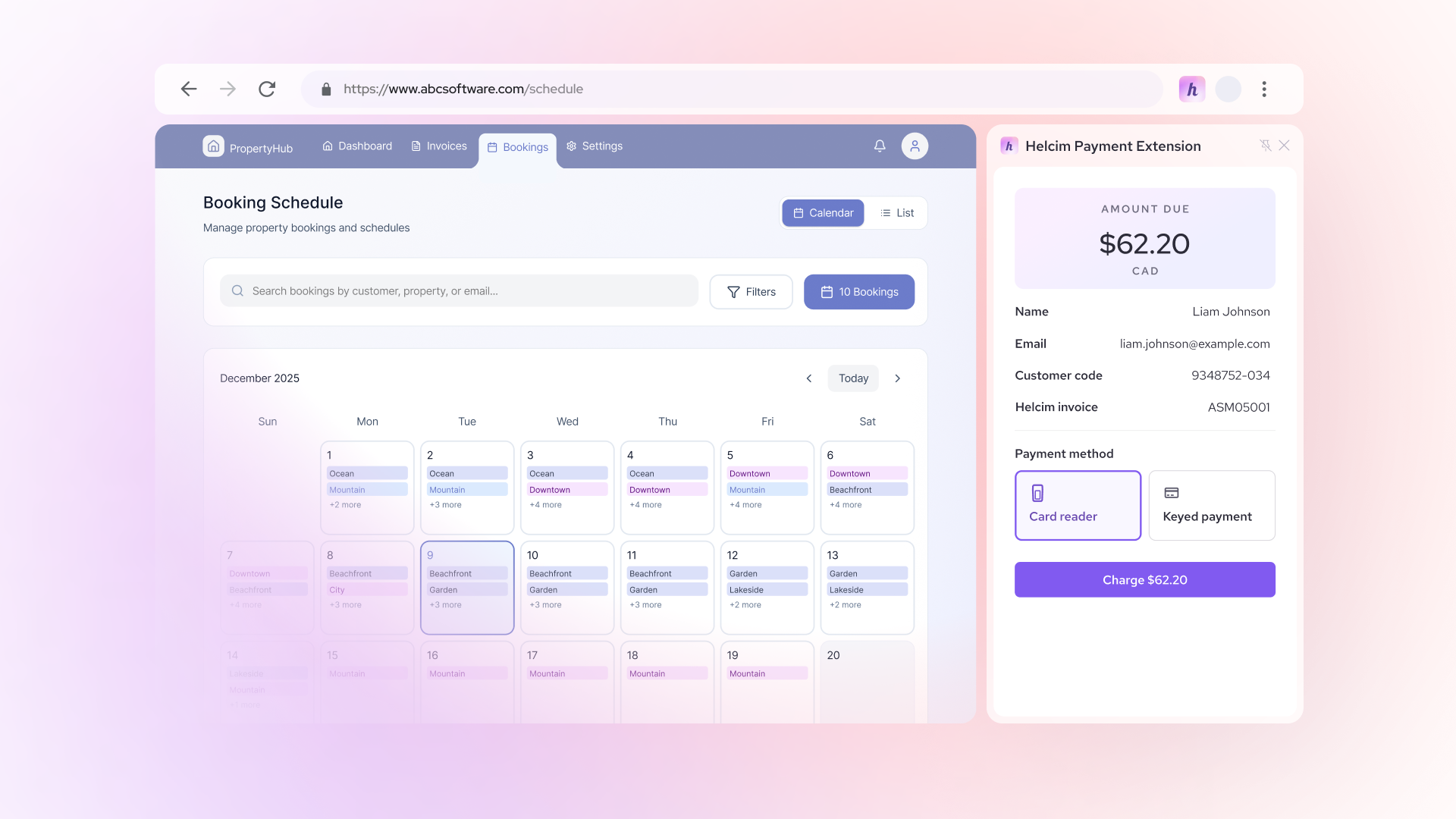
Helcim integrates with Zoho through a Helcim payment extension that connects Helcim’s payment processing platform with Zoho invoicing workflows without the need for any developer work.
This allows businesses to keep Zoho as their CRM and accounting system while using Helcim to process payments. It’s the same workflow but with much better rates, and human customer service.
The workflow becomes:
- Step 1: Zoho CRM manages the customer
- Step 2: Zoho generates the invoice
- Step 3: Helcim processes the payment
- Step 4: Zoho records the transaction
From the user’s perspective, payments simply become another part of the Zoho workflow.
How can businesses save more on Zoho payments with the Helcim integration?
Credit card processing costs can quietly add up, especially for businesses that send frequent invoices. Many payment service providers use flat-rate pricing models that bundle fees together. Helcim takes a different approach through interchange-plus pricing, which separates the real card network costs from the processor markup.
For many businesses, this results in lower transaction costs.
- Lower processing fees: Interchange-plus pricing can reduce payment costs compared with flat-rate providers.
- Transparent pricing: Helcim shows the underlying transaction costs clearly so businesses understand what they are paying.
- Ability to surcharge: With the Helcim Payment Extension, merchants can optionally pass credit card fees to customers, helping eliminate processing costs.
- Multiple payment options: Credit cards, Debit cards, ACH bank transfers (coming soon!)
Seamless integration with Zoho workflows: Because Helcim integrate with Zoho through payment extension, businesses can keep their existing Zoho invoicing workflows while improving payment processing. This makes Helcim especially useful for invoice-heavy businesses, such as agencies, consultants, and IT service firms.
Final thoughts: Turning Zoho into a complete revenue system
Zoho provides a powerful ecosystem for managing customers, operations, and financial workflows. But to complete the revenue cycle, businesses need a way to connect invoices and customers to actual payments. Online payment integrations like Helcim’s Payment Extension make that possible.
By connecting Zoho with the right payment processor, businesses can:
- Collect payments directly from invoices
- Automate financial workflows
- Reduce bookkeeping friction
- Optimize payment processing costs
When done well, Zoho becomes more than just business software. It becomes a complete system for managing and collecting revenue.
Ready to simplify payments inside your Zoho workflow?
With Helcim’s Payment Extension, you can accept credit cards and bank payments directly from Zoho invoices while keeping your accounting and CRM data perfectly in sync. Learn how the Helcim Payment Extension works and start accepting payments in Zoho today.
FAQs
Can Zoho CRM accept payments?
Zoho CRM itself does not process payments, but it can connect with Zoho finance apps and payment integrations that allow businesses to collect payments from invoices.
Are Zoho payment integrations secure?
Yes. Payment integrations rely on secure gateways that encrypt transactions and handle sensitive cardholder data. Most processors also manage PCI compliance requirements.
Do Zoho integrations support credit cards and ACH payments?
Yes. Many Zoho payment integrations support both credit cards and ACH bank transfers. Credit cards often provide faster settlement, while ACH payments can offer lower transaction costs.
Will my software break if I integrate Zoho with an extension?
No. Payment extensions are designed to work alongside Zoho applications without disrupting your existing workflows. Most Zoho extensions simply add payment functionality to invoices or billing workflows. Your CRM, accounting, and reporting systems continue to function normally while the payment processor handles the transaction.
Are Zoho payment extensions safe to use?
Yes—when installed from trusted providers or the Zoho Marketplace. Zoho extensions follow security guidelines and rely on secure payment gateways to process transactions. Sensitive payment data is handled by the payment processor rather than stored directly in Zoho. As with any integration, businesses should verify that the provider follows proper security and compliance standards.
What are the pros and cons of using a payment extension instead of Zoho Payments?
Both options allow businesses to accept payments within the Zoho ecosystem, but they serve different needs. Zoho Payments (native solution)
- Pros: Built directly into Zoho, simple setup, automatic reconciliation.
- Cons: Limited regional availability and fewer pricing or processor options.
Extensions (like Helcim)
- Pros: More flexibility in payment processors, transparent pricing models, and additional payment options.
- Cons: Requires installing an extension and managing a separate payment provider.
In short: Zoho Payments offers simplicity, while payment extensions offer more flexibility and potential cost savings.
Related Articles
-
Best Zoho integrations for payment processing for US and Canada in 2026
Robert Luong | February 26, 2026
-

How to reduce Zoho payment processing fees
Kaitie Weaver | February 2, 2026
-

Payment gateway integration guide for small businesses
Booky | August 21, 2025