
-
Content
Practice management software helps clinics and healthcare practices run more efficiently, but it often comes with a hidden cost: payment processing fees. While monthly subscriptions and seat pricing are easy to spot, the fees charged every time a client pays can quietly become one of your largest ongoing expenses.
As your revenue grows, even a small percentage difference can translate into hundreds or thousands of dollars lost each year. In this guide, we’ll show you how to reduce practice management software payment processing fees
Most importantly, we’ll show you practical ways to reduce practice management software payment processing fees.
How much does practice management software cost?
Some practice management software, such as Carepatron and CharmHealth, offer free plans for small practices to get started. However, to run day-to-day operations smoothly, most businesses need to upgrade to a paid plan, which typically starts around $33 to $200 per month. Athenahealth is a special case, as it charges fees based on a percentage of the practice’s revenue, usually 4%–8%.
Beyond the monthly software subscription, clinics and practices often pay additional fees for add-ons, extra services, and additional practitioner seats. Each extra seat usually costs $17.50 to $40 per month, depending on the software and pricing tier.
Here’s the tricky part: if you accept card payments within your system, payment processing fees can quickly exceed your software subscription costs as your monthly revenue grows. Most popular practice management platforms charge around 2.75% to 3.15% for online credit card transactions.
| Software | Monthly Subscription | Payment Processing Fees | Other Fees |
|---|---|---|---|
| SimplePractice | $49–$99/month | 3.15% + 30¢ per transaction |
|
| Jane App | $54–$99/month |
|
|
| TherapyNotes | $69–$79/month for first therapist | 3.1% + 30¢ per transaction | $50/month per additional clinician |
| CarePatron |
|
|
|
| CharmHealth | $0 – $200/month | Not listed | Extra fees for different add-ons and services |
| Noterro | $33 – $77/month |
|
$13.20 to $27.50/month for each extra seat |
| Athenahealth | 4-8% of your practice monthly revenue | N/A | Pricing is percentage-based |
Why is it expensive to bill clients using practice management software?
Billing clients through practice management software is expensive because most platforms partner with payment processors like Square and Stripe which charge a flat payment processing rate of around 2.75% to 3.15% on every transaction. For your information, these fees are 25% or 50% more expensive than Helcim’s credit card processing fees.
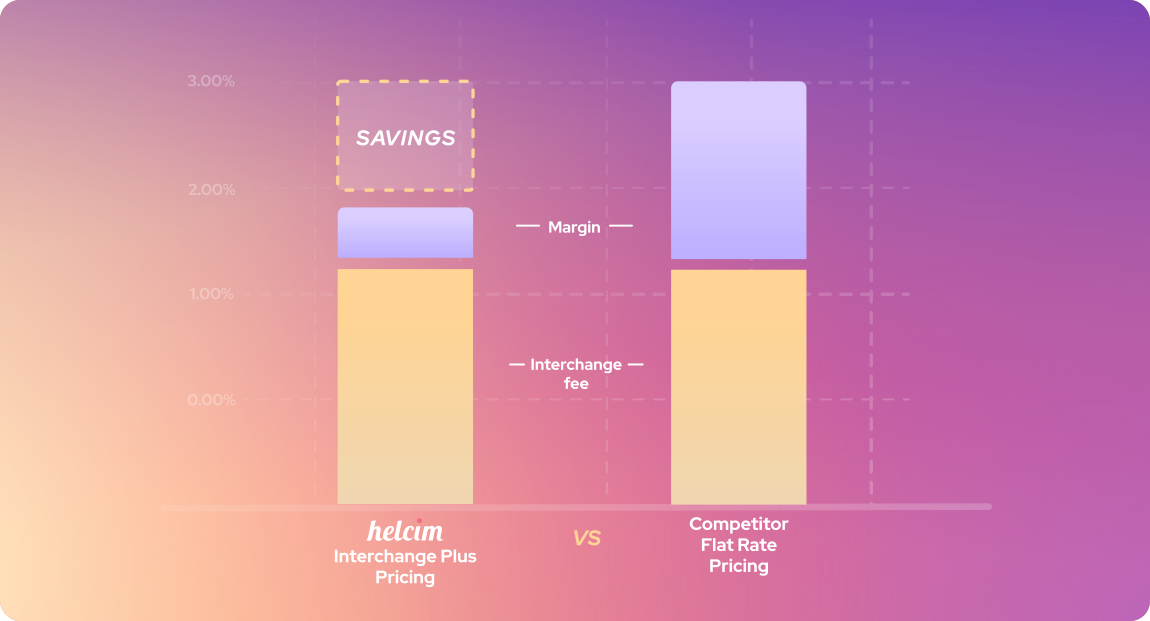
Here’s why these flat rates are expensive. Behind every card transaction are two underlying costs, including interchange fees and card network fees charged by issuing banks and card brands. These fees vary based on factors such as the type of card a customer uses and the business’s industry. To make pricing simpler, practice management software and their partnered processors bundle these variable costs into a single flat fee per transaction around 2.75% to 3.15%. However, to avoid losing money, they usually set these rates high enough to ensure every transaction remains profitable.
In contrast, payment processors like Helcim use an interchange-plus pricing model, which passes the actual card network and bank fees directly to your business, along with a transparent markup. For example, Helcim charges interchange + 0.40% + 8¢ for in-person transactions and interchange + 0.50% + 25¢ for online transactions. On average, Helcim merchants pay as little as 1.83% + 8¢ for in-person payments and 2.27% + 25¢ for online transactions, which can result in significant savings as payment volume increases.
How to reduce practice management software payment processing fees
You can reduce practice management software payment processing fees by using lower-cost payment methods, partnering with interchange-plus processors, applying surcharging where allowed, and processing payments in person.
1. Use lower-cost payment methods like ACH or EFT
Credit cards are convenient, but they are also the most expensive payment method to accept. If your practice regularly bills the same clients, you can set up authorized ACH (U.S.) or EFT (Canada) payments instead. ACH and EFT payments typically cost 0.5% to 1% per transaction, which is four to five times cheaper than credit card payments.
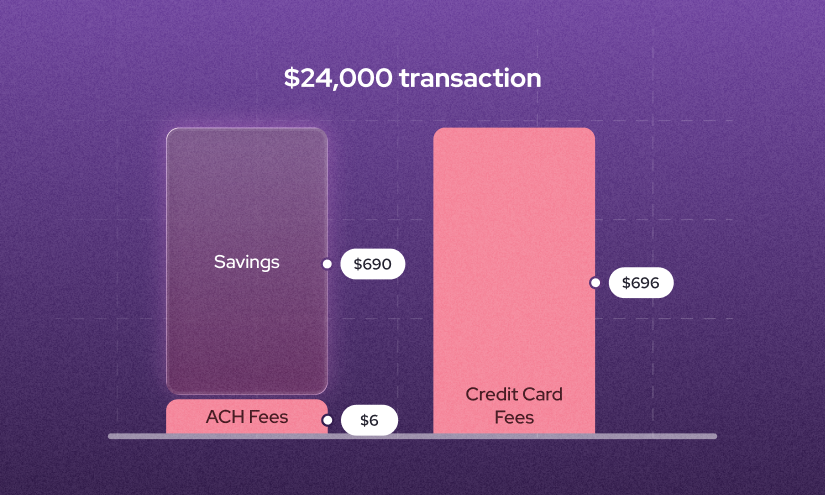
For example, collecting a $200 invoice via credit card at 2.9% costs about $5.80, while an ACH payment at 0.8% costs just $1.60. In addition, payment processors like Helcim cap ACH and EFT fees at $6 for transactions under $25,000. That means on a $24,000 transaction, credit card processing could cost $696, while ACH or EFT would cost just $6. That’s a $690 savings.
2. Partner with interchange-plus payment processors
Interchange-plus payment processors like Helcim pass the actual credit card processing fees directly to your business, along with a transparent markup. On average, Helcim merchants save up to 25% on credit card processing fees compared to flat-rate processors.
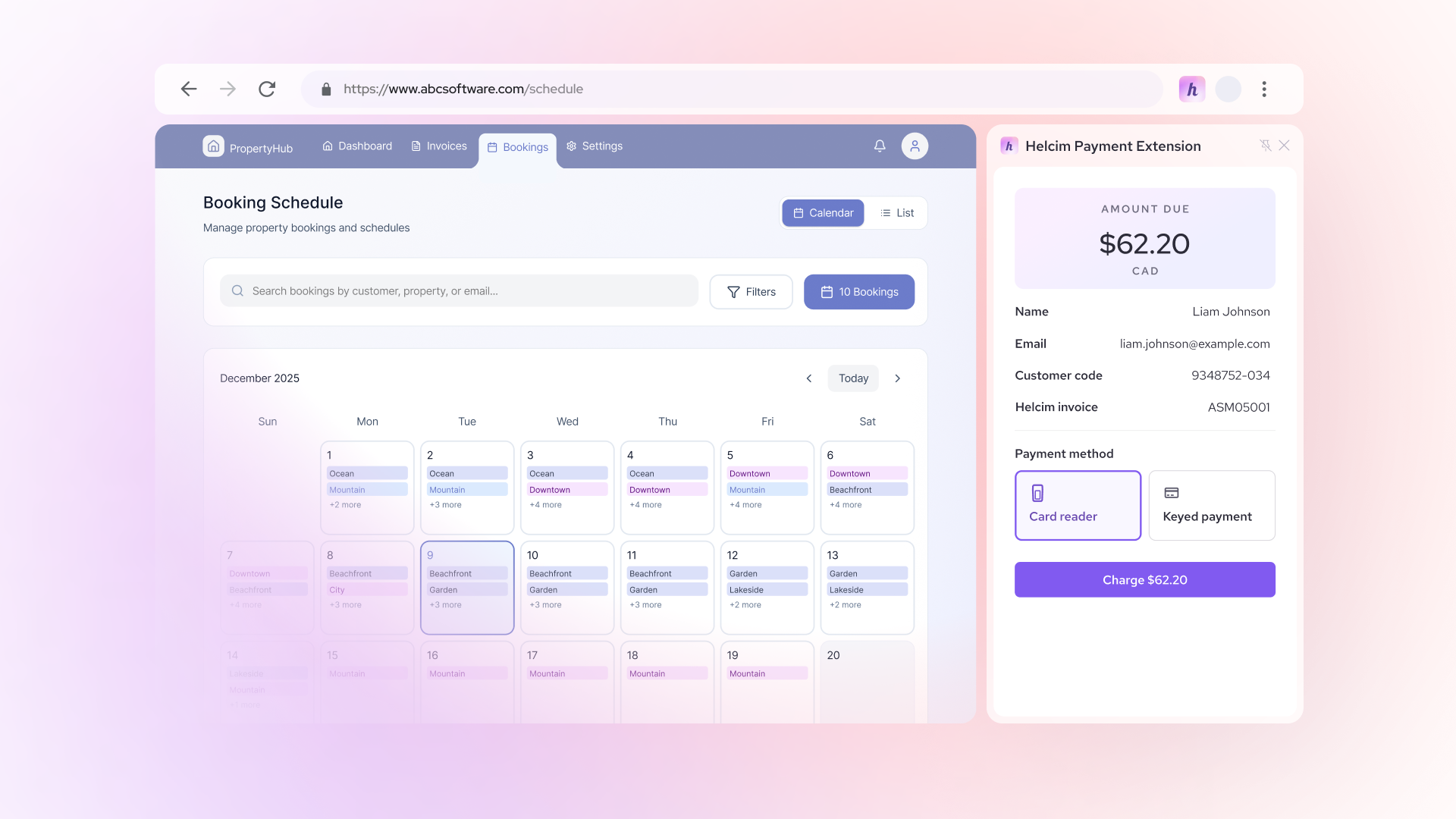
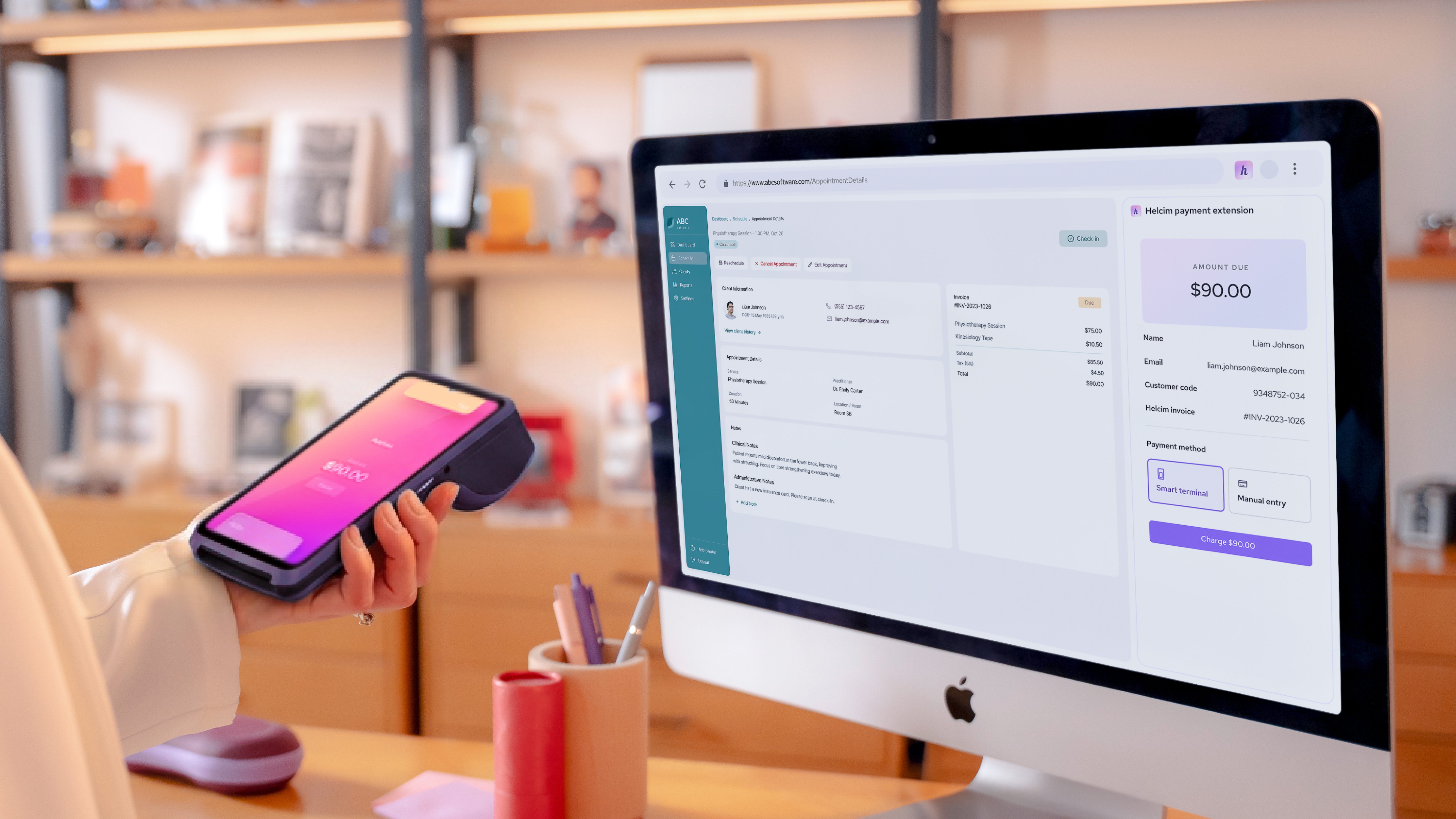
With the Helcim Payment Extension, you can integrate Helcim with popular practice management software such as SimplePractice, Jane App, TherapyNotes, Carepatron, CharmHealth, Noterro, and Athenahealth. This integration allows you to process payments using Helcim’s lower rates while continuing to manage clients, invoices, and reporting inside your existing software.
To get started, simply download the Helcim Payment Extension and sign up for a Helcim merchant account. Once your account is approved, the extension handles the integration automatically.
3. Pass the credit card processing fees to your clients
If you operate outside of Quebec, Massachusetts, Maine, and Connecticut, you can legally pass credit card processing fees to your clients. Unfortunately, most practice management platforms do not offer built-in surcharging features.
However, when you integrate Helcim with practice management software, you can apply surcharging to in-person credit card payments. Here’s how it works:
- Download the Helcim Payment Extension and register for a free Helcim merchant account.
- Connect a Helcim POS device, such as a Helcim Payment Terminal or Helcim Card Reader.
- Enable Helcim Fee Saver in your settings.
- Open an invoice in your practice management software, and both the invoice amount and surcharged credit card fees are sent to the Helcim POS device.
- Collect payment from your client in person.
- Once payment is complete, the invoice is automatically marked as Paid in your practice management software.
4. Process in-person payments for lower payment processing fees
In-person payments made using tap, chip, or swipe typically qualify for lower processing fees than online transactions due to a lower risk of fraud. However, not all practice management software supports in-person payments, and some charge separate (and still expensive) rates for them.
For example, platforms like Jane App and Noterro publicly list their in-person credit card processing rates, which typically range from 2.5% to 2.6% + 10¢ per transaction. In contrast, Helcim merchants pay around 1.67% + 8¢ in Canada or 1.83% + 8¢ in the U.S. for in-person payments.
If your practice management software does not support in-person payments or if you’re not satisfied with your current rates, you can integrate Helcim to reduce costs. Here’s how it works:
- Download the Helcim Payment Extension and register for a free Helcim merchant account.
- Connect a Helcim POS device, such as a Helcim Payment Terminal or Helcim Card Reader.
- Open an invoice in your practice management software, and the invoice details and amount are transferred to the Helcim POS device
- Hand the device to your client to complete the payment
- After payment, the invoice is automatically marked as Paid in your practice management software.
What are hidden payment processing costs of practice management software?
Chargeback and dispute fees are two common hidden costs that practice management software often does not list on its pricing page. For platforms like SimplePractice, Jane App, Carepatron, and Noterro, Stripe is the underlying payment processor. If you use these systems, you may be charged $15 per chargeback, which is non-refundable, even if you win the dispute.
Chargebacks occur when a client contacts their bank to reverse a credit card transaction. This usually happens when the client believes the charge is fraudulent, the service was not delivered as described, or they were charged more than expected.
To avoid unexpected costs, it’s important to ask your practice management software provider whether they charge any of the following common fees: chargeback fees, dispute fees, PCI compliance fees, or contract termination fees.
How does Helcim Payment Extension help cut your practice management software cost?
Helcim Payment Extension helps reduce practice management software costs by letting you use Helcim’s lower interchange-plus pricing without leaving your existing workflow. Instead of paying a high flat rate charged by the software, you can process payments at around 20%–25% lower processing fees.
Helcim Payment Extension integrates to your practice management software as a browser’s extension, so you can continue managing clients, appointments and invoices as usual.
Helcim Payment Extension also unlocks additional cost-saving tools that your practice management system doesn’t offer. For example, in-person payments, and compliant surcharging. Together, these options give you more control over how and when you pay processing fees.
FAQ
Does practice management software pricing include payment processing fees?
In most cases, practice management software pricing does not include payment processing fees. The monthly subscription typically covers essential features such as scheduling, client management, and basic billing tools. Payment processing fees are charged separately for each transaction.
Can I use my own payment processor with practice management software?
Most practice management platforms do not offer native integrations for external payment processors. However, tools like the Helcim Payment Extension allow you to integrate Helcim with your practice management software and reduce payment processing fees without leaving your existing system.
Does practice management software charge extra for invoicing and billing features?
Some practice management software includes basic invoicing and billing features, but advanced tools often come at an additional cost. Practices may be charged extra for recurring billing, automated payment reminders, text-to-pay links, or higher invoice volumes. These add-on fees can increase monthly costs even if the base subscription looks affordable.
Related Articles
-

How to reduce Jane App payment processing fees
Robert Luong | February 4, 2026
-

Payment gateway integration guide for small businesses
Booky | August 21, 2025
-

How to reduce your credit card processing fees
Ryleigh Stangness | November 1, 2022
-

Credit Card Processing Fees Ultimate Guide
Ryleigh Stangness | July 1, 2022