
-
Content
We’ve all seen the promise: “Free POS” or “Zero monthly fees,” then the bill shows up: hidden fees here, software charges there, and a pile of processing fees.
If that’s how POS gets sold, how are you supposed to budget it? POS system pricing isn’t one sticker price. It’s POS hardware, POS software, and payment processing, plus setup, add-ons, support, and the fine print. Pick wrong and you can lock yourself into a contract of higher costs.
This guide cuts through the noise. We break down every cost driver in plain language, show typical USD/CAD ranges for the U.S. and Canada, and call out Canadian specifics like Interac debit. You’ll see how subscription vs. freemium vs. bundles change the math, where “hidden” fees hide, and how to compare quotes apples to apples. We’ll also walk through ROI examples and give you a simple negotiation playbook so you can choose a POS that fits your business and your budget without surprises.
What factors affect the pricing of a POS system?
There are 6 factors that affect your POS system prices:
- POS hardware and accessories: Different providers set different prices for their hardware. The more devices your setup requires, such as terminals, printers, or scanners, the higher your overall cost.
- POS software plan: Not every provider includes free POS software. If your provider charges a monthly or annual subscription fee, that cost will add to your total.
- POS payment processing fees: Every transaction your POS processes comes with a cost. These payment processing fees depend on the pricing model your POS provider uses (for example, flat rate or interchange-plus).
- POS setup pricing: More complex installations often involve setup or onboarding fees. This can include data migration, configuration, and staff training.
- Multi-location POS pricing: Businesses with multiple locations will face higher costs because each site typically requires additional hardware, software licenses, and user accounts.
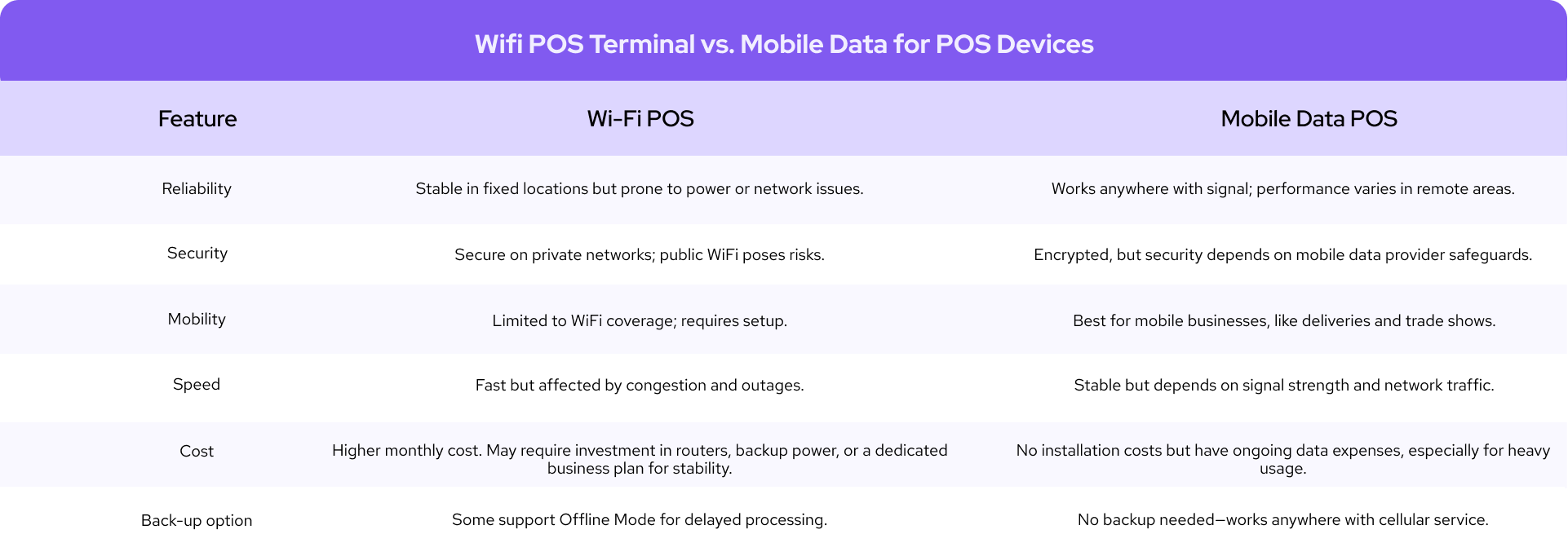
- POS Wi-Fi and cellular data pricing: If you want to ensure uninterrupted payments, you can add a 4G/LTE data plan to your credit card machine. This keeps your POS running even when Wi-Fi is unavailable. Learn more about WiFi vs. Mobile Data for POS system.
Let’s look at each of these factors in more detail so you can make the best decision when evaluating POS system pricing.
1. POS hardware and accessories pricing
The physical equipment for your POS system can range from a simple credit card reader, costing between $60 and $199 USD (or $80 to $270 CAD), to a complete countertop POS station with multiple accessories that can cost around $5,000 USD (or $7,000 CAD).
Below is a general overview of POS hardware and accessory pricing you can expect:
| POS hardware and accessories | U.S. price range (USD) | Canadian price range (CAD) |
|---|---|---|
| POS stations / registers | $329 – $1,900 | $460 – $2,660 CAD |
| Self-service kiosks | $149 – $3,499 | $210 – $4,900 CAD |
| Credit-card readers | $49 – $149 | $70 – $210 CAD |
| Payment terminals / mPOS | $299 – $699 | $420 – $980 CAD |
| Tap to Pay on iPhone / Android | $0 hardware cost | $0 hardware cost |
| Kitchen display systems (KDS) | Up to $899 | Up to $1,260 CAD |
| Cash drawers | $129 – $200 | $180 – $280 CAD |
| Receipt printers | $295 – $305 | $410 – $425 CAD |
| Barcode scanners | $149 – $399 | $210 – $560 CAD |
| Payment-terminal charging stations | $39 – $99 | $55 – $140 CAD |
The total cost of your POS setup depends on your business model. For example, if you run a portable POS system like a food truck or provide mobile services (like plumbing), a portable POS system with minimal accessories may be all you need. However, if you operate a restaurant or bakery, you’ll likely require additional hardware such as handheld ordering devices, receipt printers, and kitchen display systems (KDS).
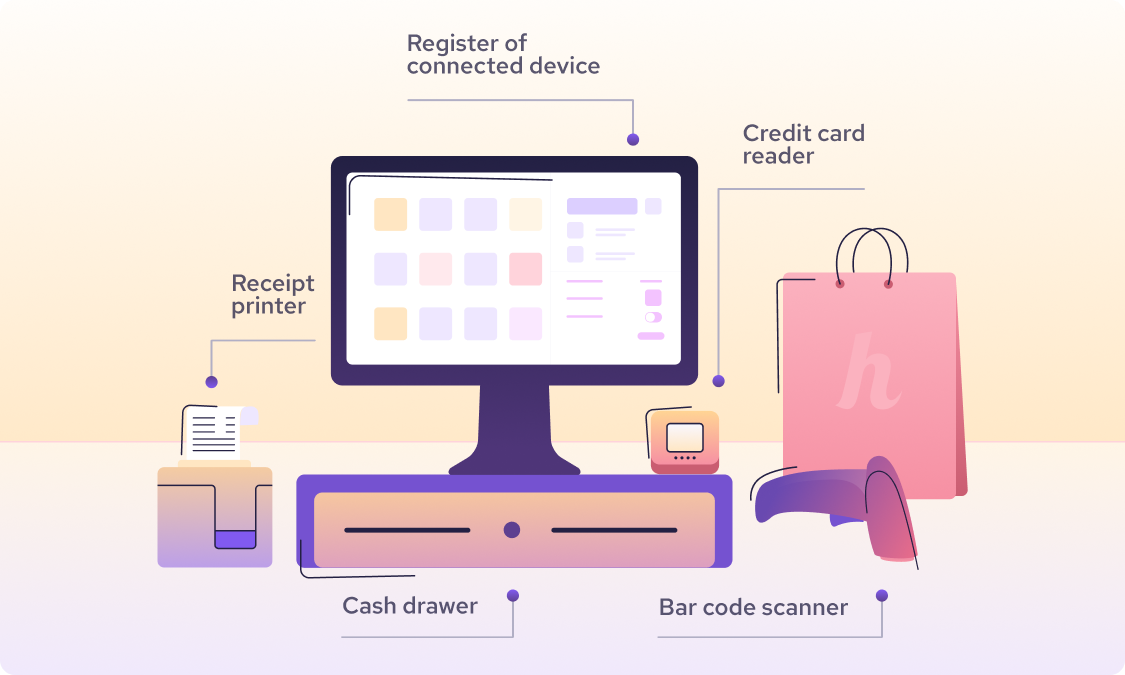
If you manage multiple locations, some POS providers, such as Lightspeed, charge additional monthly fees and separate hardware costs for each location.
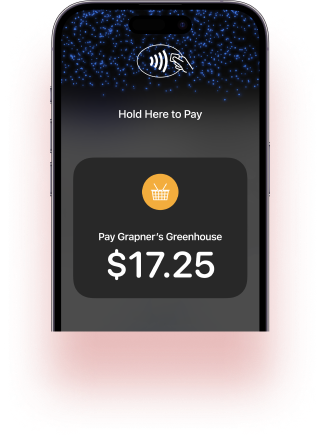
If you prefer not to invest in POS hardware upfront, Tap to Pay on iPhone or Android allows you to accept NFC/contactless payments directly from your smartphone.
Important note: Some providers package their POS hardware and accessories into pre-set bundles, meaning you’ll have to purchase an entire bundle to get started. Others, like Moneris (Canada), only offer hardware rentals, which are subscription-based and tied to 3–5 year contracts that often include hefty termination fees. For Canadian businesses, always ensure that your POS hardware and payment processor support the Interac debit network.
2. POS software pricing
POS software prices typically range from $30 to over $500 per month, depending on the functionality you need. The higher-end plans are often designed for restaurants or retail businesses that require advanced tools like floor management, loyalty programs, shift scheduling, or kitchen management systems.
Can you avoid POS software costs? It depends on your POS providers. Your POS hardware won’t function without software. A POS software stores your sales data, payment information, and processes your transactions. Some POS software, like Helcim POS software, is included for free with your merchant account, so you can avoid this cost.
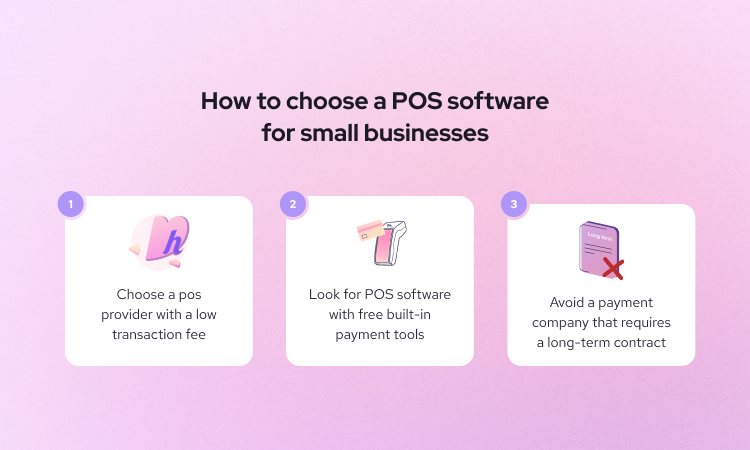
Important note: Some POS software plans include a free payment terminal, but the tradeoff is higher monthly subscription costs. These higher fees help the provider recoup the hardware cost over time. Typically, you’ll also be required to sign a 3–5 year contract to ensure you use their merchant services long enough for them to recover that expense.
3. POS payment processing pricing
Payment processing costs are not included in your POS software pricing. These are separate fees applied to every transaction. Depending on your provider and pricing model, this cost typically ranges between 2% and 3.5% (or more) per transaction.

Card-present (in-person) transactions are cheaper than card-not-present (online) ones because they carry less fraud risk. Additionally, some POS providers charge higher fees for American Express (Amex) transactions because Amex’s interchange rates are typically higher than those of Visa, Mastercard, or Discover. Learn more about card-present and card-not-present transactions.
You can reduce your POS processing fees by:
- Using interchange-plus pricing: This model passes the actual “wholesale” card network cost directly to you, with a small transparent markup. Providers like Helcim use interchange-plus pricing, and their merchants typically pay about 25% less in processing fees compared to flat-rate providers.
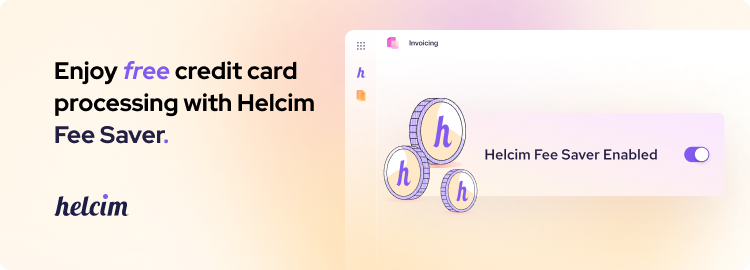
- Using credit card surcharging features: Surcharging allows you to pass credit card fees to customers who choose to pay by credit instead of lower-cost methods like debit or ACH/EFT payments. For example, Helcim Fee Saver lets you apply surcharges both online and through its payment terminals.
- Encouraging lower-fee cards: If your customers use American Express, politely ask if they can use Visa, Mastercard, Discover, or debit cards for lower fees.
- Leveraging volume discounts: Some providers automatically lower your processing rates as your transaction volume grows. For example, Helcim automatically decreases your rates as you process more, so you don’t need to negotiate manually.
- Encourage customers to use Interac debit cards in Canada: Interac is Canada’s most affordable payment option for merchants, with rates around 9¢ per transaction. If you see the Interac logo on a customer’s debit card, you’ll enjoy this lower cost; just make sure your POS supports the Interac network.
4. POS setup and implementation pricing
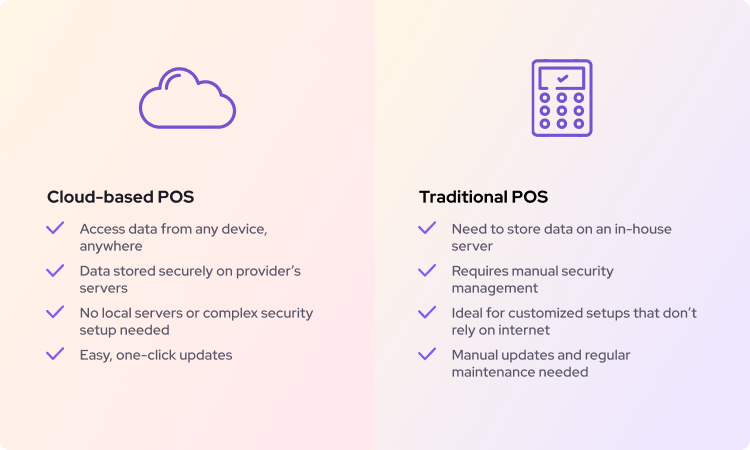
If you choose a server-based POS system, you’ll need a local server to host your data and connect it properly with your hardware and software. Purchasing a server typically costs $2,000–$5,000 USD (or $2,700–$6,700 CAD), while renting one costs $70–$300 USD per month (or $95–$400 CAD/month). Installation prices for these POS setups can also reach $500 USD (or $670 CAD) or more, depending on complexity.
If you use a cloud-based POS system (like Helcim), there’s no need to buy or maintain a local server. Setup is as simple as downloading the POS app and connecting hardware via Wi-Fi, USB, or Bluetooth.
However, some cloud-based POS providers still offer setup and onboarding packages, which can cost up to $2,000 (or more) if your business needs help. Providers may also require these onboarding fees if your POS setup involves multiple locations, complex hardware integrations, or system migrations.
5. Multi-location POS prices
POS pricing increases as your business expands to multiple locations. Many providers, such as Lightspeed and Shopify, charge per location or per register. These extra costs are usually for the additional hardware and the software to aggregate multi-location data for reporting, inventory tracking, and staff management.
However, if your business has multiple locations but uses simple workflows, such as law firms, healthcare clinics, or service providers (like plumbers or contractors), you may not need those advanced multi-location features. Paying extra per location in these cases is unnecessary.
Additionally, if you already use specialized software like Jane (healthcare), Zoho (professional services), MyCase (law firms), or Tekmetric (automotive), you might already have built-in multi-location management features. Paying extra for the same tools in your POS would be wasteful.
For Helcim merchants, multi-location management is included at no additional cost, you can accept payments and manage multiple locations under one account without paying extra monthly fees.
6. Connectivity and mobility: Wi-Fi, ethernet, and cellular data
If your business operates on the go, for example, curbside, at pop-ups, on patios, or at job sites, you might need a cellular data plan for your payment terminal. This ensures smooth transactions even when Wi-Fi is unavailable.
For example, Helcim offers a 4G/LTE Mobile Data Plan (SIM card) for $7 USD or $9 CAD per month. You can install this SIM card in the Helcim Smart Terminal, providing a stable internet connection so you can process payments anywhere your business takes you.
POS system pricing models comparison
Subscription, freemium, one-time purchase (Perpetual License), and hardware bundling are the three common POS system pricing models you can choose from. Each model comes with its own pros and cons. It’s important to understand these differences so you don’t fall for misleading claims that some POS providers make.
| POS system pricing model | How it works | Pros | Cons |
|---|---|---|---|
| Subscription | You pay a recurring monthly (or annual) fee for access to POS software, hardware, or both. Some plans scale by locations, registers, or transaction volume. | Access to specialized tools for your industry. Lower upfront costs. Option to include hardware in the plan. | Often tied to 3–5 year contracts. Early termination fees. Paying monthly for hardware can exceed the cost of buying outright. |
| Freemium | You buy the hardware outright and get basic POS software for free. Premium features may require upgrades or add-ons. | Low startup costs. Great for new or small businesses. | Limited free features. You bear replacement costs if the hardware breaks. |
| Hardware Bundling | Providers package compatible hardware (e.g., terminal, printer, cash drawer) into a single kit sold or leased together. | Guaranteed compatibility. Easier setup with preconfigured equipment. | High upfront or monthly cost. Hardware is often locked to one provider. Switching providers can make purchased equipment unusable. |
| One-time Purchase (Perpetual License) | You pay once for POS software and server hardware, and own it indefinitely. Common for on-premise systems. | No ongoing subscription fees. Can save money long term. | Large upfront investment. Must handle updates and maintenance yourself. Can become outdated faster than cloud systems. |
Rule of thumb: there’s no such thing as a free meal. Continue reading and we’ll help you identify the “catch” behind those free offers.
1. POS subscription pricing model
This is one of the most common POS pricing structures. There are several variations within this model:
- The subscription plans give you access to POS software so that you can manage and connect your POS hardware to it.
- Some providers, such as Clearly Payments, offer subscription tiers based on processing volume, the higher your monthly subscription, the lower your payment processing fees.
- Other companies include hardware under a subscription model. For example, Moneris charges a monthly fee for its payment terminals (with no option to buy outright). Lightspeed adds an extra monthly fee for each register. Be cautious: some providers advertise “free POS hardware” but recoup the cost through subscription fees and long-term contracts.
- Some providers, like Shopify, charge a monthly fee for each location using their POS system.
- Others, such as POS Nation, charge different monthly rates depending on the industry or plan type. Industries with higher transaction risks often face more expensive subscription tiers.
The pros: Subscription models can give you access to specialized features designed for your business. For example, Shopify and Lightspeed’s POS subscription plans include specialized features for restaurants and retailers with multiple locations. Paying a monthly fee for your payment terminal instead of buying can also make sense if you don’t want to buy hardware outright or if your staff frequently drops or damages devices.
The cons: In the POS industry, subscriptions often come with contracts. If you prefer flexibility, a 3–5 year contract can be a huge deal breaker. Early termination fees can be expensive if you decide to switch providers. Also, paying monthly for a terminal over several years can easily exceed the cost of buying it up front.
2. POS freemium pricing models
In a freemium model, you purchase the POS hardware outright, and the provider gives you free access to its POS software so you can start accepting in-person payments. For example, Helcim offers free POS software, so you just need to purchase the Helcim Smart Terminal or Helcim Card Reader to process in-person transactions. If you don’t need POS hardware, you can use free payment tools in the POS software to accept online payments.
The pros: This pricing model can be good for new businesses to start cheaply.
The cons: If you buy hardware outright and it’s damaged or dropped by staff or customers, you’ll have to replace it at your own expense. Besides, some providers offer a free POS software with very limited features, then upsell with a paid POS plan with more features. Expenses can increase as you add more advanced features. Always check what “free” truly includes and whether essential tools that your business needs are included.
3. POS hardware bundling
Some providers bundle their POS hardware together into packages. For example, Clover offers the Station Duo package, which includes a monitor, card reader, cash drawer, and receipt printer for $1,899 USD outright, or $175 USD/month as a hardware bundle subscription.
The pros: Hardware bundles eliminate compatibility issues between your POS terminal and accessories. Buying a complete kit ensures all equipment works seamlessly together, saving you the time and frustration of checking compatibility for each item.
The cons: The downside is the high upfront cost obviously. The POS equipment from one provider usually won’t work with another. So, if you decide to switch providers, your bundled hardware could become useless. In contrast, purchasing accessories from third-party providers can potentially let you reuse them with other providers.
4. POS one-time purchase model
In this model, you pay a one-time license fee for the POS software and server, allowing you to use it indefinitely. This approach is common with older, on-premise POS systems. A perpetual license typically costs $2,000 to $10,000 USD (or $2,700 to $13,400 CAD) or more, depending on the system and number of terminals.
The pros: You make a single payment and can use the software and hardware for years without monthly bills. This can lead to substantial savings in the long term.
The cons: This model requires a large upfront investment, and you’re responsible for maintaining the software and paying for future updates or support contracts.
POS hardware pricing comparison
| POS providers | USD pricing | CAD pricing |
|---|---|---|
| Helcim | Helcim Smart Terminal: $349 Helcim Credit Card Reader: $99 | Helcim Smart Terminal: CA$429 Helcim Credit Card Reader: CA$129 |
| Square | Square Register: $799 Square Handheld: $399 Square Terminal: $299 Square Kiosk: $149 Square Reader: $59 | Square Register: CA$899 Square Handheld: CA$449 Square Terminal: CA$399 Square Kiosk: CA$187 Square Reader: CA$69 |
| Stripe | Stripe Reader S700: $349 BBPOS WisePOS E: $249 Stripe Reader M2: $59 | Stripe Reader S700: CA$449 BBPOS WisePOS E: CA$299 BBPOS WisePad 3: CA$79 |
| PayPal (Zettle) | PayPal Terminal: $199 PayPal Card Reader: $29 | Unavailable |
| Bank of America | POS System E800 Smart Register: $1,439 Smart POS Terminal E700: $1,129 A920 Portable Mobile Payment Terminal: $529 Countertop A80 Payment Terminal: $359 D135 Mobile Card Reader: $99 | POS System E800 Smart Register: CA$1,439 Smart POS Terminal E700: CA$1,129 A920 Portable Mobile Payment Terminal: CA$529 Countertop A80 Payment Terminal: CA$359 D135 Mobile Card Reader: CA$99 |
| Clover | Clover Kiosk: $3,499 Clover Station Duo: $1,899 Clover Station Solo: $1,799 Clover Mini: $849 Clover Flex Pocket: $699 Clover Compact: $349 Clover Go: $199 | Not listed |
| Shopify | Wireless Countertop Bundle: $999 POS Terminal Countertop Kit: $459 POS Terminal: $349 Tap & Chip Countertop Kit: $219 Tap & Chip Reader with Dock: $89 Tap & Chip Card Reader: $49 | Wireless Countertop Bundle: CA$1,299 POS Terminal Countertop Kit: CA$599 POS Terminal: CA$459 WisePad 3 Countertop Kit: CA$229 WisePad 3 Card Reader: CA$69 |
| Authorize.net | Smart Card Reader: $189 Card Reader: $135 | Smart Card Reader: CA$189 Card Reader: CA$135 |
| Lightspeed | Retail: $109 – $339/month/location (includes 1 register; +$59 per extra register) Restaurant: $69 – $399 (+$30 per kitchen display) Other hardware selections: $34 – $629 | Retail: $139 – $399/month/location (includes 1 register; +$69 per extra register) Restaurant: $239 – $499 (+$40 per kitchen display) Other hardware selections: $34 – $629 |
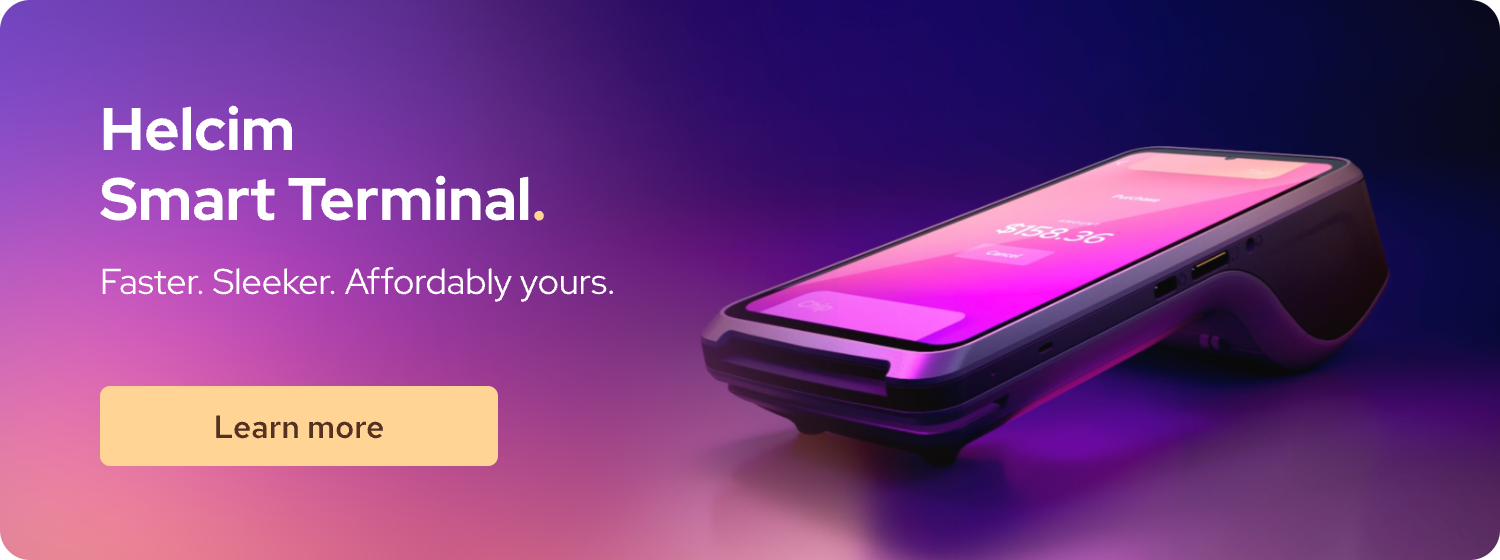
Helcim’s hardware lineup focuses on flexibility and simplicity. Both the Helcim Smart Terminal and Helcim Card Reader connect seamlessly to Helcim’s free POS software, allowing you to accept in-person payments quickly. In addition, Helcim’s POS software includes a full suite of payment tools with no monthly fees, contracts, or hidden charges, so merchants can also accept payments online with ease.
Square, Bank of America, Clover, Shopify, and Lightspeed offer a variety of POS hardware options that allow retail and food-and-beverage businesses to build customized setups that fit their specific needs. Clover, Shopify, and Lightspeed are particularly powerful for established restaurants and retailers. However, Lightspeed’s costs can add up quickly if you have multiple locations, as there is a separate subscription fee for each one.
POS software monthly pricing comparison
| POS providers | USD monthly pricing | CAD monthly pricing |
|---|---|---|
| Helcim | $0 for POS software and all payment tools | $0 for POS software and all payment tools |
| Square | $0 – $149 | $0 – $35+ |
| Stripe | $0 for primary payment tools $25 – $65 for advanced reporting functionality | $0 for primary payment tools $35 – $90 for advanced reporting functionality |
| PayPal (Zettle) | $0 – $30 | $0 – $35+ |
| Bank of America | Not listed | Not listed |
| Clover | Full-service restaurant: $89.95 – $129.85 Quick-service restaurant: $89.95 – $109.90 Professional services: $29.95 – $84.95 Home & field services: $29.95 – $84.95 Retail: $0 – $104.90 Personal services: $0 – $84.95 | Not listed |
| Shopify | Basic – Advanced plan: $39 – $399 Plus plan: $2,300 (on a 3-year term) Extra monthly fee for Shopify POS Pro (in-person selling): $89 per location | Basic – Advanced plan: $49 – $517 Plus plan: $2,300 (on a 3-year term) Extra monthly fee for Shopify POS Pro (in-person selling): $119 per location |
| Authorize.net | $25 | $25 |
| Lightspeed | Retail: $109 – $339/location (includes 1 register; +$59 per extra register) Restaurant: $69 – $399 (+$30 per kitchen display) | Retail: $139 – $399/location (includes 1 register; +$69 per extra register) Restaurant: $239 – $499 (+$40 per kitchen display) |
Helcim is known for its all-inclusive pricing model. The POS software is completely free, and all online payment tools are included with no monthly fees, contracts, or hidden charges, such as:
- Helcim Invoicing: Send and manage online invoices, and handle late payments
- Helcim Recurring Payments: Automate billing, customize subscription plans, and grow revenue effortlessly
- Helcim Online Checkout: Effortlessly bring your store online, no coding or extra costs needed.
- Helcim Virtual Terminal: Process credit cards and ACH payments online without any hardware.
This makes Helcim ideal for businesses that need affordable payment hardware and free online payment tools to operate seamlessly. Even as your business grows, there are no additional costs for extra users, locations, or integrations, making Helcim one of the most cost-effective POS solutions in North America.
Square, Clover, and Lightspeed offer POS software plans designed for restaurants and retail businesses that need advanced, industry-specific features. Their software can cost up to $399 USD (or $499 CAD) per month and often includes specialized tools such as menu or table management, kitchen display systems, and employee scheduling.
Shopify, on the other hand, is built for ecommerce-first retailers but also provides POS options for brick-and-mortar stores. It’s an excellent choice for online businesses that already use Shopify and want to expand their presence into physical retail locations.
What are the hidden costs of the POS systems
1. Hidden POS payment processing fees
- Monthly minimums: If a provider advertises low processing fees or you sign up for a POS plan with a minimum processing volume, you’ll usually be required to process a set amount of card payments each month. If you don’t meet that volume, you pay the difference in processing fees. Always check the contract to see what you owe if you fall short.
- Non-qualified/premium credit card charges: Many providers quote low rates for certain credit card types only. Transactions on premium cards (such as American Express) often cost extra fees.
- High online debit card fees: When customers use debit cards online, those transactions typically run over the credit card networks and are priced at online credit card rates. Don’t assume debit always equals lower fees.
- Cross-border and foreign card fees: Transactions on foreign-issued credit cards may include cross-border and currency conversion fees. Confirm these charges with your provider before accepting foreign cards. For example, Stripe charges +1.5% on top of regular processing fees for international cards. Learn about international credit card processing.
- Third-party processor fees: Some POS platforms, such as Shopify, allow you to connect and use a third-party processor instead of them. If you do, you may pay an extra fee (Shopify charges 0.6%–2%) on top of standard transaction fees.
2. Contract traps and equipment fees
- Early contract termination fees: Some providers (e.g., Clover resellers) require 3–5 year contracts for software or hardware leases, often with hefty early termination fees. Read the fine print before you sign.
- Inactive equipment charge: Certain POS providers require monthly processing activity. If you don’t process within a month or don’t meet a minimum volume, you may be charged an inactive equipment fee. For example, at the time of writing, Eposnow charges $59 USD/month ($64 CAD/month) if a merchant doesn’t process at least $2,000 or 75% of card payments in a rolling 28-day period. (U.S. policy: link) (Canada policy: link)
- Expensive “Free” hardware: Some POS providers bundle POS hardware and software into an expensive monthly subscription. It might sound like you’re getting the hardware for free, but in reality, you end up paying more every month. If the provider also locks you into a 3–5 year contract, your total subscription cost (and any termination fees) can end up costing more than buying the hardware outright. When you calculate your POS costs, always look at the total subscription cost throughout the contract length before you sign anything.
- Expensive financing option: If your provider offers hardware financing, calculate the total cost versus buying outright. Financing usually comes with a contract; also, check what you’ll owe if you cancel early.
3. Other hidden POS costs
- Extra cost per POS features: Sometimes a pricing page says “no monthly software fee,” but specific tools carry per-transaction or monthly charges. For example, Stripe charges an extra 0.4% on top of regular online processing fees for every paid invoice you collect with Stripe Invoicing.
- Credit card chargeback and dispute fees: Each chargeback typically carries a $15–$30 fee. Most providers don’t refund this fee; Helcim refunds the chargeback fee if you successfully win the chargeback dispute.
How to calculate the ROI on a new POS system investment with examples
Step 1: Set your time frame
Pick a period long enough to see real impact. Most teams model 12 months for first-year ROI and 36 months for long-term value. If you’re replacing an existing POS, start your clock on the go-live date.
Step 2: Calculate your total POS costs
There are two types of POS costs: fixed POS costs and variable POS costs.
The common fixed POS costs are:
- Hardware: terminals, readers, printers, scanners, cash drawers, and stands.
- Setup & implementation: vendor onboarding, internal staff time (hours × hourly wage).
The common variable POS costs are:
- Software: POS plan(s), per-location or per-register fees, and paid add-ons.
- Payment processing fees: POS provider’s rate × sales volume.
Step 3: Calculate the ROI on a new POS system investment
For a business that switches to a new POS provider (switcher), you can use the following ROI formula:
ROI(%) = (Total fee savings - total POS costs excluding processing fees) / total POS costs excluding processing fees × 100
POS system ROI calculation example for switcher:
- Total yearly sales: $400,000
- Total yearly transactions: 2,000 transactions
- The old POS provider’s transaction rate: 2.9% + $0.30
- The new POS provider’s transaction rate: 2.2% + $0.10
- Hardware cost: $349 (one-time purchase)
- Monthly POS software cost: $30/month ($360/year)
Yearly processing-fee savings calculation:
- Old fees = (2.9% × 400,000) + (0.30 × 2000) = $12,200/year
- New fees = (2.2% × 400,000) + (0.10 × 2000) = $9,000/year
- Total fee savings = $12,200 - $9,000 = $3,200/year
Total POS costs excluding processing fees = $349 + $360 = $709
ROI(%) on a new POS system investment = ($3,200 - $709 ) / $709 x 100 = 351%
How to negotiate POS system pricing and fees
You can negotiate POS payment processing rates. Providers are more willing to lower credit card processing rates when you have high credit card sales volume. Some publish a minimum sales threshold for custom pricing; with others, you’ll need to contact them directly to negotiate.
POS hardware and software pricing is typically non-negotiable unless you’re a large or enterprise business. For enterprise and established businesses that need tailored POS software to match their operations, pricing for the software and any hardware bundles is usually custom and set through direct negotiation with the provider.
Get Helcim POS system and save 25% on payment processing fees
Helcim gives you free POS software with built-in payment tools to accept payments both online and in person. You can get your business up and running with no monthly fees, no setup fees, and no hidden costs.
Besides, the Helcim Interchange-plus model helps you save 25% on credit card processing fees compared to other POS providers.
Book a demo, call us at +1 (877) 643-5246, or sign up today to see how Helcim can help you accept POS purchases at lower transaction fees.

If you’re currently locked into a contract with another provider, the Helcim Merchant Buyout Program will cover up to $500 of your processing fees to help offset cancellation costs.

Break up with bad rates.
Feeling stuck with your provider? We'll waive $500 of your processing fees when you switch to Helcim.
FAQ
Does the POS system pricing include transaction fees?
Usually not. The POS software price covers your app and features, while transaction fees are billed separately on each sale. You can expect a rate around 1.5%–3.5% depending on your customer’s payment method and your sales channel.
Do extra marketing features like gift cards, discount codes, or loyalty increase POS prices?
Often, yes. Many providers lock the gift cards, loyalty, email/SMS marketing, and advanced analytics in higher-tier subscription plans that cost more. Some providers provide these features as add-ons that have a recurring cost per month.
How much should you budget for POS installation, training, and onboarding?
For cloud POS, self-setup can be $0 if you configure it yourself. Many POS providers offer paid onboarding packages that can cost up to $2,000, depending on complexity. For server-based or legacy POS systems, you may need to spend $2,000–$5,000 for a server and $500 for POS server installation.
Related Articles
-
iPad POS Systems: The Ultimate Guide for Business Owners
Robert Luong | October 31, 2025
-
POS Debit vs POS Credit: What is the difference?
Connor Tennant | February 10, 2025
-
Can I use my iPhone as a POS system?
May Montenegro | December 20, 2024
-

POS Software: Everything you need to know.
Kaitie Weaver | December 20, 2024
-

What are the pros and cons of POS systems?
Robert Luong | August 1, 2024
-

What is the best POS system for small businesses?
Feyi Oladipo | August 1, 2024
-
What is a POS transaction?
Robert Luong | July 25, 2024
-
How to get a POS for your business?
Robert Luong | June 11, 2024
-
What is a POS system and how does it work?
Ryleigh Stangness | April 5, 2021
