























Running a business often feels like a game of digital Tetris. You start with one tool for emails, another for your calendar, and maybe a spreadsheet to track who owes you money. Eventually, those pieces stop fitting together, and you spend more time moving data around than actually growing your business.
This is why thousands of scaling businesses move to Zoho. It isn’t just a single app; it’s an entire ecosystem that handles everything from your sales pipeline in a CRM to your inventory and accounting. It’s the platform of choice for the "mature" business owner who wants their departments to finally speak the same language.
But even with the best automation, your workflow isn't finished until the money hits your bank account. Whether you are a consultant sending a single invoice or a high-volume retailer managing a subscription model, you need a way to bridge the gap between "bill sent" and "funds received".
In this article, we are going to look at the different ways to accept credit card payments inside Zoho. We’ll compare the convenience of native tools against third-party payment integrations, helping you find the setup that keeps your favorite software running during every transaction.
Which Zoho apps allow you to accept credit card payments?
Zoho is a vast ecosystem, but not every app in their catalog can handle money. To accept credit cards, you’ll typically be working within their finance and commerce suites. These specific tools are built to bridge the gap between managing a customer and actually collecting payments.
Here is a quick look at the primary Zoho apps that support credit card processing:
- Zoho Invoice: Best for freelancers and service providers sending one-off bills.
- Zoho Billing: Designed for SaaS and subscription businesses with recurring cycles.
- Zoho Checkout: Ideal for simple, shareable payment links or donation pages.
- Zoho Commerce: Built for retail businesses running a full digital storefront.
Zoho Invoice
Zoho Invoice is the go-to tool for freelancers and service-based businesses, like consultants or creative agencies, who need to send professional bills. It simplifies the transition from "work completed" to "payment received" by allowing you to integrate digital payment options directly into the PDFs you email to clients.
Zoho Billing
For businesses that rely on recurring revenue—like SaaS companies, gyms, or subscription box services—Zoho Billing is the core engine. It handles the complexity of automated renewal cycles and prorated charges. Because it stores customer card data securely, it allows you to "set and forget" your collections so you aren't chasing down payments every month. Learn more about how to collect past due invoices.
Zoho Checkout
Zoho Checkout is designed for simplicity. It allows you to create custom, branded payment pages that you can share via a payment link or embed on a website. This is ideal for businesses running a one-time fundraiser, selling a single digital product, or collecting deposits without needing a full-scale online store.
Zoho Commerce
If you are running a retail operation with a digital storefront, Zoho Commerce is your central hub. It competes with platforms like Shopify by giving you a way to manage your inventory and your customer's checkout experience in one place. It is built for businesses that need to handle physical goods and shipping alongside their payment processing.
Should you choose Zoho Payments or Zoho Payment Integrations to accept credit card payments?
Most businesses using Zoho generally have three main options for accepting credit card payments, each with different advantages depending on how the company operates. Whether you value a simple setup or the lowest possible credit card processing fees will determine which path is right for your business.
- Zoho Payments: A native, "all-in-one" processor built by Zoho for a simple setup.
- Third-Party Integrations: Connecting well-known gateways like Stripe, PayPal, or Square directly to your Zoho account.
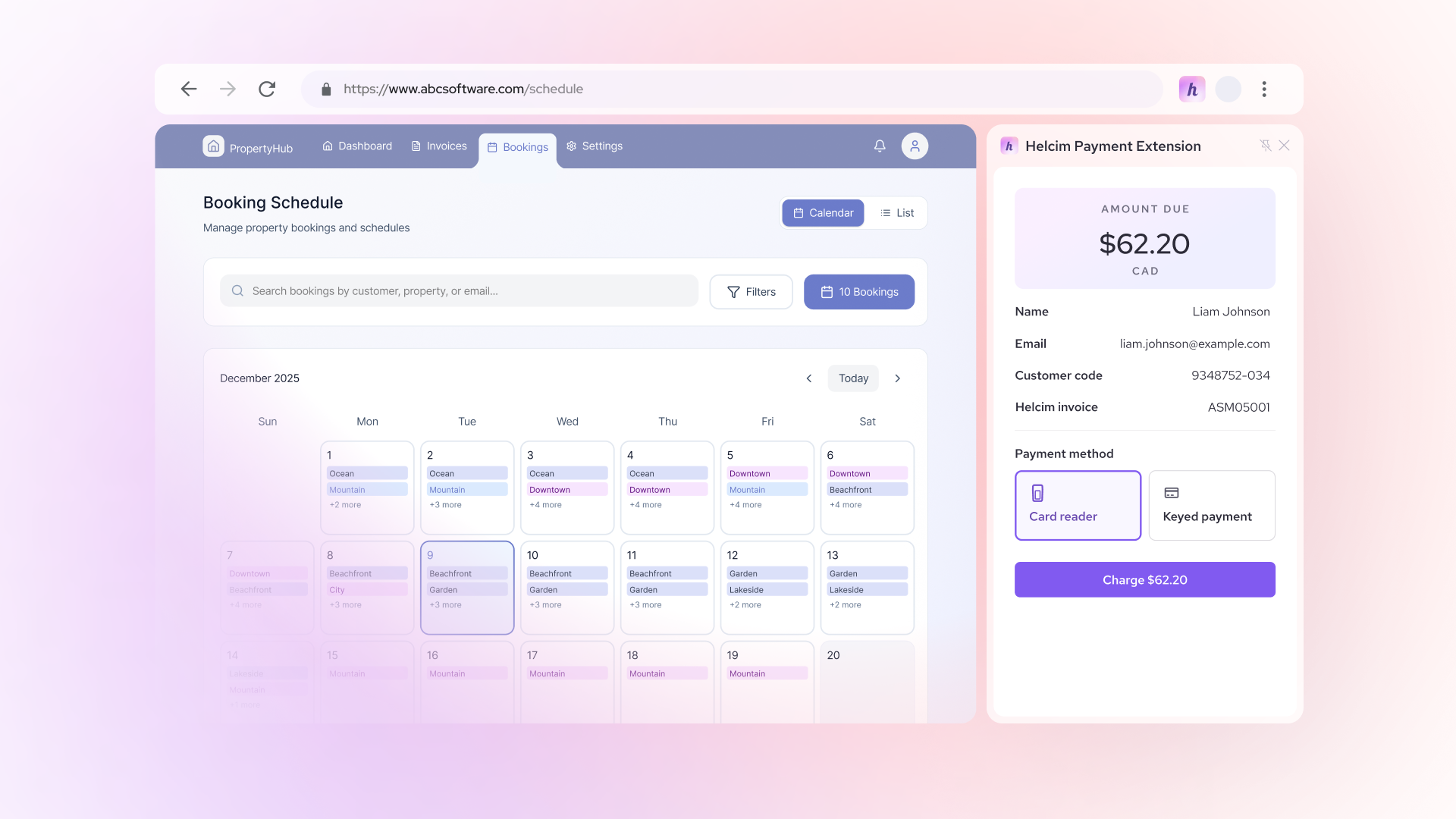
- Helcim Payment Extension: A "bring your own payments" tool that lets you keep your Zoho invoice workflow while using Helcim’s lower rates.
Zoho Payments
Zoho Payments is the native solution built to integrate directly with Zoho’s finance applications. Because it is made by the same company, the setup is extremely straightforward and offers automatic reconciliation within your books. It is often the easiest starting point for businesses that aren't processing a high volume of payments. However, scaling businesses may find the flat-rate pricing expensive and the regional availability somewhat limited.
Zoho integrations with third-party gateways
Zoho also offers built-in connections to several major external payment service providers. This allows you to track a lead in your CRM, generate an invoice, and have a provider like Stripe or PayPal handle the actual transaction. Common integrations include:
- Stripe: Popular for online payments and developer-friendly features.
- PayPal: A widely recognized platform that customers often trust.
- Square: Often used by businesses that also have a high volume of in-person, inventory-heavy sales.
- Authorize.net: A long-standing gateway known for its reliability and security.
While these are easy to connect, they often use flat-rate pricing (like 2.9% + 30¢), which can act as a hidden tax as your business grows.
Helcim Payment Extension
The Helcim Payment Extension offers a third way to handle payments without forcing you to change how you use Zoho. Instead of using a traditional "back-end" integration, this browser extension allows you to "bring your own payments" to the software you already love. It effectively acts as a bridge, pulling data from your Zoho invoice and processing it through Helcim’s transparent, interchange-plus pricing.
This is the "have your cake and eat it too" option for Zoho Invoice users. You get to keep your perfectly automated Zoho workflow, but you gain access to lower processing fees, human customer support, and the ability to pass on credit card fees to your customers through surcharging.
How much does credit card processing cost in Zoho?
The cost of processing credit card payments in Zoho isn't a single flat rate; it depends entirely on which provider you choose to power your transactions. While some options prioritize simplicity with a "one-size-fits-all" fee, others offer transparent models that can save your business thousands as you scale.
1. Zoho Payments costs
Zoho Payments is the native solution designed for ease of use within the Zoho ecosystem. Because it’s built by the same company, there are no setup or maintenance fees, but you are charged a consistent rate for every transaction.
| Payment Method | Typical Fee (Zoho Payments / Stripe) |
|---|---|
| Domestic Credit Cards | 2.9% + $0.30 |
| International Cards | 3.9% + $0.30 |
| ACH Direct Debit | 0.8% (Capped at $5.00) |
| Instant Payouts | 1.5% of the payout volume |
2. Zoho third-party integration costs
Most businesses gravitate toward Zoho third-party integrations like Stripe or PayPal because they are easy to set up. However, that convenience comes with a "flat-rate tax." Regardless of whether your customer uses a basic debit card or a high-end rewards card, you are usually charged the same high percentage.
- Stripe: Their standard rate for domestic card transactions is 2.9% + 30¢.
- PayPal: For standard credit and debit card payments, transaction fees often exceed 3%, with additional costs for currency conversion and cross-border payments.
- Authorize.net: This common Zoho integration also charges a flat 2.9% + 30¢ per transaction, which is approximately 27% more expensive than transparent pricing models like Helcim for many businesses.
3. Helcim Payment Extension for Zoho costs
Instead of a flat rate, the Helcim Payment Extension uses interchange-plus pricing, which passes the wholesale cost of the card directly to you with a small, transparent markup.
On average, Helcim’s online processing fees range from 2.27% + 25¢ to 2.28% + 25¢. While that might look like a small difference on paper, the savings add up quickly and save businesses 25% on average. On top of the savings from Interchange plus pricing, Helcim also offers all merchants:
- Automatic Volume Discounts: As your business grows, Helcim automatically lowers your rates. For example, once you process between $100,000 and $500,000, your markup is discounted by 30%. If you scale past $1 million, that discount reaches 70%.
- Fee Saver (Surcharging): The extension includes a compliant surcharging tool that allows you to pass credit card fees directly to your customers. This effectively reduces your processing costs to 0% while still allowing you to use the Zoho workflow you love.
- No "Hidden" Fees: Unlike other processors, there are no monthly fees, no setup fees, and no PCI compliance fees.
To see the impact of these different rates, consider a business processing $100,000 monthly in invoices. At a flat rate of 2.9%, you would pay $2,900 in fees. By switching to a model like Helcim’s, where rates average closer to 2.28%, those fees drop to $2,280. That is $620 back in your pocket every month—money that could be reinvested into your business instead of handed over to a processor.
How long does it take for Zoho payments to settle in your bank account?
Getting paid is only half the battle; the other half is actually seeing that money in your bank account. Depending on which path you choose for your Zoho payments, the "wait time" (or settlement period) can vary from a single day to nearly a week.
- Zoho Payments (Cards): Credit cards processed through Zoho Payments typically settle within 2 business days after the transaction date.
- Zoho Payments (UPI/Bank Transfer): Banks transfers processed through Zoho Payments are often faster within 1 business day after the transaction date
- Third-Party Integrations: The payment processing time through third-party integration varies by provider; for example, ACH payments via certain gateways can take 4 business days.
- Helcim Payment Extension: Credit card payments processed through Helcim Payment Extension typically settle in 1-2 business days, matching or beating most standard Zoho integrations while offering more transparency.
1. Understanding Zoho payment processing timeline
When a customer clicks "Pay Now" on your Zoho invoice, the funds don't fly directly into your vault. The payment processor first authenticates the transaction with the card network and the customer's bank. For Zoho Payments, once your account is verified and active, payouts are initiated daily, but the funds generally become "available" for deposit 2 business days after the sale. Learn more about payment processing time here.
2. Factors that can delay your money
It is important to remember that "business days" do not include weekends or bank holidays. If a customer pays you on a Friday evening, your two-day clock likely won't even start until Monday morning. Additionally, first-time users may experience a slight delay of 2–3 business days while Zoho verifies their new account before the very first payout is released.
3. Consistency is king for cash flow
If you are managing a high-volume business, these 48-to-72-hour gaps can add up. Using the Helcim Payment Extension provides a consistent, reliable 2-day settlement window. Because you are using a dedicated processor like Helcim instead of a "bundled" native tool, you often get clearer communication if a payout is ever delayed due to a security flag or a bank holiday, keeping your cash flow predictable.
Turning Zoho into a complete revenue system
Zoho provides a powerful ecosystem for managing your customers, operations, and financial workflows. But to complete the revenue cycle, your business needs a way to connect those invoices and customers to actual payments. Whether you choose a native solution or a third-party tool, the goal is to bridge the gap between "billing" and "banking" without creating extra work for your team.
Payment integrations like the Helcim Payment Extension make this transition possible. By connecting Zoho with the right processor, you can:
- Collect payments directly from invoices to get paid faster.
- Automate financial workflows so your records stay up to date.
- Reduce bookkeeping friction by eliminating manual data entry.
- Optimize processing costs to keep more of what you earn.
When done well, Zoho becomes more than just a place to store data; it becomes a complete system for managing and collecting revenue.
Ready to simplify payments inside your Zoho workflow? With the Helcim Payment Extension, you can accept credit cards and bank payments directly from Zoho invoices while keeping your accounting and CRM data perfectly in sync. You don't have to choose between the software you love and the fair pricing you deserve. Learn how the Helcim Payment Extension works and start accepting payments in Zoho today.
FAQs
Which Zoho apps support third-party credit card processing?
Zoho allows third-party processing across its major finance and commerce applications, including Zoho Invoice, Zoho Books, Zoho Billing, and Zoho Commerce. By using the Helcim Payment Extension, you can also process payments directly through your browser on these platforms without needing a developer to build a custom integration. This ensures your customer data and invoices stay in sync while you use the payment provider of your choice.
Are Zoho credit card processing fees negotiable?
While standard flat-rate fees from native providers or big-name gateways are typically non-negotiable for small to mid-sized businesses, switching to a different pricing model can offer similar benefits. Instead of trying to negotiate a flat rate, many businesses move to interchange-plus pricing. This model is naturally more flexible because your costs decrease automatically as your transaction volume grows or when customers use lower-cost cards.
What is the cheapest way to accept credit card payments in Zoho?
The most cost-effective method is to use the Helcim Payment Extension to access interchange-plus pricing instead of standard flat rates. While most gateways charge a fixed percentage like 2.9% + 30¢, Helcim passes the wholesale cost of the transaction directly to you with a transparent markup. Additionally, the extension allows you to use surcharging, which gives you the option to pass processing fees on to your customers, potentially bringing your own costs down to zero.
Is accepting credit card payments in Zoho secure?
Yes, accepting payments through Zoho is secure because the platform relies on encrypted gateways to handle sensitive cardholder data. When you use an integration or an extension, the actual payment details are processed and stored by the payment provider—like Helcim—rather than being saved directly inside Zoho. This setup helps your business maintain PCI compliance and ensures that customer information is protected by industry-standard security protocols.