
-
Content
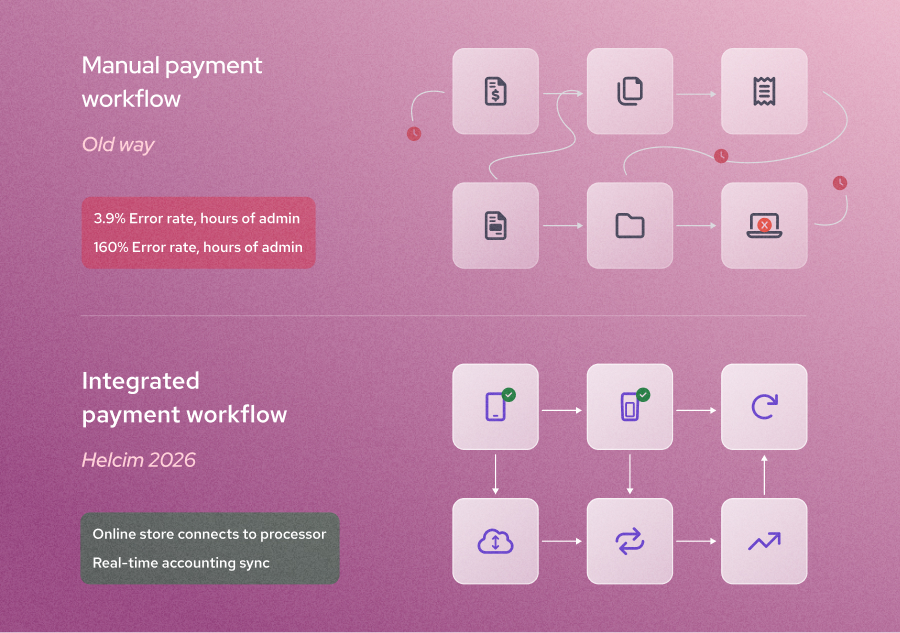
In the modern business landscape, speed is the only true currency. Yet, in a traditional setup, your software and your payment terminal act like "strangers." You manually type a total into a keypad, wait for a receipt, and then manually re-type that data into your accounting software.
This is the "Manual Entry Tax." It costs North American small businesses an average of 10 - 40 hours a month in administrative labor and carries a 3% risk of human error per transaction. Integrated payments solve this by building a digital bridge between your checkout and your back-office, turning every transaction into an automated, real-time sync.
Instead of bouncing customers to a third-party site or wrestling with paper receipts, the entire experience happens within one unified ecosystem.
What are integrated payments?
Integrated payments are a type of payment processing technology that connects your point-of-sale (POS) or business software platform directly with your payment processor. Instead of your software and your terminal living in separate worlds, they share a single brain. This connection lets your financial data flow automatically from the moment a customer taps their card straight into your records, without you having to lift a finger.
Think of it as the end of the "double-entry" headache. When your payments are integrated, your software (like your CRM or inventory tool) tells the payment terminal exactly how much to charge. Once the payment is approved, the software instantly updates your books, marks the invoice as paid, and adjusts your inventory.
For most business owners, this is the moment they stop being data entry clerks and start being CEOs again. It’s about moving away from "fixing the books" at 9:00 PM on a Sunday and moving toward a business that essentially balances itself.
What are the benefits of integrated payments
Integrating your payments doesn't just save time; it fundamentally reduce human error, improve cash flow, secure your payment data, and ultimately changes your bottom line by reclaiming lost revenue.
1. Eliminate the "Human error" tax
Manual data entry is prone to mistakes—transposing a number or missing a decimal can lead to hours of messy reconciliation at the end of the month. Integrated payments ensure the amount on your invoice matches the amount on the terminal every single time.
- The Stat: Manual data entry carries an average 3.9% risk of error per transaction, which can cost businesses thousands in uncollected or mismanaged revenue annually.
- The Example: A busy restaurant owner no longer has to worry about a server accidentally typing $10.00 into the terminal for a $100.00 bill; the terminal automatically pulls the correct $100.00 total from the POS system (learn what is POS system here).
2. Faster cash flow and instant reconciliation
With a non-integrated payment setup, you often have to wait until the end of the day to manually "close the books." Integrated payment systems update your ledger in real-time, meaning you always know exactly how much cash you have on hand.
- The Stat: Businesses using integrated payments report an average of ‘25 hours a week on manual data entry overspending $3,000 a month on unused software’.
- The Example: A retail store manager can see their "Real-Time Sales" dashboard update the second a customer taps their card, allowing them to make inventory decisions on the fly rather than waiting for a Monday morning report.
3. Enhanced security and trust
Integrated payment systems use "tokenization," which means sensitive card data never actually touches your business software. This reduces your liability and keeps your customers’ information safer than standalone terminals might.
- The Stat: Security is now a primary driver of conversion. According to the Baymard Institute, nearly 20% of consumers will abandon a checkout specifically because they "didn't trust the site with their credit card information."
- The Example: Because the payment is encrypted and tokenized at the point of sale, a boutique owner can rest easy knowing that even if their store's Wi-Fi was compromised, hackers couldn't steal credit card numbers from their transaction history. The data simply isn't there to be stolen.
What are the disadvantages of integrated payments
While the benefits are significant, there are a few trade-offs that business owners should consider before making the switch such as technical difficulty, higher required upfront effort and operarion flexibility.
1. Technical dependence
When your payments and your software "share a brain," you are more dependent on your internet connection and the uptime of your merchant service provider. While integration streamlines your day-to-day operations, it also means that if one part of the system experiences a hiccup, it can affect your ability to process transactions smoothly.
-
The Stat: Customer patience is at an all-time low in the digital age. Research shows that 88% of consumers say they would abandon a purchase if they encounter friction when paying, highlighting how critical smooth payment experiences have become to keeping customers and completing sales.
-
The Reality: If your business software goes down for maintenance or your internet connection drops, you might be temporarily unable to trigger payments directly from your system. That’s why many businesses keep a "stand-alone" backup payment terminal or a mobile processing option ready to keep things moving while systems sync back up.
-
The Example: Imagine a busy retail boutique during a holiday sale. If their primary POS software loses its connection, the staff must quickly pivot to a backup terminal to swipe cards manually. While this keeps the line moving, it temporarily loses the integrated benefits—like real-time inventory updates—until the connection is restored.
2. Higher upfront effort
Unlike a standalone payment terminal you can plug in and start using right away, integrated payment systems usually require more upfront setup. Connecting your software to a payment processor often involves extra configuration work, like mapping data fields and setting up API connections.
-
The Stat: Moving away from older software is the biggest hurdle for most businesses. According to research on legacy system replacement, 74% of organizations consider legacy systems a barrier to digital transformation. This shows how common it is for businesses to encounter friction when trying to connect outdated software to modern tools.
-
The Reality: Legacy integrations are rarely "plug-and-play" because older platforms weren't built with today’s APIs in mind. This means the initial setup requires a bit of "heavy lifting" to ensure your systems communicate properly and data isn't lost during the transition.
-
The Example: A growing gym might spend a few afternoons connecting their member management software to a payment API. While it takes some effort to ensure monthly dues are billed correctly, it prevents a massive manual data-entry headache down the road.
3. Platform specificity
Some integrated payment providers operate inside closed ecosystems, which can make it harder to switch to a different processor later without changing your broader business software.
- The Stat: Vendor lock-in is a major hurdle for growing businesses. In fact, a Boston Consulting Group study found that 62% of IT buyers are concerned about vendor lock-in with digital platforms, showing how common it is for organizations to worry about being tied too closely to a single provider’s ecosystem.
- The Reality: Once payments are tightly connected to your POS, reporting tools, and customer database, switching providers becomes a much bigger task than just swapping a terminal. It often involves exporting data, reconfiguring workflows, and retraining staff—all of which add hidden administrative costs.
- The Example: A coffee shop using a bundled POS-and-payment system might find it difficult to switch to a cheaper processor because its loyalty program and inventory tools are "locked" into the original provider’s software. Even if a new option offers better rates, the friction of migrating can make switching feel like more trouble than it’s worth.
How do integrated payments work?
You don’t need a computer science degree to understand integrated payments, but knowing the "plumbing" helps you choose the right partner. Modern integration typically follows one of three technical paths depending on your business setup:
- API Cloud-to-Cloud: Ideal for e-commerce (like WooCommerce payment integration), where your online store talks directly to the processor's cloud.
- The SDK Path: For custom apps (like a restaurant's proprietary ordering app) where developers build payment screens directly into the interface.
- Browser-Based: A "universal translator" that reads your screen and pushes data to your terminal without needing a single line of code.
1. How do API-based integrated payments work?
- What it is: An Application Programming Interface (API) is the digital "messenger" that allows your software to send commands—like "Charge this customer $50"—directly to your payment processor’s cloud.
- The Benefits: API payment integrations offer the highest level of customization, allowing you to build a checkout experience that lives entirely within your own website or app without redirecting customers elsewhere.
- Who often uses it: Tech-savvy merchants and e-commerce businesses that want a fully branded, "white-label" checkout experience.
Steps to Implement:
- Generate API Keys: Access your processor's dashboard to create secure credentials.
- Develop the Connection: A developer writes code to send transaction data from your software to the processor’s endpoint.
- Map Data Fields: Align your software's fields (e.g., Customer Name, Order ID) with the processor's requirements for accurate reporting.
- Test in a Sandbox: Run mock transactions to ensure the "messenger" is delivering the right commands before going live.
2. How do SDK integrated payments work?
- What it is: A Software Development Kit (SDK) is a pre-packaged "toolbox" that includes the code and libraries needed to build payment screens directly into a specific platform, like a mobile app.
- The Benefits: SDKs save time by providing pre-built, secure components (like credit card entry fields) that are already optimized for mobile devices and security standards.
- Who often uses it: App developers and proprietary software companies (like a custom gym management app) that need a native, in-app payment experience.
Steps to Implement:
- Download the Kit: Select the SDK library specific to your platform (e.g., iOS, Android, or Python).
- Embed UI Components: Use the SDK’s pre-coded widgets to create secure payment forms.
- Configure Webhooks: Set up automated notifications so your app knows the instant a payment is successful.
- Validate Compliance: Utilize the SDK’s built-in encryption to simplify PCI-DSS security requirements.
3. How do browser-based integrated payments work?
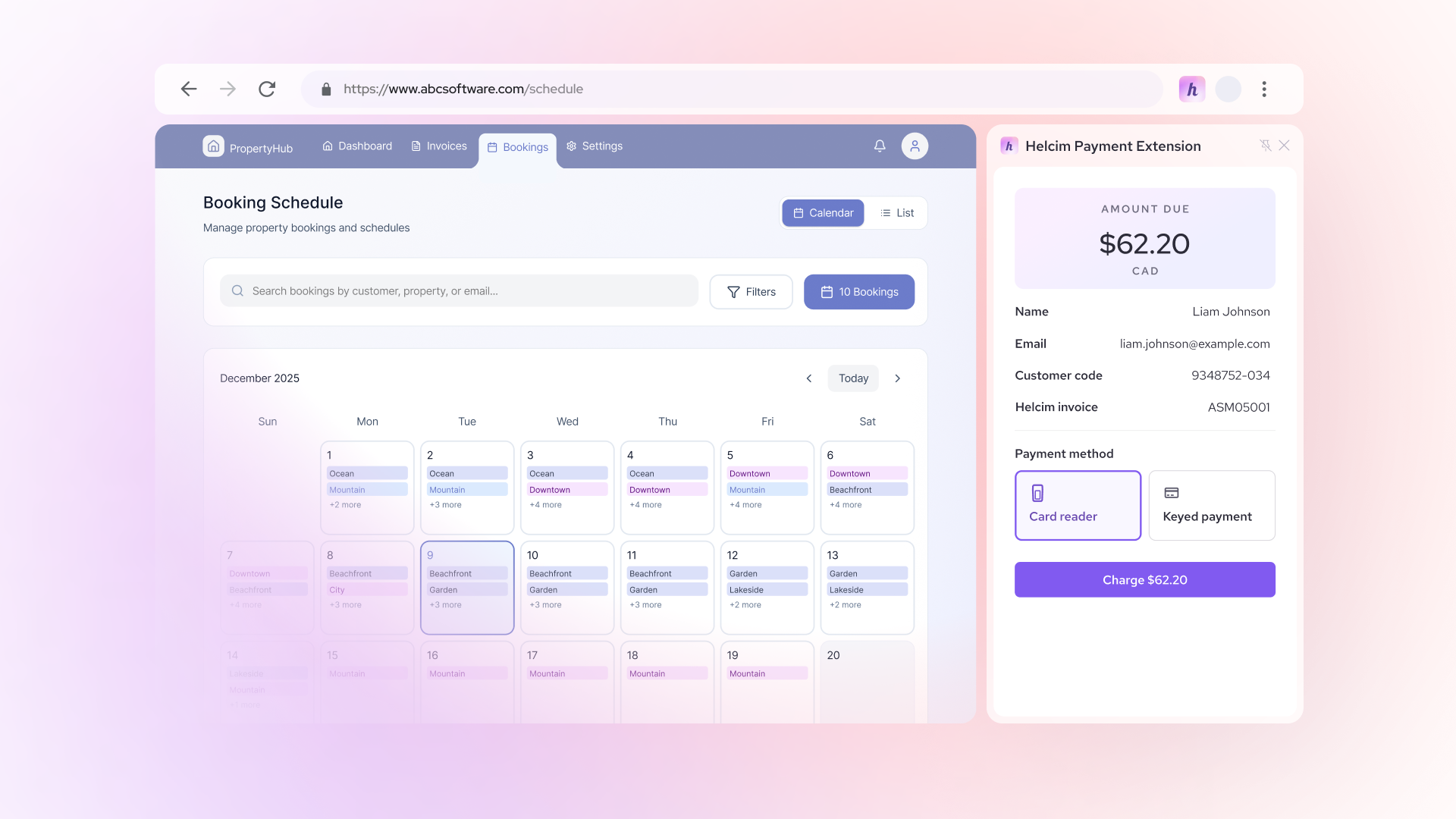
- What it is: Browser-based integration uses a "bridge" tool—like a browser extension—to read data from your web software and send it to your physical payment hardware.
- The Benefits: This is the ultimate "No-Code" savior, allowing you to integrate payments into web software that wasn't originally built for it without hiring a developer.
- Who often uses it: Small-to-medium businesses that use web-based CRMs or accounting tools and want the speed of integration without the custom coding costs.
Steps to Implement (Example: Helcim Payment Extension):
- Install the Extension: Add the Helcim Payment Extension to your Chrome browser.
- Link Your Hardware: Connect your card reader to your computer via Bluetooth or USB.
- Define Your Fields: Open the extension on your software’s checkout page and "teach" it where to find the Total Amount on the screen.
- Trigger the Charge: Click the extension icon to pull the amount from your screen and automatically push it to the card reader for the customer to tap or dip.
What is the difference between non-integrated and integrated payments?
| Feature | Non-Integrated (Standalone) | Integrated Payments (2026 Standard) |
|---|---|---|
| Workflow |
|
|
| Data Accuracy |
|
|
| Reconciliation |
|
|
| User Experience |
|
|
Why don’t some software platforms allow integrated payments?
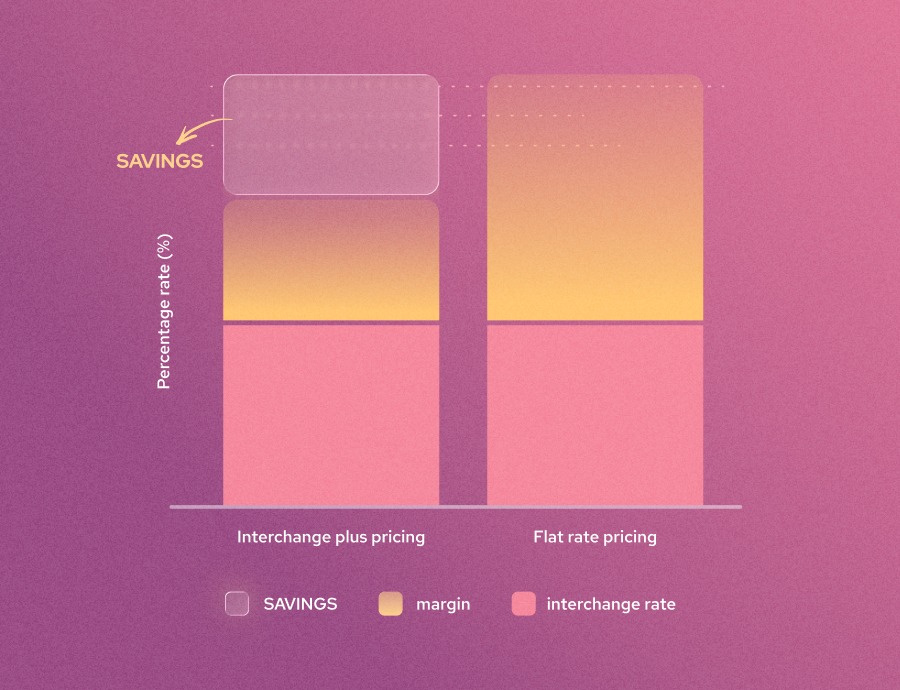
Many business owners feel trapped. You love your industry-specific software (like Jane App for clinics or Jobber for home services), but you’re often forced to use their "built-in" payment processor at a high flat payment processing rates. This is often called a Walled Garden. In this setup, the software provider takes a "Revenue Share" (a cut of your sales) as a kickback from the processor, which is why they make it so difficult for you to leave.
- The Solution: Helcim offers browser-based integrated payments that let software users escape from expensive payment processing fees charged by these closed platforms. Instead of being locked into a walled garden, you can use a "bridge" like the Helcim Payment Extension. This tool reads the checkout amount directly from your browser and sends it to your Helcim card reader, bypassing the software's expensive proprietary processor entirely while still keeping your data organized.
- Pro-Tip: Check out the Helcim Integration Marketplace to see if your favorite software is already supported. If it isn't, the Payment Extension is your "universal key" to transparent pricing without having to switch your business software.
What are the costs of integrated payments?
The cost of integrated payments typically falls into three buckets: the transactional fees for each swipe, the fixed monthly costs for software access, and the technical resources needed for setup. While many providers charge a premium for integration, a transparent pricing model can actually lower your total cost of ownership by eliminating manual labor and errors.
1. The processing fees for integrated payments
Payment processing fees are the "rent" you pay to use the global credit card networks (Visa, Mastercard, etc.). These fees cover the security, technology, and risk management required to move money from a customer's bank to yours in seconds. Most integrated providers charge between 2.4% + $0.30 and 3.5% + $0.15 per transaction.
| Provider | Pricing Model | Typical Rate (Online/Integrated) |
|---|---|---|
| Helcim | Interchange Plus |
|
| Stripe | Flat Rate |
|
| Square | Flat Rate |
|
| Clover | Tiered/Flat |
|
Why Helcim is the Most Cost-Effective: Unlike "Flat Rate" providers that charge everyone the same high markup, Helcim uses Interchange Plus pricing. This means when a customer uses a low-cost debit card, we pass those savings directly to you instead of pocketing the difference. As your business grows, our Volume-Based Discounts automatically lower your margin, making us one of the few processors that actually gets cheaper as you get bigger.
2. The subscription fees for integrated payments
Many "Walled Garden" software platforms and legacy processors charge a monthly "Integration Fee" or a "SaaS Subscription" just for the privilege of connecting your payments to your software.
- The Industry Standard: Providers like Toast or Shopify often charge anywhere from $30 to $200+ per month for their software tiers that allow integrated payments.
- The Helcim Difference: At Helcim, we don't believe in charging you to access your own data. We have zero monthly subscription fees and no "integration access" charges. You only pay when you process a transaction.
3. The implementation costs of integrated payments
"Implementation costs" refers to the time and money you spend actually getting the system up and running.
- The Big Business Path (API): For large enterprises, this might involve hiring a developer to write custom code using an API to create a bespoke checkout experience.
- The Small Business Path (No-Code): For smaller shops, the resource cost is often the frustration of trying to follow complex manuals.
- The Helcim Solution: Helcim is built for both ends of the spectrum. We provide robust API documentation for developers who want a custom build, but we also offer the Helcim Payment Extension—a no-code tool that allows a small business owner to set up integrated payments in minutes without spending a dime on a programmer.
4. The hidden fees of integrated payments
This is where the "too good to be true" quotes usually fall apart. Many processors hide their profit in the fine print of your contract. Common hidden fees include:
- PCI Compliance Fees: Charging you $20–$100 a year just to "verify" your security.
- Cancellation Fees: "Early Termination" penalties that can cost thousands.
- Minimum Volume Fees: Charging you a penalty if you don't process a certain amount each month.
- Administrative/Statement Fees: A $10–$25 monthly fee just for the "privilege" of receiving a bill.
Pro-Tip: Helcim has eliminated all of these. No PCI fees, no contracts, and no hidden fees—just straightforward processing.
What are the example use cases for integrated payments?
Retail & Restaurants
- The Problem: Manual entry leads to long checkout lines, and server errors often result in "incorrect change" disputes or mismatched end-of-day reports.
- The Solution: Integrated payments sync your POS directly to the customer’s bill on a handheld or countertop terminal.
- The Expected Outcome: You’ll experience faster checkout speeds, automated "table turns" for higher volume, and a perfect 1-to-1 match between your daily sales and your bank deposits.
B2B & Wholesale
- The Problem: Processing high-value corporate or government cards without extra data often triggers "Standard" interchange rates, which are significantly more expensive.
- The Solution: An integrated system automatically attaches Level 2 & 3 data (like invoice numbers and tax amounts) to every transaction.
- The Expected Outcome: By meeting these data requirements, you can lower your processing rates on corporate cards by up to 1%, directly increasing your net profit on large-scale orders.
Professional Services (Lawyers & Accountants)
- The Problem: Tracking down clients for credit card numbers over the phone is time-consuming, and waiting for physical checks to clear creates a "cash flow gap."
- The Solution: Integrated "Click-to-Pay" links are embedded directly into your digital invoices, allowing clients to pay the moment they review the bill.
- The Expected Outcome: Firms typically see a 40% reduction in Late Payment Days, ensuring that revenue is in your account days—or even weeks—sooner than traditional billing methods.
Field Services (HVAC, Plumbing, & Landscaping)
- The Problem: Techs often have to call the home office to process a payment, or worse, wait until the end of the week to manually input paper invoices into the system.
- The Solution: Integrated mobile apps allow techs to take payments on-site that instantly sync with the main office’s inventory and accounting software.
- The Expected Outcome: You’ll close out jobs in real-time, eliminate manual data entry errors, and ensure that your inventory levels are always accurate across the entire fleet.
How to choose an integrated payment processor
Choosing an integrated payment processor is not just about rates. Before you commit, you need to look at a few key criteria, like fee optimization for B2B transactions, direct software sync, no-code setup options, and hardware flexibility, to make sure your integration works for you, not against you.
Level 2 & 3 Support
- What it is: Essential for B2B; level 2 & level 3 processing provides extra data to lower fees on corporate cards. This is automatically applied with Helcim.
- Why it matters: Providing this extra data qualifies you for significantly lower interchange rates on corporate, commercial, and government cards. Without this support, you are essentially overpaying on every B2B transaction. This is automatically applied with Helcim, ensuring you always get the best possible rate.
Direct Sync
- What it is: Native connections to the tools you already use, such as QuickBooks or Xero, WooCommerce.
- Why it matters: "Direct" is the keyword here. If a provider requires a third-party "connector" app to talk to your accounting software, you’re adding another potential point of failure and often another monthly subscription fee. Native sync ensures your books are updated in real-time, reducing human error and saving hours of manual reconciliation.
The "No-Code" Factor
- What it is: Look for browser-based integrated payments (like Helcim’s Payment Extension) that bridge your software and hardware without custom coding.
- Why it matters: Most small businesses don't have a developer on speed dial. A no-code solution allows you to get the benefits of an integrated system—like pulling an amount directly from your CRM to your card reader—without the high cost and long timelines of a custom API build. It’s the fastest path to "plug-and-play" integration.
Hardware Flexibility
- What it is: Support for modern Smart Terminals and "Tap to Pay" on mobile devices.
- Why it matters: Your software is only as good as the hardware that supports it. If your provider locks you into clunky, outdated terminals, you lose the ability to accept modern payment methods or take payments on the go. Flexibility ensures you can scale from a countertop terminal to mobile "Tap to Pay" without needing to rebuild your entire software integration.
Why do businesses use Helcim for integrated payments?
Across the U.S. and Canada, the "simplicity" of flat-rate pricing (like 2.9%) is becoming an expensive anchor. As labor and operational costs rise, moving to an Interchange Plus model is no longer just a "pro tip"—it’s a survival strategy.
- The U.S. Edge: New data-quality initiatives mean integrated systems can now "auto-qualify" your transactions for lower wholesale rates that flat-rate providers often pocket.
- The Canadian Edge: With Interac Debit and Real-Time Rails, integrated systems allow you to bypass expensive credit card loops for lower-cost domestic payments.
- The Surcharge Secret: Modern platforms (like Helcim) can automatically apply surcharges where legal, potentially bringing your credit card processing costs down to 0%. The Bottom Line: If you process over $25,000/month, the "convenience" of a flat rate is likely costing you 18–25% more than a Helcim integrated Interchange Plus model.
Frequently Asked Questions
What are the three types of payment systems?
Modern businesses typically use Point-of-Sale (POS) for in-person sales, Online Gateways for e-commerce, and Integrated Systems to unify both into one dashboard.
What is an example of an integrated payment system?
A retail store using a POS that automatically updates their QuickBooks accounting whenever a sale is made in-person or online.
Are integrated payments more expensive?
While some charge an "integration fee," the labor savings and move to Interchange Plus pricing usually result in a significant net profit over time.
What are the main challenges of implementing integrated payments?
The biggest hurdles are often technical debt (trying to connect to very old, non-compatible software) and initial setup time. As we noted earlier, mapping data fields and testing APIs can take several afternoons of "heavy lifting" to ensure that the systems talk to each other correctly without causing service disruptions.
What’s the difference between integrated payments and a payment gateway?
Think of a payment gateway as the "digital tunnel" that moves money from a customer's bank to yours. Integrated payments go a step further by connecting that tunnel directly into your business software (like your CRM or accounting tools). A gateway just processes the charge; an integrated system processes the charge and automatically updates your records.
What coding languages are used for integrated payments?
Most modern payment APIs and SDKs are built to be language-agnostic, but the most common ones developers use are JavaScript (Node.js) for web integrations, Python for its simplicity, and Ruby or PHP for many e-commerce platforms. For mobile-specific SDKs, Swift (iOS) and Kotlin (Android) are the standard.