
























Wave offers your business invoicing and bookkeeping tools in one place, and the entry cost is low. But many businesses start looking for an alternative when their payment processing volume grows because of the expensive payment processing fees, support problems or needs for better invoicing and accounting tools.
What are the top Wave invoicing alternatives?
The top Wave invoicing alternatives are Zoho Invoice, FreshBooks, QuickBooks Online, Xero, Zoho Books, Square Invoices, Stripe Invoicing, PayPal Invoicing, and Helcim Payment Extension for Wave. The best choice depends on what you want to improve: lower credit card processing costs, better invoicing workflows, or deeper accounting and reporting.
| Alternative | Best for | Monthly software cost | Online payment fees |
|---|---|---|---|
| Helcim Payment Extension for Wave | Wave users who want to keep Wave but lower payment costs | $0 | Average 2.27% + 25¢ |
| Zoho Invoice | Freelancers, micro-businesses, and service businesses that want better invoicing | $0 | Up to 2.90% + 30¢ card, 0.80% ACH capped at $5 |
| FreshBooks | Service businesses that bill by time, projects, or retainers | From USD $6.90 to $21 | 2.9% + 30¢ standard cards, 3.5% + 30¢ commercial/Amex, 1% ACH |
| QuickBooks Online | Businesses that want full accounting, reporting, and accountant-friendly software | From CAD $30 to $220 / USD $38 to $275 | U.S.: 2.99% online, 3.5% keyed-in, 1% ACH |
| Xero | Businesses that want deeper bookkeeping and multi-currency support | From $25 to $75 CAD / $25 to $90 USD | 2.9% + 30¢ online, 3.4% + 30¢ keyed-in |
| Zoho Books | Businesses that want full accounting with automation and custom reports | From $0 to $50 CAD / $0 to $70 USD | Depends on integrated processor |
| Helcim Invoicing | Businesses that want simple invoicing with lower payment fees | $0 | Average 2.27% + 25¢ |
1. Helcim Payment Extension for Wave
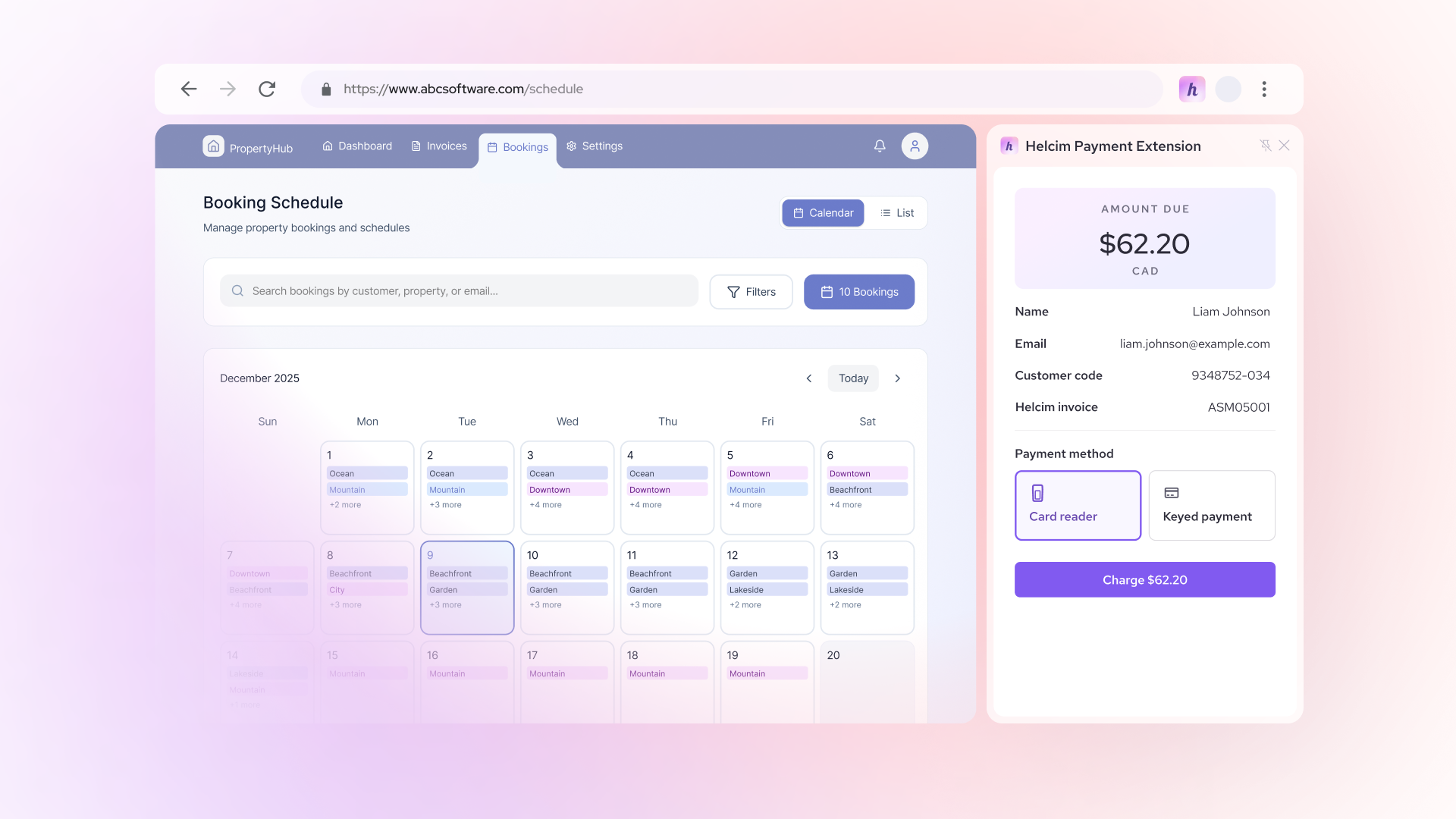
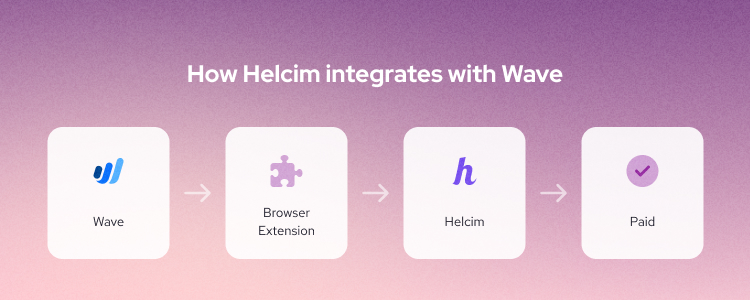
Helcim Payment Extension for Wave is the best option for businesses that like using Wave but hate Wave’s high fees. It is a Chrome-based extension that lets you create invoices in Wave and get paid using Helcim’s low payment processing fees through an interchange-plus pricing model.
It detects invoice details, sends the payment through Helcim, and syncs the paid status back to Wave, so you do not have to reconcile everything by hand. It also gives Wave users a way to accept in-person payments through Helcim hardware. Explore Helcim and Wave integration here.
Helcim Payment Extension is best for Wave users with high credit card volume, such as service businesses. Businesses can keep their workflow and operations unchanged while still reducing credit card processing costs.
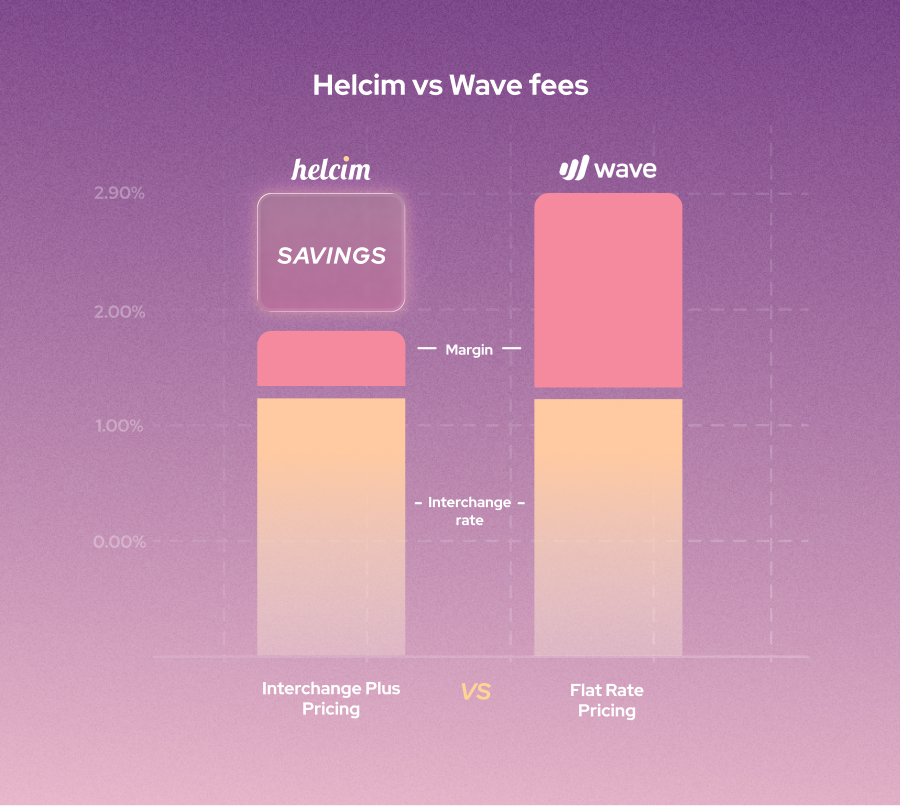
Helcim Payment Extension is free to use, with no monthly fees, contracts, or hidden fees. Helcim uses interchange-plus pricing for each card transaction: Interchange + 0.50% + 25 cents for online transactions. On average, businesses pay 2.27% + 25 cents for each online transaction. These rates are significantly lower than Wave’s flat fee of 2.9% + 60 cents.
You can create a Helcim merchant account for free and start saving on Wave’s credit card processing fees right away.
2. Zoho Invoice
Zoho Invoice is for businesses that mainly want better invoicing, not a full accounting suite. It is a good fit for freelancers, micro-businesses, and service businesses that want a client portal, recurring payments processing, and the freedom to use their own payment gateway.
With Zoho, you get free invoicing software, a client portal, recurring billing support, and gateway flexibility without being forced into a bundled payment stack. However, Zoho’s free plan has limits, such as annual invoice caps and user and project limits. You need to upgrade to Zoho Billing or Zoho Books once you outgrow the free tier.
Zoho Invoice also includes estimates, recurring invoices, automated payment reminders, time tracking, and a customer portal where clients can view invoices, quotes, payment history, and pay online. It also supports connected gateways like Stripe, PayPal, and others, which gives merchants more flexibility than tools that lock you into one processor.
Zoho pricing and payment fees: Zoho Invoice does not require a monthly subscription fee. Zoho Payments charges up to 2.90% + 30 cents for each card transaction and 0.80% per ACH transaction, capped at $5.00. Zoho’s ACH fees are lower than Wave’s ACH fees, which are 1% with a $1 minimum fee and no cap.
Helcim Payment Extension can integrate with Zoho to help you save even more on processing fees.
3. FreshBooks
FreshBooks includes customizable invoices, recurring billing, automatic reminders, estimates, expense tracking, and accounting reports on higher plans. You can also turn tracked time and projects into invoices and bill retainers automatically.
FreshBooks pricing and payment fees: FreshBooks monthly plans range from USD $6.90 to USD $21, or CAD $7.80 to CAD $21.60. FreshBooks Payments is powered by Stripe, with 2.9% + $0.30 for standard credit and debit cards, 3.5% + $0.30 for commercial and Amex cards, and ACH at 1%.
FreshBooks’ monthly plans are slightly cheaper than Wave’s plans. However, FreshBooks’ payment processing fees are roughly similar to Wave’s payment processing fees, which are 2.9% + $0.60 for Visa, Mastercard, and Discover, and 3.4% + $0.60 for Amex per transaction.
Overall, FreshBooks makes the most sense when invoicing is closely tied to time, projects, and ongoing client work.
4. QuickBooks Online
QuickBooks Online is for businesses that want a full accounting system, stronger reporting, and an accountant-friendly platform. It is less about getting cheaper payment processing fees and more about moving into a broader finance stack with reporting, payroll options, bank feeds, and an ecosystem most accountants already know well.
Aside from basic invoicing and accounting features, QuickBooks Online offers advanced features like cash flow planning, customer reputation management, revenue recognition, and auto-tracking for fixed assets. It also offers a broader integration ecosystem with more than 800 apps.
QuickBooks Online pricing and payment fees: QuickBooks Online’s plans are more expensive than Wave’s, ranging from CAD $30/month to CAD $220/month in Canada, and from USD $38/month to USD $275/month in the U.S. However, this higher pricing can be justified by the advanced accounting features that QuickBooks Online offers. In Canada, QuickBooks Online charges 2.9% + 25 cents for keyed-in transactions and 1% for bank transfer (EFT) transactions. In the U.S., it charges 2.99% for online transactions, 3.5% for keyed-in transactions, and 1% for bank transfer (ACH) transactions.
The main disadvantage of QuickBooks Online is its high cost. You pay subscription fees, then payment fees, and then extra add-ons on top.
If you need powerful software like QuickBooks Online but do not want to pay high payment processing fees, you can use Helcim Invoicing, which integrates and syncs with QuickBooks Online. You can also use Helcim Payment Extension to process payments right from QuickBooks Online using Helcim’s low fees. Explore Helcim and QuickBooks Online integration now.
5. Xero
Xero is a strong alternative for businesses that want deeper bookkeeping and more payment flexibility. It lets your business get paid and send quotes in more than 160 currencies. Like QuickBooks Online, Xero also has an app store that lets you connect third-party software and payment processors.
The main disadvantage of Xero is complexity. Some users on social media complain about email deliverability issues, invoice-sending restrictions, and slow support.
Xero pricing and payment fees: Xero’s monthly plans range from $25 to $75 per month in Canada and from $25 to $90 per month in the U.S. Xero’s payment processing fees are 2.7% + 5 cents for in-person payments, 2.9% + 30 cents for online payments, and 3.4% + 30 cents for keyed-in transactions. Xero’s payment processing fees are roughly similar to Wave’s payment processing fees.
If you want to move to Xero but feel hesitant about the higher payment processing fees, you can use Helcim Invoicing, which integrates and syncs with Xero. You can also use Helcim Payment Extension to process payments right from Xero using Helcim’s lower fees. Explore Helcim and Xero integration now.
6. Zoho Books
Zoho Books is a more ideal solution for businesses that want a full accounting suite, automation, approvals, custom reporting, and more bookkeeping functionality. Your business can record multi-currency transactions with the Professional plan or higher. This feature is especially useful for businesses that accept invoice payments across borders.
However, the main disadvantage of Zoho Books is that it does not offer as many advanced features as QuickBooks Online. Still, Zoho Books is a strong choice when you want more than invoicing and would rather grow into a flexible accounting suite than jump straight into QuickBooks.
Zoho Books pricing and payment fees: Zoho Books’ monthly plans range from $0 to $50 per month in Canada and from $0 to $70 per month in the U.S. The payment processing fees for Zoho Books depend on the processors you integrate with.
If you want to use Zoho Books for accounting and basic invoicing but do not want to pay high payment processing fees, you can use Helcim Payment Extension to process payments right from Zoho Books using Helcim’s lower fees. Explore Helcim and Zoho Books integration now.
7. Helcim Invoicing
Helcim Invoicing is an ideal solution for businesses that care more about lower payment processing costs than accounting features.
Helcim Invoicing lets you create on-time and recurring invoices with payment links, so customers can click and pay by card or ACH payments. It also supports a virtual terminal that lets you collect past due invoice payments on behalf of your customers. Helcim also offers Helcim Fee Saver that lets you pass the credit card processing fees to the clients. However, because Helcim doesn’t have accounting features, you need to integrate Helcim with accounting software like Xero or QuickBooks.
Helcim Invoicing pricing and fees: Helcim does not charge a monthly software fee for Helcim Invoicing. Helcim uses an interchange-plus model that charges Interchange + 0.50% + 25 cents for online transactions. On average, businesses pay 2.27% + 25 cents for each online transaction.
Why do businesses look for Wave invoicing alternatives?
Most businesses look for Wave invoicing alternatives because, even though Wave offers a free plan and an affordable paid plan, its payment processing fees can add up quickly and affect your business’s bottom line. For businesses that process high-ticket invoices and large credit card volumes, those fees become harder to ignore.
As a business grows, it also starts to need more than basic transaction recording and accounting features. For example, you may need stronger reporting, better workflows, payroll options, multi-currency support, or more integrations. That is why alternatives like QuickBooks Online, Xero, and Zoho Books start to look more attractive. They cost more, but they can reduce day-to-day friction for businesses that have outgrown a simpler setup.
What should you look for in a Wave alternative?
You should look at five things first: invoicing features, accounting features, payment processing costs, and migration effort. Before you switch, ask a simple question: Do you want a better invoicing tool, a deeper accounting system, or a cheaper way to get paid?
Invoicing features
First, you should check if the Wave alternative offers basic invoicing features like recurring invoices, estimates or quotes, payment reminders, and a client portal. These are the features that save you time, reduce back-and-forth with customers, and make it easier to get paid on schedule. If you bill by the hour or work on ongoing projects, look closely at time tracking and retainer billing too.
Accounting features
You also need to decide how advanced the accounting features of the alternative should be. If you only need to send invoices and track basic transactions, then Wave invoicing-first alternatives like Zoho Invoicing or Helcim Invoicing may be enough. But if you want strong or better accounting features, then Wave accounting-first alternatives like Zoho Books, QuickBooks Online and Xero are the go-to options.
This matters more as your business grows. At first, basic invoicing may feel like enough. But once you start closing the books, reviewing cash flow, or working with an accountant, you may realize you need more than a billing tool. If Wave already feels too limited, you should look for a platform with deeper accounting features from the start.
Payment processing costs
You should never judge a Wave alternative by the monthly plan alone. The real cost often comes from payment processing fees, so you need to compare credit card and ACH processing fees, and international and currency conversion fees.
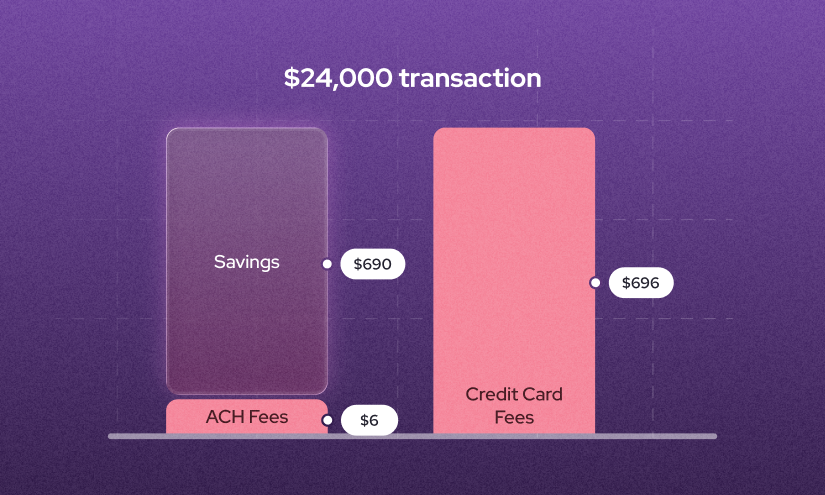
The payment processing fees can pile up quickly as you process more invoices or often process high-ticket invoices. Some platforms like Helcim Invoicing or Zoho Invoices cap the ACH payment processing fees at $6 and $5, respectively. This helps you save even more on payment processing fees.
Migration difficulty
Before you switch, ask yourself how hard the move will be. You need to know whether you can export your customers, invoices, products, and transaction history and import into the new software cleanly. You also need to think about how much work it will take to rebuild invoice templates, tax settings, and payment connections in the new system.
How hard is it to switch from Wave to another invoicing platform?
Every business has a different setup and process, so the migration may look different for each company. But at a high level, the steps your business may go through are: choose your new setup, export your data, rebuild your settings, run both systems in parallel for a short period, and then complete the cutover.
- Choose your new platform and confirm your must-haves first: Before you export anything, you need to decide which parts of your workflow you want to keep and which parts you want to improve.
- Export your Wave data early: Export your customers, products or services, invoices, and transactions, then import them into the new Wave alternative before you start building anything. Make sure all data fields are mapped correctly and stored in the right place in the new system so that, when you start rebuilding the workflow, all the necessary data is ready.
- Rebuild your templates, taxes, and payment settings carefully: This is where many migrations get messy. You need to recreate key parts of your workflow, such as invoice templates, tax settings, and payment settings, so the new system matches how your business already works.
- Connect your payment processor and test the invoice flow: Do not assume payments will work exactly the way they did in Wave. Test what your customer sees, how the payment is posted, and whether the invoice status updates correctly. This is especially important if you are changing processors, adding ACH, or moving to a tool with a different payment flow.
- Run both systems in parallel for a short time: It may be risky to switch completely to the new system right away. To be safe, run both systems in parallel for a short period to make sure the workflow in the old and new systems is consistent. This also helps you spot setup errors and identify areas for improvement.
- Complete the final cutover only after everything checks out: Once the new setup is working, stop creating new invoices in Wave, do a final reconciliation, and archive your Wave exports.
What hidden fees and risks should you watch for?
Payment processing fees and monthly plan costs are not the only expenses you pay for with Wave and other accounting platforms. Other hidden costs and risks you should watch for include payout holds, credit card chargeback fees, ACH return fees, international processing fees, and free-plan limits that push you into a paid tier later.
- Payout holds and account reviews: This issue happens often in the payment processing industry. We have seen many businesses on social media say that Wave held their funds. In many cases, the bank is the one holding the merchant’s funds, not the platform itself. But when this happens, you need to make sure the platform has a human support team that can help you navigate the issue.
- Extra invoicing fees on top of payment fees: If you are shopping for an invoicing software alternative to Wave, make sure you pay attention to any extra fees the provider adds on top when an invoice is paid successfully.
- International and currency-conversion markups: If you collect invoice payments internationally, your business may need to pay extra processing fees for each transaction. These fees usually include international card fees and currency conversion fees.
- Dispute and chargeback fees: If your clients pay invoices with credit cards, they may be able to reverse the transaction. This is called a credit card chargeback. When a chargeback happens, you may need to pay around $15 to $30 per transaction. Chargebacks usually happen when customers feel the service did not meet their expectations or believe the transactions were fraudulent. Make sure you document all invoices and contracts so you can dispute the chargeback if you believe you are in the right. Helcim refunds the chargeback fee if you successfully win the dispute. Learn how to avoid card-not-present frauds here.
- ACH/EFT return fees: Similar to a chargeback, you may be charged a return fee, usually around $5, if a bank-transfer payment such as ACH or Canadian EFT is returned. This usually happens because the customer’s account does not have enough funds, the account information is incorrect, the account is closed, or the bank believes the transaction is unauthorized. Unfortunately, this fee is usually not refundable. Learn more about how to stop authorized push payment fraud.
- Free-plan limits that force an upgrade later: A tool may look cheap at first, then get more expensive as your business grows. For example, Wave’s recurring invoice automation is only available with Pro or online payments, Zoho Invoice has annual invoice limits, and QuickBooks, Zoho, and Xero all have plan tiers and add-ons that can raise your total cost faster than expected.
FAQ
Which Wave alternative has the lowest payment processing fees?
Helcim is the lowest-fee Wave alternative for many businesses. On average, Helcim charges 2.27% + 25¢ for each online transaction. If your business wants to keep using Wave but hates its high fees, Helcim Payment Extension for Wave lets you process Wave invoices with lower fees. If you want to move away from Wave completely, you can use Helcim Invoicing and integrate Helcim with accounting platforms like Xero or QuickBooks Online.
Can you keep Wave for invoicing and use another payment processor?
Yes. You can integrate Helcim with Wave using Helcim Payment Extension. It is a browser extension that lets you keep creating invoices in Wave while routing payments through Helcim and syncing the paid status back automatically. It is not a full replacement for Wave, but it is a practical way to keep the workflow you already know while lowering processing costs.
How long does it take to switch from Wave to another invoicing platform?
Before switching from Wave, you should have a migration plan in place. This plan should let you export your data from Wave, import it into the new platform, and then set up and test the workflow to make sure your business is ready before fully moving over. The timeline depends on how complex your setup is, but switching usually takes more than just a day or two if you want to do it properly.