


Just like you get an invoice for a vet visit, a furnace repair, or your Amazon order, you also get one for your payment processing, your merchant statement.
The problem? These statements are harder to read than most invoices. They’re packed with fees, codes, and numbers that don’t always make sense at first glance.
Whether you’re concerned or just curious, every business owner can benefit from knowing how to read a merchant statement. Once you understand it, you’ll be able to:
- Spot where your money is really going
- Catch fees you shouldn’t be paying
- Hold your processor accountable
Plus, we can show you a few key terms, what to look for, and where to catch hidden fees, so you don't get swindled on your bill!
What is a merchant statement?
A merchant processing statement is a monthly report that your payment processor sends you. It lists every credit and debit card sale you accepted, then shows the portion that they take as fees before sending the rest to your bank. In other words, it’s like the bank statement for your card payments, money in, money out, and what you actually kept.
Depending on the provider, you might hear different names for this same document: merchant statement, merchant processing statement, credit card processing statement, merchant account statement, or simply processing statement.
Why do merchant statements matter?
I understand that it’s boring to look at all the abbreviations, tables, and numbers. That’s why many business owners spend only a few seconds glancing at their statements, just to check the summary of sales, fees, and leftover funds.
But that’s a mistake, because your merchant statement is more than just a receipt. It’s a financial control tool that helps you:
- See your true cost of card payments: Your merchant statement shows the real processing rates (effective processing rate) you pay, not just the advertised rate. We will show you how to calculate this real rate below. If you're interested, explore the cheapest credit card processing fees here.
- Catch errors and hidden credit card charges: Do you see fees you don’t recognize, such as “service fee” or “admin fee”? By reading your statement closely, you can spot these vague charges, question your processor, and stop overpaying.
- Spot fraud or unusual activity: If there’s a credit card chargeback, refund, or suspicious transaction, it will appear on your statement. A sudden spike in refunds or chargebacks can be an early warning sign of ongoing fraud that’s eating into your sales.
- Understand customer payment behavior: Reviewing your statement shows which card types your customers use most like Visa, Mastercard, Amex, debit, and others. If you notice more customers paying with expensive credit cards like American Express, you’ll also see your processing costs rise month over month.
- Hold your processor accountable: Your payment processor can promise one thing, but are they delivering? Your merchant statement reveals your true effective payment processing cost, including hidden costs like PCI fees, chargeback fees, and admin charges. If you spot a new fee or an overall increase you never agreed to, you have grounds to challenge it.
In short, reading your merchant statement is not optional bookkeeping — it’s a way to protect your bottom line.
Common merchant processing statement terms
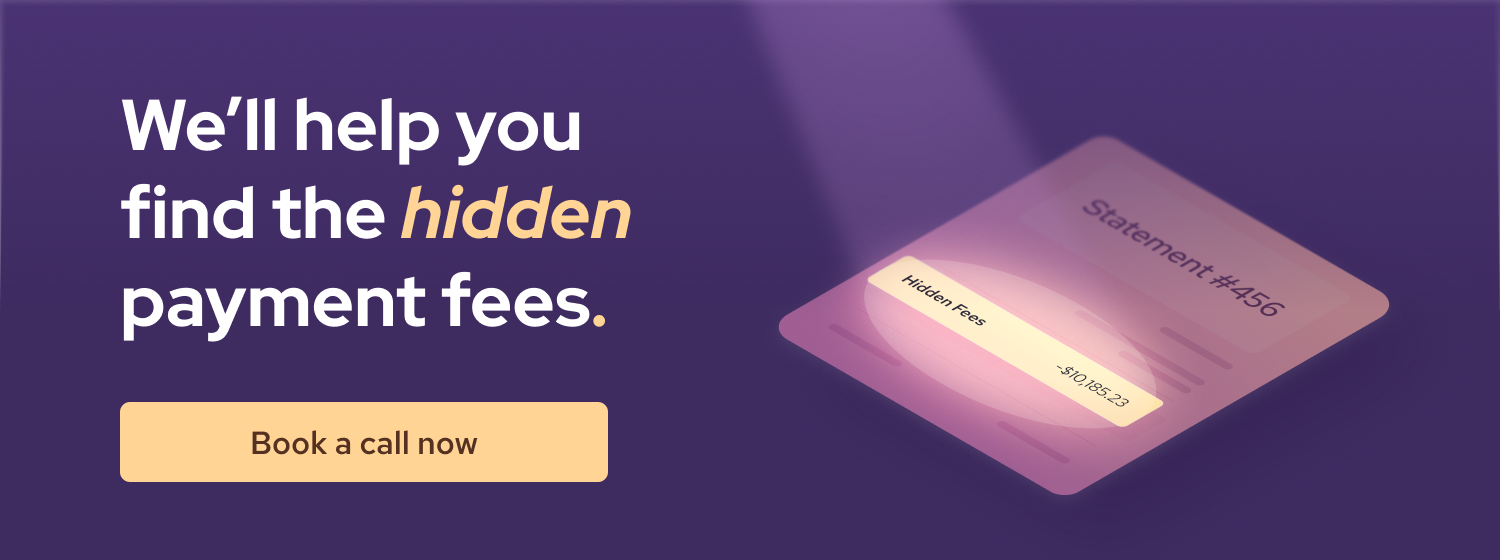
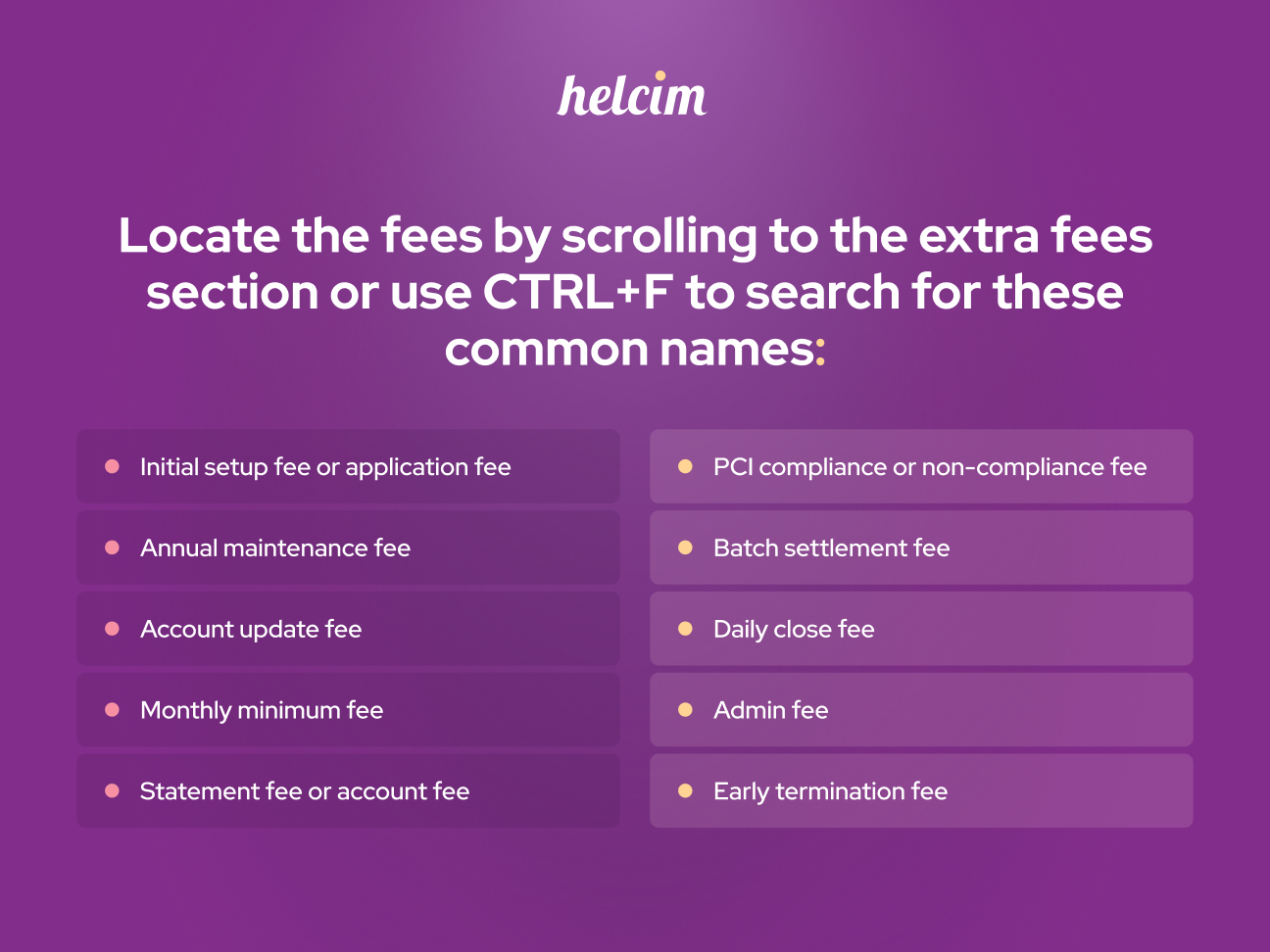
If you want to locate any hidden fees, simply use the combination of CTRL + F (windows) or COMMAND + F (Mac), then search for common terms like: maintainance fee, administration fee, minimum fee, termination fee, etc.
Common merchant processing statement abbreviations
What does your merchant statement include?
Every merchant statement looks slightly different depending on the provider, but they should include the 5 main sections:
1. Account information and statement period
At the very top, you’ll see your business name, address, merchant number (merchant ID), and the statement period (for example, July 1–July 31). This information tells you which billing cycle the statement covers. If you have any questions, you can call customer support and provide your merchant number when asked so they can quickly pull up your account.
2. Merchant account summary (the snapshot page)
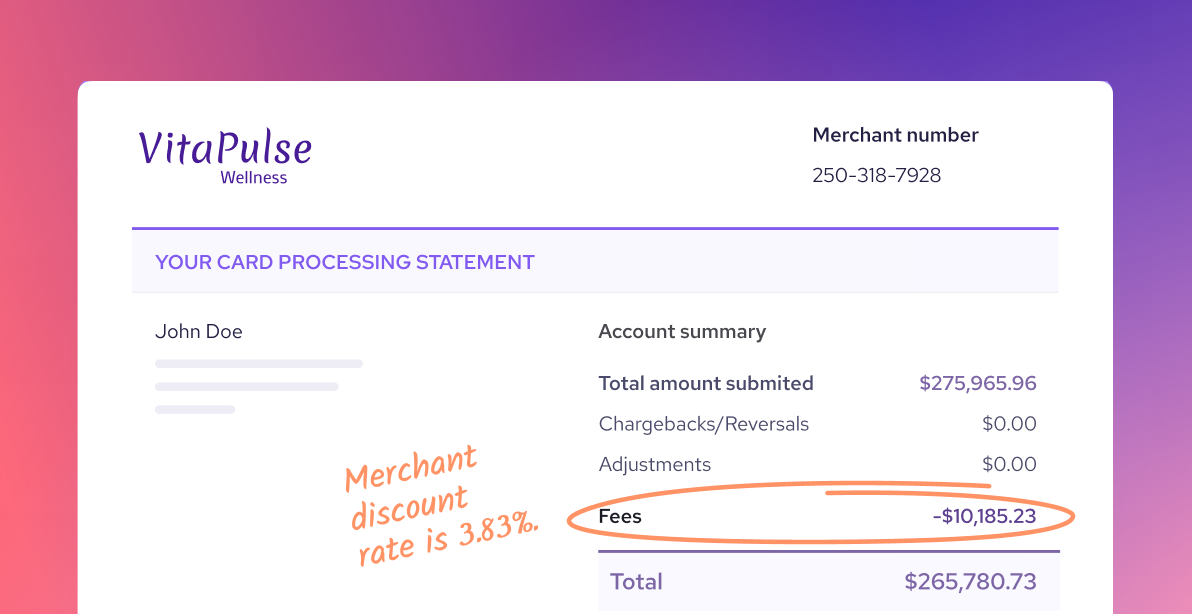
This is a quick overview of your monthly performance. It includes:
- Gross sales: The total value of all card transactions before refunds or fees.
- Refunds/returns: The total dollar value refunded to customers.
- Chargebacks/adjustments: The amount lost to disputes and other corrections.
- Total fees charged: All payment processing costs.
- Net deposits: The actual amount that you should receive in your bank account.
For example:
- Gross sales = $50,000
- Refunds = $1,000
- Chargebacks = $500
- Fees = $1,400
- Net deposit = $47,100
3. Daily activity or batch summary
This is the most detailed and often the most confusing part of the statement. It lists every payment processing batch that is closed each day. But what is a batch? Instead of processing and depositing funds into your account for every single transaction, payment processors group multiple transactions into a batch. They then process them all at once at the end of your business day.
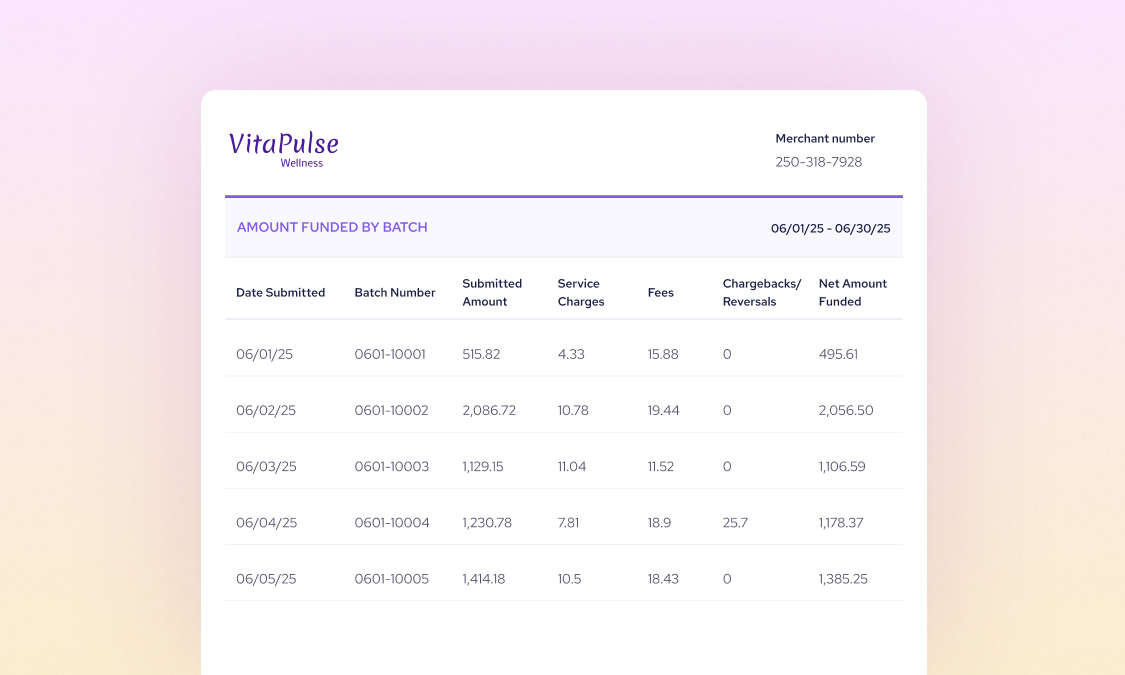
In each line item, you should see:
- The date or batch number
- The total sales amount you processed
- Payment processing fees and other adjustments such as chargebacks or refunds/returns
- Any additional service charges such as admin fees or service fees
- The net amount deposited into your bank account
This section helps with reconciliation. You can match each day’s deposit in your bank statement to a specific batch on your merchant statement. If something is missing, you’ll know right away.
4. Card brand summary
Below the daily breakdown, you’ll find a section that shows the batches submitted by each card brand, such as Visa, Mastercard, Amex, or Discover. This summary helps you see which cards your customers used most on different days.
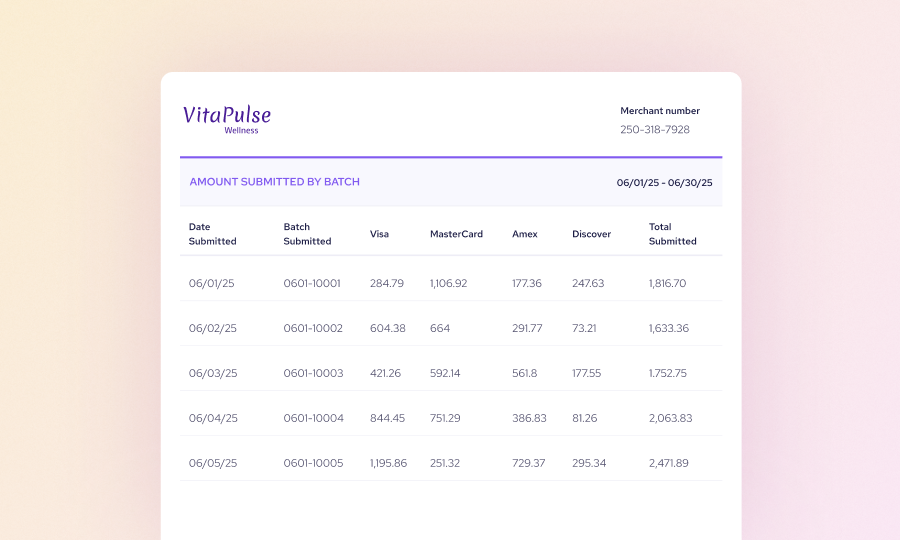
The card brand summary typically lists:
- The date of the submitted batch
- The batch numbers
- The total net dollar amount after processing fees for each card brand
5. Fee breakdown each payment processing batch
This is the most detailed, and often the most confusing, part of the statement. It breaks down the total fees you pay by card brand.
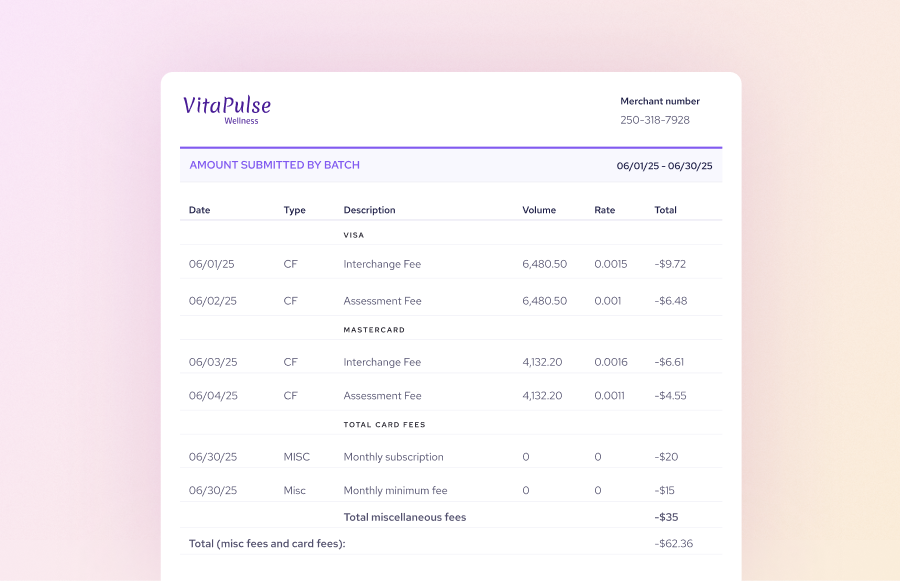
Each type of fee is grouped under the card brand it relates to, such as:
- Interchange fees: Paid to the customer’s bank
- Assessment fees: Paid to the card network
- Processor markup: Collected by your payment processor
- Other per-transaction fees: Such as authorization fees, batch fees, or AVS checks
- Monthly or annual charges: Such as statement fees, PCI compliance, or equipment rental, collected by your processor
Why does this section matter? It gives you a detailed view of exactly what you’re paying. You can use the totals here to calculate your effective payment processing rate and see the true cost of accepting card payments. The formula is simple: Total fees ÷ Total sales = Effective rate
For example, last month, you processed $8,105 in sales, and the fee breakdown showed you paid $358 in fees. That means your effective processing rate was: $358 ÷ $8,105 = 4.42%. For your information, the cheapest payment processing rate is usually in the 2% to 2.5% range. So, if you are paying more than these rates, you’re overpaying.
6. Notices and messages
The final section is the notice or message from the payment processor. This section is usually found on either the first or last page of the merchant statement. Here, you’ll see upcoming changes to your merchant account, fees, or other important policy updates. Don’t skip these messages because they may have a significant impact on your revenue in the long term.
How to use the merchant statement to know your true payment processing rates
Using the merchant statement, you can calculate your true payment processing rate (a.k.a effective payment processing rate). It tells you the true cost of accepting card payments, regardless of what your processor “advertised” when you signed up. Aside from the payment processing fees, the effective payment processing rate takes into account other fees like PCI fees, batch fees, administrative fees, etc.
Effective payment processing rate (%) = (Total fees ÷ Total sales volume) x 100
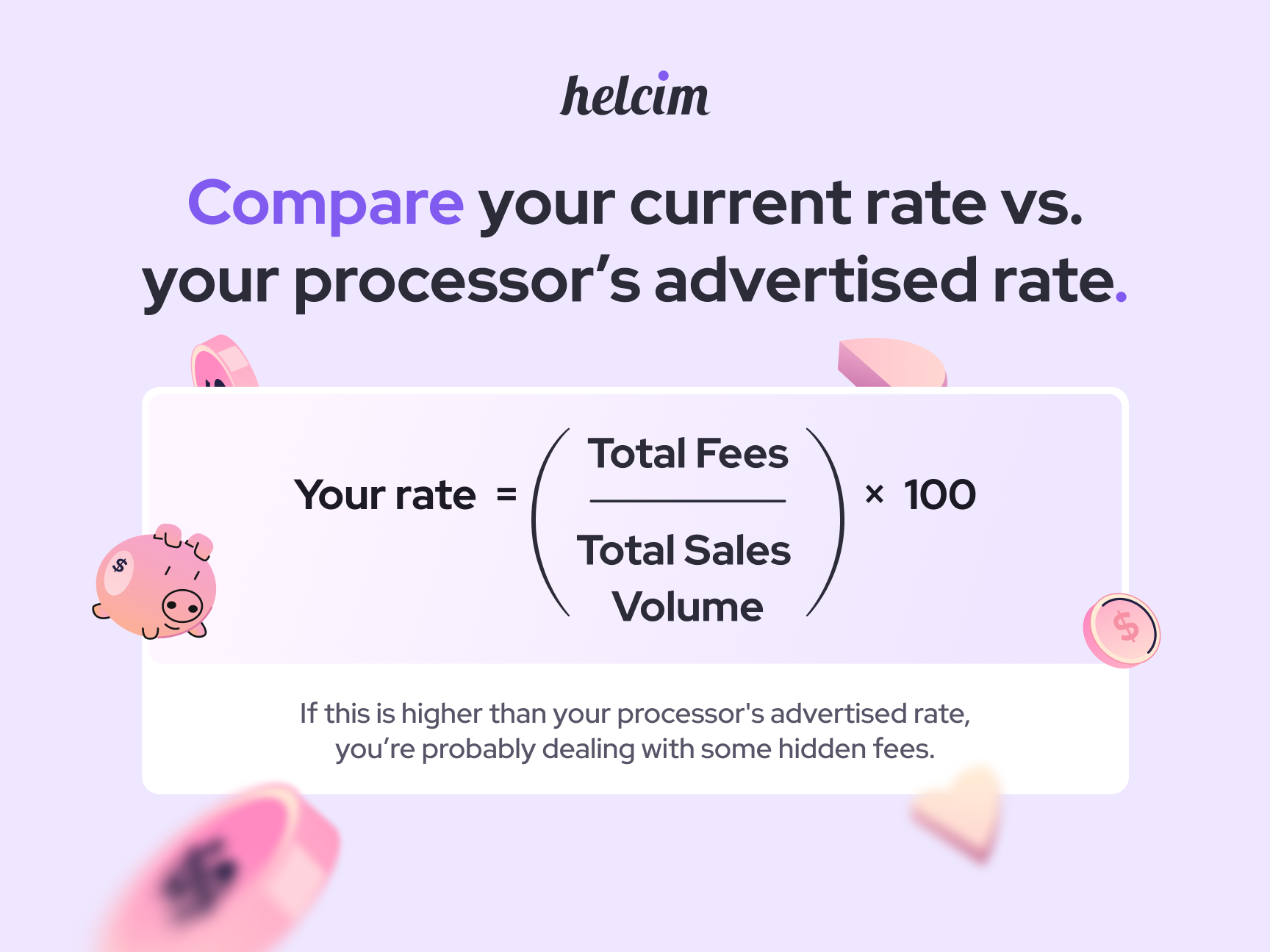
Example on how to calculate your effective payment processing rate: Let’s say your business processed $20,000 in sales across 400 transactions in a month. Here’s how fees could look:
- Interchange = $360
- Assessments = $28
- Processor markup = $120
- Batch fees = $6
- Monthly subscription fee = $30
- Service fee = $10
- Admin fee = $8
Total fees = $360 + $28 + $120 +$6 + $30 +$10 +$8 = $562
Your effective rate = $562 ÷ $20,000 = 2.81%. So if payment processors advertise that they charge you 2.50%, then you are actually paying more than you promised when you take into account other hidden fees like batch fees, service fees or admin fees.

How to identify chargebacks and refunds in a merchant statement
Refunds and chargebacks are two different events that both reduce your revenue.
A refund (sometimes called a return) is when you voluntarily send money back to a customer. Refunds may also be labeled as RTN or RFD. In your merchant statement, refund amounts typically appear as negative amounts in the sales or batch summary.
A chargeback is different. It’s when the customer’s bank forcibly reverses a transaction because the cardholder disputes it. In your statement, chargebacks are labeled as CHBK or C/B. They appear as negative amounts with a reference code or masked card number. You’ll also see a chargeback fee ($15–$40) as a separate line in the fee breakdown.
For Helcim merchant, if they dispute the chargeback successfully, Helcim will refund a chargeback fee.
Common mistakes when reading merchant processing statements
Merchant processing statements can be overwhelming. So, it’s understandable that many business owners only skim them quickly or avoid looking at it. But without reading it, you face the risks of paying more than you’re promised.
Here are the most common mistakes business owners make when reading merchant statements, and how to avoid them.
1. Confusing “discount rate” with a real discount: The term merchant discount rate often tricks business owners into thinking they are getting cheap payment processing fees. In reality, it’s just another term for payment processing fees.
2. Trusting the summary without checking the details: Many processors bill some fees later (like interchange adjustments, monthly service fees, or assessments). That means part of August’s fees might actually show up on September’s statement.
3. Ignoring vague fees: Many processors bury hidden or vague credit card fees deeper in the statement or push them into the following month’s billing cycle. These can be labeled as “service fee,” or “administrative fee,”. So, make sure to question your payment processors when you see these vague fees shown in your merchant statement.
4. Not comparing month-to-month: Make sure to compare your payment processing fees this month to last month to spot overall trends. If your sales haven’t increased much but your processing fees have, it’s time to ask why. Is it because more of your customers are using rewards cards? Or did your payment processor raise its fees?
5. Overlooking chargebacks and refunds: Some merchants forget to review the chargebacks or refunds. Refunds and disputes reduce your revenue, and chargebacks come with extra fees. If you don’t catch them, you won’t be able to spot the fraudsters or underlying problems of your product.
6. Skipping the fine print and notices: The last page of a merchant statement often contains “messages” from the processor. This is where they announce upcoming fee increases or policy changes. If you miss it, you’ll be surprised when fees go up.
How to reconcile merchant processing statement with your bank statement
Now you know how much processing fees you pay and how much ends up in your bank statements. But how do you check if you receive the actual amount that the merchant statement claims to send you? This is when the reconciliation process comes into play.
Below are the 4 steps to reconcile the merchant processing statement with your bank statement.
Step 1: Start with your daily batches or deposits
Most merchant statements include a section that breaks down batch processing by date, or multiple times per day if you close your batch more than once. Look for headings like Daily Activity, Batch Summary, or Deposit Detail.
In this section, you’ll typically see line items showing:
- The date the batch was closed
- The total sales
- Refunds
- Total fees
- The net deposit amount sent to your bank account
Step 2: Match statement deposits to bank deposits
Now open your bank statement and look for deposits that match the net deposit amounts on your merchant statement. Important: Funds may take 1–3 business days to post to your bank account.
If you don’t see the deposit on the same day you closed your batch, check your bank statement 1–2 business days later to avoid missing it. Learn more about payment processing times here.
Example:
- Batch on Sunday, July 16: $4,000 net deposit
- Bank deposit shows up on Monday, July 17: $4,000
Step 3: Account for monthly or yearly fees
Not all fees are deducted daily. Some processors take them out at the end of the month or year. Common monthly and yearly fees are subscription fees, PCI compliance fees, and monthly minimum fees. So if, in any month, you notice that the money deposited into your bank account is suddenly lower than usual, check your merchant statement for monthly or yearly fees that may be cutting into your sales.
Step 4: Reconcile refunds and chargebacks
Another reason you might see lower-than-usual deposits in your bank account is refunds and chargebacks. First, check if you issued a large number of refunds to your customers. If so, confirm whether this was due to product quality or operational problems in that period.
For chargebacks, if you notice a sudden increase in chargeback fees, it means your business has been hit with more fraud. In this case, make sure you have systems in place to prevent fraudulent transactions, and be especially cautious with unexpected large purchases.
Helcim can help you read your merchant statement
If your merchant statement feels too confusing, Helcim can help you review it and spot any hidden payment fees. We started as a small business ourselves, so we know how important it is to grow without being taken advantage of. That’s why this service is completely free. No strings attached, just honest help to make sure you’re not overpaying your processor.
Here’s how it works:
- Book a call, and our specialists will analyze your payment statement.
- We’ll uncover any hidden fees and show you how much you might be overpaying.
- You’ll get expert tips on how to cut costs and see how much you could save by switching to Helcim.