






















Healthcare clinics run lean, and payment collection is where revenue quietly disappears. Patients forget to pay after visits, online portals time out, paper statements go straight to the recycling. Clinic owners on Reddit describe it well: "Healthcare billing friction feels like it was designed to make people give up."
The right patient payment processing solution fixes that. It collects at the point of care, keeps a card on file, and follows up automatically. The wrong one adds another screen, another portal, another month of outstanding A/R.
This guide breaks down the top platforms by use case, cost, and what actually moves the needle on collections. Full disclosure: Helcim published this guide and we've evaluated ourselves on the same merits as everyone else.
Quick scan: Top patient payment processing solutions
Here's a quick look at which platform fits which kind of practice before we get into the full evaluations.
- InstaMed: best for large health systems managing both insurance claims and patient out-of-pocket billing on one platform
- Waystar: best for AI-assisted patient estimates, prior authorization, and denial management
- Phreesia: best for patient intake and time-of-service collection via mobile or kiosk
- Helcim: best for independent clinics and cash-pay practices that want transparent, standalone payment processing with no monthly fees, no contracts, and Interchange Plus pricing
How do we evaluate different patient payment processing solutions?
Five criteria drove our selections:
- Pricing transparency (can you find actual rates without booking a demo?)
- Payment collection features (in-person, card on file, recurring, invoicing)
- EHR/EMR integration depth
- Compliance posture (HIPAA and PCI DSS)
- Real user feedback from verified third-party review sources including G2, Capterra, and Reddit.
Pricing was verified against each platform's own live pages at the time of publication.
What are the best patient payment processing solutions?
The best fit depends on three things: whether your clinic bills insurance or runs cash-pay only, how embedded you want payments in your existing EHR, and how much monthly volume you process. None of these platforms are interchangeable and choosing the wrong category of tool is a more expensive mistake than choosing the wrong vendor within a category.
| InstaMed | Waystar | Phreesia | Helcim | |
|---|---|---|---|---|
| Processing fees | Custom quote required | Custom quote required | Custom quote required | No monthly fee, pay per transaction only |
| Monthly fees | Not disclosed | Not disclosed | Not disclosed | None |
| EHR integration | Many major EHR and practice management systems | Many major EHR and practice management systems | Many major EHR and practice management systems | Payment Extension for supported systems |
| Best for | Large health systems managing insurance + patient billing at scale | Practices with high claim volume, denials, or complex prior auth | High-volume practices collecting at intake via mobile or kiosk | Independent clinics and cash-pay practices wanting transparent and affordable processing |
| HIPAA compliant | Yes | Yes | Yes | Yes, HIPAA-ready, BAA available |
| Card on file | Yes | Yes | Yes | Yes, encrypted tokenization, no extra fee |
| Surcharging available | Not publicly confirmed | Not publicly confirmed | Not publicly confirmed | Yes, via Helcim Fee Saver, compliance automated |
InstaMed
Best for: Large health systems managing insurance and patient billing at scale
InstaMed is a JPMorgan Chase company built for hospital-scale healthcare payments. Where most standalone payment processors start at checkout, InstaMed starts before the patient arrives. It connects payer-side insurance reimbursements and patient-facing billing on one platform, so billing teams aren't reconciling payments across two systems.
Key features
Four capabilities are worth understanding in detail, because how InstaMed handles them differs meaningfully from the other platforms in this list:
- Real-time eligibility verification. InstaMed verifies insurance eligibility during scheduling, registration, or before claims are submitted, supporting individual and batch verification across 440+ payers. Waystar uses eligibility primarily to generate patient responsibility estimates; Phreesia integrates it into digital check-in rather than surfacing it as a billing team tool.
- Claims submission and remittance tracking. InstaMed connects to 2,800+ payers for claims and automates payment posting through electronic remittance advice, eliminating the manual work of matching EOBs across multiple payers. Waystar covers the same ground and adds AI-assisted denial management.
- Patient payment plans. Patients enroll in installment plans through InstaMed's portal for outstanding balances after insurance adjudicates, which matters most for high-deductible plans where patients may owe hundreds or thousands post-visit. Helcim supports recurring payment plans too, but as a standalone workflow rather than one connected to claims and remittance.
- Omnichannel payment collection. Patients can pay online, by phone, in person, via digital wallet, or ACH. What separates InstaMed is that every payment ties back into the same claims and remittance workflow, rather than operating as a separate merchant account the way Helcim or Phreesia do.
Processing fees
A custom quote is required. No published tiers makes it hard to size up costs before committing to a demo, which is a notable contrast to Helcim's publicly listed Interchange Plus rates, for example.
Strengths
The payer network is the real differentiator. For a multi-location health system billing across dozens of insurance plans, having eligibility, claims, remittance, and patient payments in one place reduces the reconciliation work that comes with managing separate billing and payment tools.
Limitations
The custom-quote-only pricing model is a practical barrier for smaller practices. There's no way to sanity-check costs before investing time in a demo, a friction Helcim avoids entirely through published rates. The platform is also built around insurance and RCM first, which means cash-pay or low-insurance practices are paying for infrastructure they won't use.
Our take
InstaMed earns its place for multi-location practices with real insurance volume that need payer-side and patient-side billing in one system. For a smaller clinic that just needs to collect co-pays and balances, it's overkill.
Waystar
Best for: Practices dealing with high claim volume, prior authorization complexity, or persistent denial problems
Waystar is a Revenue Cycle Management platform where patient payments are one part of a broader financial clearance workflow. Its focus is upstream: catching eligibility issues, authorization gaps, and claim errors before they become rejected claims or delayed revenue. That's a different starting point than InstaMed, which leads with payer connectivity, or Helcim, which is a payment processor, full stop.
Key features
- Eligibility verification. Waystar checks insurance eligibility before care begins, with real-time and batch verification across payers, plus alerts for inactive coverage, out-of-network plans, and missing patient information. InstaMed verifies eligibility as part of its payment and reimbursement workflow; Phreesia integrates it into digital check-in focused on front-desk efficiency rather than revenue cycle.
- Patient responsibility estimation. Before the appointment, Waystar estimates a patient's deductible, coinsurance, and copay using eligibility data, payer contracts, and charge master information, allowing practices to collect upfront rather than sending statements post-visit. Phreesia supports pre-service collection through its intake workflow; Helcim has no insurance estimation capability.
- Prior authorization. Waystar's Authorization Manager determines whether authorization is required, submits requests, attaches clinical documentation, tracks approvals, and automates workflows. For a cardiology or oncology practice where a missing authorization can delay a procedure by weeks, this replaces the phone calls and payer portal logins that eat billing staff time.
- Claims management. Waystar validates claims before submission, catching coding issues, missing data, and payer-specific edits before they trigger a rejection. After adjudication, electronic remittance automates payment posting, with the emphasis on preventing denials rather than raw payer network volume.
Processing fees
Enterprise pricing on request. Like InstaMed, Waystar does not publish rates, so cost comparison requires a sales conversation.
Strengths
Waystar has one of the strongest revenue cycle workflows in this comparison. Prior authorization is more advanced than anything InstaMed, Phreesia or Helcim offers. Patient responsibility estimation incorporates eligibility and payer contract data rather than functioning as a simple payment calculator. For hospitals and large physician groups where denials and authorization bottlenecks are the primary revenue risk, Waystar addresses both in one platform.
Limitations
Waystar is not a payment processor in the way Helcim is. There is no standalone surcharging program, no published Interchange Plus rates, and patient payment collection is a feature of the revenue cycle workflow rather than the core product. A cash-pay or low-insurance independent clinic would be buying a platform built for problems they don't have. Implementation is also more involved than deploying a standalone processor, given the depth of EHR and payer integration required.
Our take
Waystar makes sense when the biggest revenue problem is on the claims side: denials, prior auth bottlenecks, payer complexity at scale. If you run primarily cash-pay or your EHR already handles claims adequately, you are paying for infrastructure you won't use.
Phreesia
Best for: High-volume practices that want to complete registration, eligibility, and payment collection before the patient reaches the exam room
Phreesia is a patient access and engagement platform. Where Waystar starts with financial clearance and InstaMed starts with payer connectivity, Phreesia starts with the patient, specifically everything that happens before the clinical encounter begins. Registration, insurance verification, forms, payments, and communication all happen before the appointment starts, not after.
Key features
- Digital patient intake. Patients complete registration, demographics, insurance information, consent forms, and document signing before arriving or through a self-service kiosk. InstaMed has no equivalent intake workflow; Waystar handles registration as part of financial clearance rather than as a patient-facing experience.
- Insurance eligibility verification. Phreesia verifies active coverage, validates demographics, and checks coordination of benefits automatically during registration, so staff can address coverage problems before the patient arrives rather than at check-in. Waystar uses eligibility for financial clearance and reimbursement optimization; InstaMed treats it as part of enterprise payment and claims operations.
- Point-of-service payment collection. Patients can pay copays, outstanding balances, and estimated patient responsibility before or at check-in through their phone, tablet, or kiosk. Waystar integrates pre-service payments with its RCM workflow; Helcim supports online payment collection but has no intake workflow attached.
- Self-service check-in. Patients check in via mobile, tablet, or kiosk without receptionist assistance, reducing front-desk bottlenecks in high-volume specialties. No other platform in this comparison positions kiosk or mobile arrival management as a core capability to the same degree.
- Patient communication. Automated appointment reminders, registration reminders, payment reminders, and post-visit surveys run through Phreesia's communication workflow, completing the entire administrative sequence before the patient arrives. Waystar and InstaMed tie communication primarily to billing workflows rather than ongoing patient engagement.
Processing fees
Module-based pricing, not publicly listed. Practices evaluating Phreesia should verify whether payment processing fees are bundled into the platform subscription or charged separately, as costs can increase significantly as modules are added.
Strengths
Phreesia's front-end workflow is the most developed of any platform in this comparison. No other product here combines digital intake, eligibility verification, self-service check-in, pre-service payment collection, and patient communication as a unified patient access layer. For high-volume specialty practices where front-desk congestion and incomplete registration data create downstream billing problems, Phreesia addresses multiple friction points at once.
Limitations
Phreesia has expanded its revenue cycle capabilities, including payment plans, automated collections, card on file, and digital statements, but its RCM tools remain centered on patient financial engagement rather than enterprise claims management. Waystar provides broader RCM with prior authorization, denial management, and claims optimization. InstaMed offers deeper payer connectivity and remittance infrastructure. Pricing opacity is also a practical concern, particularly for smaller practices that need to understand total cost before committing.
Our take
Phreesia is a patient experience platform that includes payments, not a payment processor that includes patient experience. Budget and evaluate it accordingly. For high-volume practices where front-desk congestion, incomplete registration, and pre-visit collection are the primary operational problems, it's well suited. For a smaller clinic that needs a payment processor and not much else, it's more platform than the problem requires.
Helcim
Best for: Independent clinics and cash-pay practices that want transparent standalone processing with no monthly fees
Helcim is a Canadian payment processor serving small and mid-sized businesses across industries: dental offices, physio and chiro clinics, mental health practices, and independent medical clinics. Every other platform in this comparison is built around insurance workflows, RCM infrastructure, or patient engagement at scale. Helcim is built around one thing: taking payments at the most transparent cost possible.
Key features
- Payment Extension. Helcim's Payment Extension connects Helcim's payment processing directly into healthcare management software including Jane App and Noterro, so front desk staff don't have to leave their primary platform to process a payment. It also works with the Helcim Smart Terminal for in-person payments in software environments that don't natively support terminal payments.
- Card on file and recurring billing. Helcim's Customer Vault stores patient cards with encrypted tokenization at no extra monthly fee, eliminating the need to collect payment at every appointment for practices running ongoing sessions. Recurring billing supports automated installment plans with flexible intervals and automatic retry on failed payments, and works independently of any practice management software.
- Customer Portal. Patients can log into Helcim's Customer Portal to manage their own information, view transaction history, and pay outstanding invoices directly. Phreesia offers a patient portal too, but as part of its broader intake and engagement platform; Helcim's is standalone and payment-focused.
- Virtual Terminal and phone payments. Helcim's Virtual Terminal lets staff process payments on behalf of patients over the phone, which matters when a patient's insurance payment doesn't go through and the clinic needs to collect a balance remotely. No equivalent front-desk phone payment workflow is a primary feature of Phreesia or Waystar at the independent practice level.
- Estimates via invoicing. Helcim's invoicing tool supports sending estimates before appointments or sessions, allowing patients to verify pricing in advance. Waystar supports pre-visit patient responsibility estimates too, but tied to its RCM and payer contract data; Helcim's estimates are simpler and suited to practices that set their own fees rather than billing through insurance.
- ACH payments and Fee Saver. ACH bank payments are capped at $6 per transaction regardless of size, making them the lowest-cost option for large patient balances. Helcim Fee Saver allows eligible clinics to pass credit card processing fees to patients who pay by card, with no other platform in this comparison offering a comparable standalone surcharging tool with automated compliance built in.
Processing fees
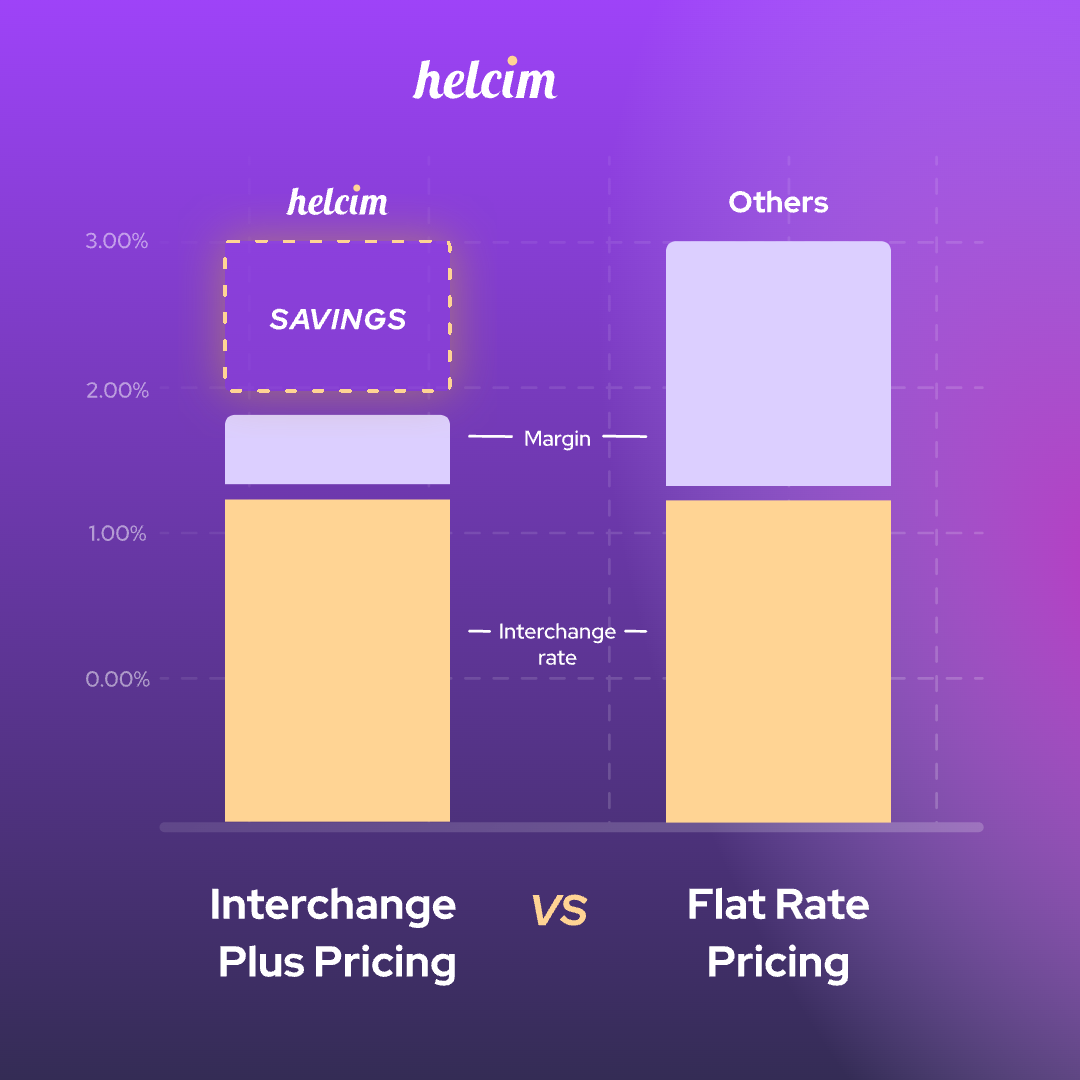
Interchange Plus pricing with no monthly fees and no contracts. Rates are publicly listed on the website before any sales conversation. Volume discounts apply automatically as monthly processing increases, and merchants processing $100K+/month report an average 25% cost savings over flat-rate processors, based on Helcim's internal merchant data. This is the most transparent pricing model of any platform in this comparison.
Strengths
Helcim is the only platform in this list where pricing is publicly available, no monthly fees apply, and the payment tools work independently of any specific practice management software. For a clinic already using Tebra, Jane App or Noterro, the Payment Extension adds Helcim's processing directly into that workflow rather than requiring a platform switch. The combination of card on file, recurring billing, ACH, Fee Saver, and the Customer Portal covers the full payment lifecycle for an independent clinic without requiring an RCM layer on top.
Limitations
Helcim has no RCM, prior authorization, claims management, or EHR charting. For practices where insurance billing drives the revenue cycle, that's a structural gap no Payment Extension connection resolves. Fewer third-party integrations than Square also comes up in r/smallbusiness discussions, though the Payment Extension covers the most common healthcare management platforms. Patient intake, self-service check-in, and engagement workflows are outside Helcim's scope entirely.
Our take
Helcim fits cash-pay and low-insurance independent clinics that want transparent processing without a full RCM stack attached. If your practice runs on Tebra, Jane App, or Noterro and you're tired of flat-rate fees eating into your margins, the Helcim Payment Extension makes switching straightforward. If insurance billing is central to how your clinic runs, look at the RCM-first platforms above.
What features should you look for in a patient payment processing solution?
The features that matter are the ones that remove steps for patients and staff. Six worth evaluating closely:
| Icon | Feature | Description |
|---|---|---|
| 💳 | In-person payments at time of service | Tap-to-pay, chip, swipe, Apple Pay, Google Pay. Collect at checkout, not after |
| 🗂️ | Card on file | Store cards securely with encrypted tokenization. Charge balances automatically with prior consent |
| 🔁 | Recurring payments | Flexible billing intervals with automatic retry, no chasing patients for installments |
| 📨 | Invoicing and payment links with reminders | Send invoices by text or email with built-in payment links. Reminders stop automatically when paid |
| 💰 | HSA/FSA card acceptance | Accept health savings and flexible spending account cards without friction at checkout |
| % | Surcharging or cash discounts | Pass the credit card processing fee to patients who pay by credit card. Patients who pay by debit, ACH, or cash aren't surcharged, but the clinic still pays standard processing fees on those transactions. |
In-person payments at time of service
Collecting at the appointment is the most reliable lever on collection rates. Once a patient walks out without paying, collection probability drops with every day that passes. This is especially true when insurance only covers part of the bill. A patient who owes a $150 copay at checkout is far more likely to pay it on the spot than to respond to a statement three weeks later.
In-person payment rates also tend to be lower than online or keyed transactions, so collecting on the spot is the most convenient and cheapest option for the clinic. Helcim's Smart Terminal and Card Reader handle tap-to-pay, chip, swipe, insert, PIN, and contactless wallets without monthly terminal lease fees.
Card on file
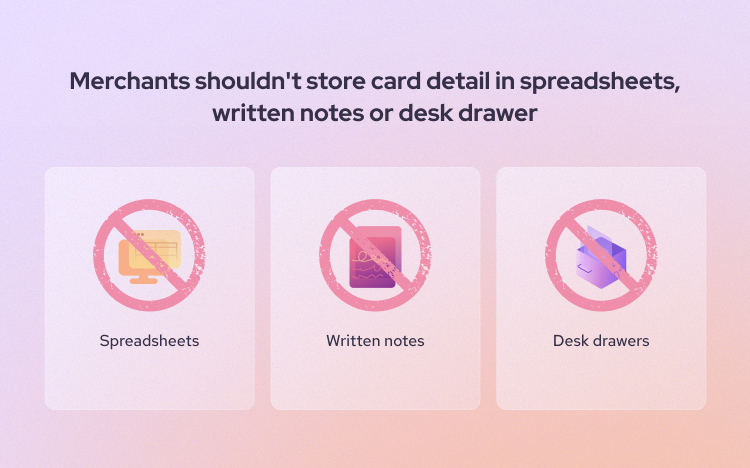
A patient card on file ends the paper statement problem. Patients don't have to log in, find a check, or remember to call back because their co-pay or balance is charged automatically with their prior consent. Look for a processor with a secure card vault that charges no extra monthly fee for storing cards. Helcim's Customer Manager uses encrypted tokenization and includes this at no additional cost.
Recurring payments
Payment plans on high-deductible balances, orthodontic treatments, or ongoing therapy packages work better when the system charges automatically on schedule, with no manual follow-up from your staff. Helcim recurring billing supports flexible intervals and retries on failed payments.
One important distinction: recurring billing is not available through the Helcim Payment Extension. Clinics that need both EHR integration and recurring payment plans would run Helcim's recurring billing separately alongside their practice management software and reconcile payments back to their EHR manually.
Invoicing and payment links with automated reminders
Not every balance gets collected in person. An invoice with a payment link sent by text or email is more effective than a paper statement. The one thing to check: does the reminder sequence stop automatically once the patient pays, or does your staff have to cancel it manually? Helcim Online Invoicing handles both.
HSA/FSA card acceptance
Patients with HSA or FSA cards expect their card to work at checkout like any other. Some processors reject these transactions outright, which makes for an awkward moment at the front desk. Confirm your processor handles them correctly before it becomes a patient complaint. Helcim supports HSA/FSA card acceptance for eligible healthcare merchants.
Surcharging or cash discount programs
Credit card processing fees run 2–3% per transaction. On a $200 appointment that's $4–6 per visit, and it compounds across hundreds of appointments. Surcharging lets clinics pass the credit card processing fee to patients who choose to pay by credit card. Patients who pay by debit, ACH, or cash don't get a surcharge added to their bill, though the clinic still pays standard processing fees on those transactions. Helcim Fee Saver automates the disclosure mechanics and shows the fee to patients before they confirm payment.
What payment methods do patients expect to use?
Your payment solution needs to handle every method a patient might walk in with.
- Credit and debit cards are the baseline. Debit interchange rates are lower than credit, so steering patients toward debit on large balances saves money. Contactless tap-to-pay is worth prioritizing in busy check-in environments.
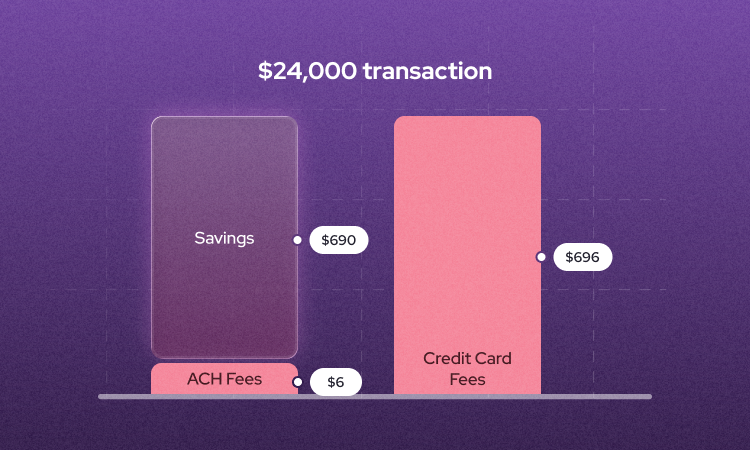
- ACH / bank payments are worth enabling for larger balances. Helcim's ACH rate is 0.5% plus $0.25, capped at $6 per transaction below $25,000 . On a $5,000 dental procedure, that's $6 instead of $125–150 in credit card fees.
- HSA and FSA cards function like debit cards for eligible healthcare expenses. Patients with high-deductible health plans rely on them for co-pays, deductibles, and treatment balances.
- Digital wallets (Apple Pay, Google Pay, Samsung Pay) are increasingly the default, especially for patients under 40. They're also EMV-compliant and carry lower fraud risk than magnetic stripe.
How much do patient payment processing solutions cost?
Costs range from effectively zero (if you pass fees to patients via surcharging) to 3–4% per transaction, depending on your pricing model, card mix, and processor fee structure.
| Flat-Rate Pricing | Interchange Plus Pricing | |
|---|---|---|
| How it works | Every transaction charges at one fixed rate, regardless of card type | Card network's actual cost passes through at cost, plus a small separate processor markup |
| Who sets the rate | Your processor, and they build their margin in | The card networks set interchange; your processor adds a transparent markup on top |
| What you see on your statement | One blended rate | Two line items: interchange cost + processor markup |
| Example: $200 debit payment | 2.9% + $0.30 = $6.10 | ~0.15% interchange + processor markup = less than flat-rate equivalent |
| Example: $200 premium rewards Visa | 2.9% + $0.30 = $6.10 | Higher interchange rate + processor markup = actual network cost, clearly shown |
| At scale ($100K/month) | Same flat rate whether you're processing cheap debit or expensive Amex | Rate structure is transparent and predictable, so what you see on your statement matches what you were quoted |
| The catch | You overpay on every low-cost transaction to subsidize the processor's margin | None, but you need to read your statement to understand card mix |
The advantage of Helcim's credit card volume discount: a clinic reducing its effective rate by 0.5% on $100K/month in volume gets $6,000/year back that was previously buried in flat-rate fees. Helcim's Interchange Plus pricing page shows exactly how this works, publicly listed rates, no sales call required.
Platform fees, PCI compliance fees, statement fees, and batch fees can add $50–200/month on top of transaction costs at many processors. Helcim charges none of these fees and no monthly fees. For a breakdown of what to watch for elsewhere, see Helcim's guide to hidden credit card fees.
How can clinics reduce patient payment processing fees?
Three levers worth pulling: shift patients toward lower-cost payment methods, switch to a pricing model that reflects actual cost, and use surcharging to offset credit card fees where it makes sense.
Steer toward debit and ACH for large balances
Debit interchange rates are generally lower than credit card rates. US debit typically runs 0.05% to 1.15% depending on card type, issuing bank size, and merchant category code, compared to 1.5% to 2.5% or more for premium rewards credit cards. Helcim's ACH processing, capped at $6 per transaction, is the lowest-cost option for large patient balances.
Switch from flat-rate to Interchange Plus
If your current processor charges a flat 2.9%, you're overpaying on every low-cost transaction. Interchange Plus shows exactly what the card networks charge and what your processor adds on top. Run your own comparison using Helcim's processor comparison tool.

Enable surcharging for credit card payments
Helcim Fee Saver lets eligible clinics pass the credit card fee to patients who pay by card. The fee is disclosed before the patient confirms payment, which is required everywhere surcharging is legal.
Surcharging is legal in most US states, but Connecticut, Massachusetts, Puerto Rico, and states including Maine and Colorado prohibit it outright or impose additional caps or conditions. Helcim Fee Saver is not available to merchants in these locations. Debit cards cannot be surcharged anywhere in the US under Visa and Mastercard merchant rules and the Durbin Amendment.
In Canada, surcharging is permitted everywhere except Quebec, where the Consumer Protection Act effectively prohibits it. Outside Quebec, the surcharge rate is capped at 2.4%. Helcim Fee Saver automatically detects your location and applies the correct cap. See the Financial Consumer Agency of Canada for the full rules.
For the full legal picture, see how to implement surcharging and passing on credit card fees to customers on helcim.com.
What is HIPAA compliance for patient payment processors?
When a payment processor touches patient-linked data—names on invoices, appointment-linked transactions, diagnosis codes attached to billing records—it becomes a business associate under HIPAA. Your clinic needs a signed Business Associate Agreement (BAA) in place before any patient data flows through their system.
What does HIPAA actually require from a payment processor?
Under HIPAA rules administered by HHS, any vendor that creates, receives, maintains, or transmits Protected Health Information (PHI) on behalf of a covered entity is classified as a business associate. Per HHS guidance, a written BAA must specify how PHI can be used, require the processor to implement appropriate safeguards, and require them to report any breach. A BAA is only required when the processor actually accesses PHI, but most clinic billing workflows attach patient names, dates of service, or procedure information to invoices. In those cases, a BAA is required. When in doubt, require one before onboarding.
What is PCI DSS compliance and how is it different from HIPAA?
PCI DSS (Payment Card Industry Data Security Standard) is administered by the PCI Security Standards Council and governs how cardholder data is stored, processed, and transmitted. HIPAA governs patient health information. PCI DSS governs payment card data. A processor can be fully PCI DSS compliant and still not HIPAA compliant, so no BAA means no HIPAA coverage regardless of card security posture. Many consumer payment processors are PCI compliant but don't sign BAAs. Always ask before assuming compliance. See Helcim's guide to PCI compliance in healthcare for more.
Do patient payment solutions need to be HIPAA compliant?
Only if they access Protected Health Information. Most clinic billing systems do attach patient data to transactions, so the answer is usually yes. Require a BAA before onboarding any processor your clinic uses for patient billing. For the governing rules, see HHS guidelines on business associate contracts.
Best patient payment processing solution FAQs
Do you need a merchant account for patient payment processing?
Yes. Without a merchant account, you can't accept card payments. Some processors aggregate merchants under one shared account (Square and Stripe work this way). Helcim gives each merchant a dedicated account, which provides more pricing transparency and can reduce the likelihood of account holds. See Helcim's guide to merchant accounts for a full breakdown.
Should clinics collect payment before or after the appointment?
Before, whenever possible. Collecting a co-pay or deposit at booking or check-in removes the collection problem for that visit. For balance billing after insurance adjudicates, a payment link by text or email within 24–48 hours of the explanation of benefits beats a paper statement every time.
Can patients use HSA or FSA cards for co-pays, deductibles, and coinsurance?
Yes. HSA and FSA cards work like debit cards for eligible healthcare expenses. Your processor needs the right merchant category codes for these to process correctly. Helcim supports HSA/FSA card acceptance for eligible healthcare merchants.
Ready to stop losing money on payment processing?
If you're running an independent clinic, a cash-pay practice, or a small specialty clinic, the answer is probably simpler than the enterprise software demos suggest: collect at the point of care, keep a card on file, send invoices with payment links, and keep fees from eating into margins.
Helcim handles all of it with no monthly fees, no contracts, and rates published on the website before you sign up. Start for free or compare your current processor using your actual processing volume. The number will tell you whether switching is worth it.
Rather talk it through first? Helcim has real human support, not a chatbot, not a ticket queue. Reach someone directly..