
























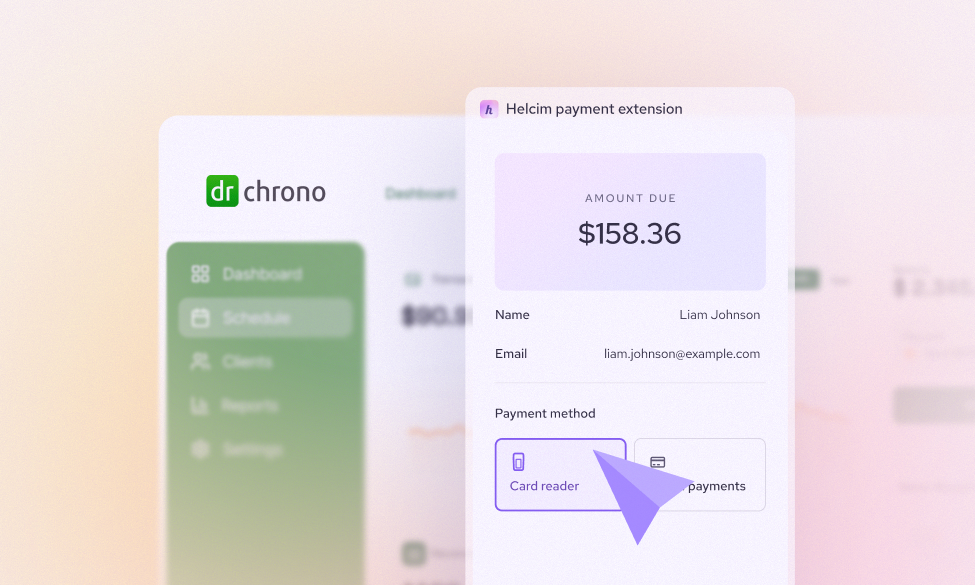
Picture Dr. Amara Chen. Her family medicine practice is the kind of busy that feels like a good problem to have — a packed waiting room, a full team, and a schedule that never really slows down. A few years ago, she made the switch to DrChrono for her EHR, and honestly? It transformed her practice. Scheduling is seamless. Clinical notes are organized. Patient records are a click away. She can manage healthcare billing, track claims, and run her entire operation from a single platform. DrChrono is genuinely excellent at what it does, and Dr. Chen will be the first to tell you that.
But here's the part that stings a little at the end of every month: the payment processing fees. Every time a patient pays their copay or settles a balance, 3.25% plus $0.30 disappears before it ever touches her account. Add a $5 monthly PCI fee on top of that, and the occasional $30 chargeback, and suddenly that "convenient" built-in payment solution is quietly costing her practice thousands of dollars a year.
Here's the thing though — she doesn't have to choose. Who says you can't have your cake and eat it too?
With Helcim, Dr. Chen can keep enjoying every single benefit of DrChrono. The scheduling, the clinical workflows, the billing management, all of it while Helcim handles the payment processing side at significantly lower rates. Think of it this way: DrChrono built a world-class EHR platform. That's their lane, and they own it. But payment processing is a different discipline entirely - one that requires its own expertise, infrastructure, and pricing model. And let’s face it, that’s Helcim's lane.
Helcim brings no disruptions to your existing workflow. Just better rates on every patient transaction, running quietly in the background while your practice operates exactly as it always has.
What Are the DrChrono Payment Processing Fees?
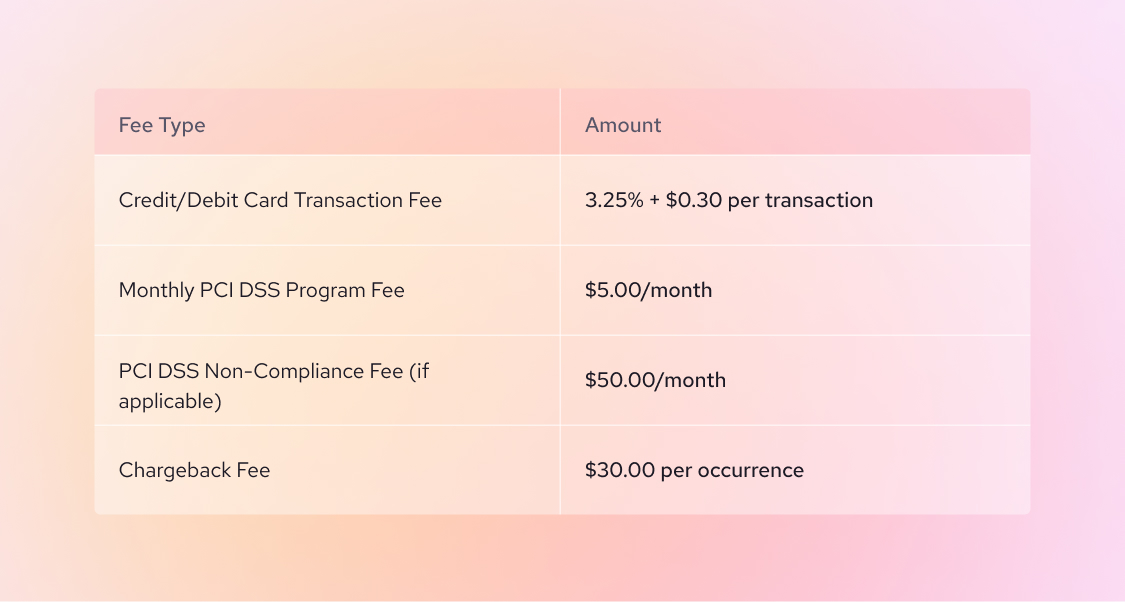
Before we get into solutions, let's get clear on the problem. DrChrono's built-in payment processing is powered by Stripe and uses a flat-rate pricing model. Here's what that looks like:
| Fee Type | Amount |
|---|---|
| Credit/Debit Card Transaction Fee | 3.25% + $0.30 per transaction |
| Monthly PCI DSS Program Fee | $5.00/month |
| PCI DSS Non-Compliance Fee (if applicable) | $50.00/month |
| Chargeback Fee | $30.00 per occurrence |
Fees are deducted on a daily basis from your settlement totals which means they're taken out automatically before the money even hits your account. Transparent? Sure. Affordable? That's where things get interesting.
Why Are DrChrono Payment Processing Fees So High?
The honest answer is that DrChrono's payment processing isn't built to save you money. It's built to be convenient. And convenience, in the payment industry, almost always comes with a premium.
Here's specifically why DrChrono’s flat payment processing rate costs you more than it needs to:
- You never benefit when rates drop. Card networks like Visa and Mastercard periodically lower their underlying interchange rates which is the wholesale cost of processing a card payment. With flat-rate pricing, your processor pockets that difference. With interchange-plus pricing (what Helcim uses), those savings flow directly to you.
- All cards get treated the same. A patient paying with a basic debit card costs far less to process than one paying with a premium travel rewards credit card. Flat-rate pricing ignores that entirely — you pay 3.25% either way, even when the actual cost of that transaction is closer to 1.5%.
- There's no room to negotiate - and the markup runs deeper than you think. DrChrono's payment tool is tied to one processor: Stripe. But most practice owners don't realise they’re not even paying Stripe's rate. You're paying DrChrono's rate. Think of these fees as a sandwich: Stripe charges a base rate to process the transaction, DrChrono adds their own margin on top, and by the time that 3.25% + $0.30 reaches you, it's already been through two sets of hands. No transparency into either markup and no way to negotiate. With Helcim, there's only one layer: the wholesale interchange rate set by the card networks, plus a single transparent margin you can see and verify. No middleman. No margin stacked on top of a margin. Compare Helcim against Stripe here.
How to Calculate Your DrChrono Payment Processing Fees
Here's a quick way to see exactly what you're paying, and what you could be saving.
Take a practice processing $25,000 in-patient payments per month across approximately 300 transactions:
- Transaction fees: $25,000 × 3.25% = $812.50
- Per-transaction fees: 300 × $0.30 = $90.00
- Monthly PCI fee: $5.00
- Total: $907.50/month — or roughly $10,890/year
That's nearly $11,000 a year going straight to payment processing. For a multi-provider practice, that number multiplies fast.
Knowing your actual cost is the first step. The next step is doing something about it.
Strategies to Lower DrChrono Payment Processing Costs
There are two ways to reduce DrChrono Payment Processing costs: switching to ACH payments or leveraging low interchange-plus processing fees using Helcim Payment Extension.
A.) Switch to ACH and keep more of every large payment
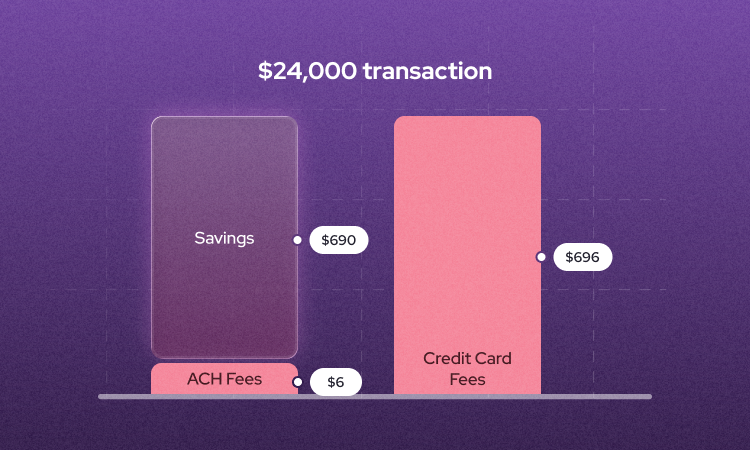
ACH payment is something DrChrono's built-in payment processing quietly can't do. There's no native support for direct ACH/EFT bank-to-bank transfers within DrChrono Payments which is a bigger deal than it sounds.
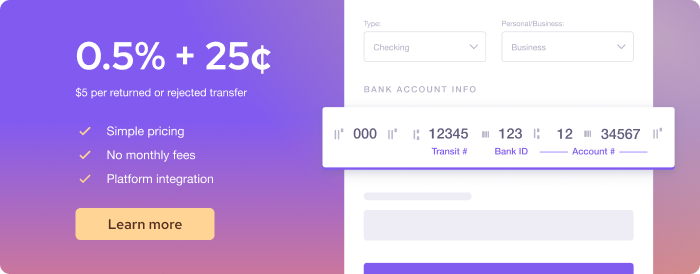
ACH is one of the cheapest ways to collect patient balances, especially larger ones. With Helcim, ACH costs just 0.5% + $0.25 per transaction, capped at $6. On a $500 patient balance, that's $2.75 — compared to $16.55 through DrChrono's flat 3.25% + $0.30. That gap compounds fast across hundreds of monthly transactions.
But let's be honest: patients are going to pay however they want to pay. You can offer ACH, you can make it easy, but credit cards are convenient and for a lot of patients, that's the end of the conversation. If that sounds like your practice, the next strategy is where the real savings live.
B.) Integrate Helcim with DrChrono Using the Helcim Payment Extension
This is the big yet easy one. The Helcim Payment Extension is a no-code, browser-based tool that lets you accept Helcim payments directly inside DrChrono without switching platforms, without touching your workflows, and without hiring a developer.
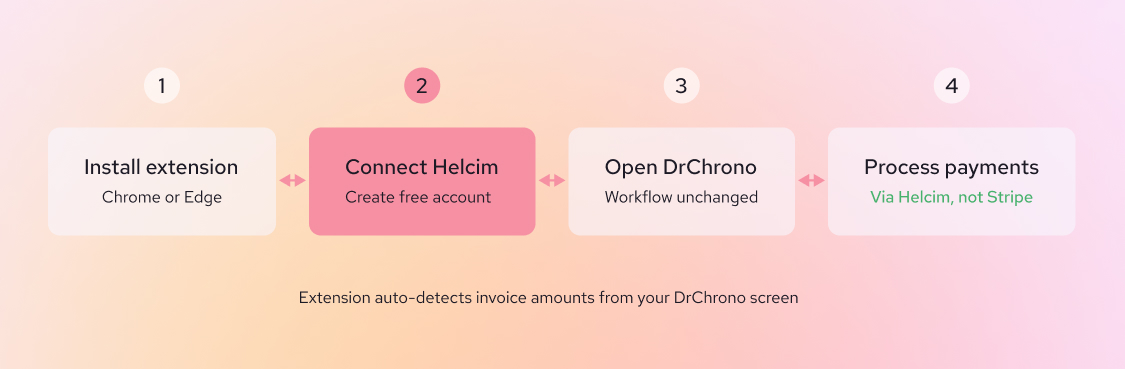
Here's how it works: You install the Helcim extension in your Chrome or Edge browser, create and connect your Helcim merchant account, and the extension intelligently detects invoice amounts and patient details directly from your DrChrono screen. Your team processes payments the same way they always have; they just do it through Helcim's infrastructure instead of Stripe's.
 The difference that makes? Helcim uses interchange-plus pricing instead of flat-rate. That means instead of paying a fixed 3.25% on every transaction, you pay the actual wholesale interchange rate plus a small, transparent markup. Depending on the card type, Helcim merchants typically pay anywhere from around 1.5% to 2.5%, compared to DrChrono's flat 3.25% on every single transaction, no exceptions.
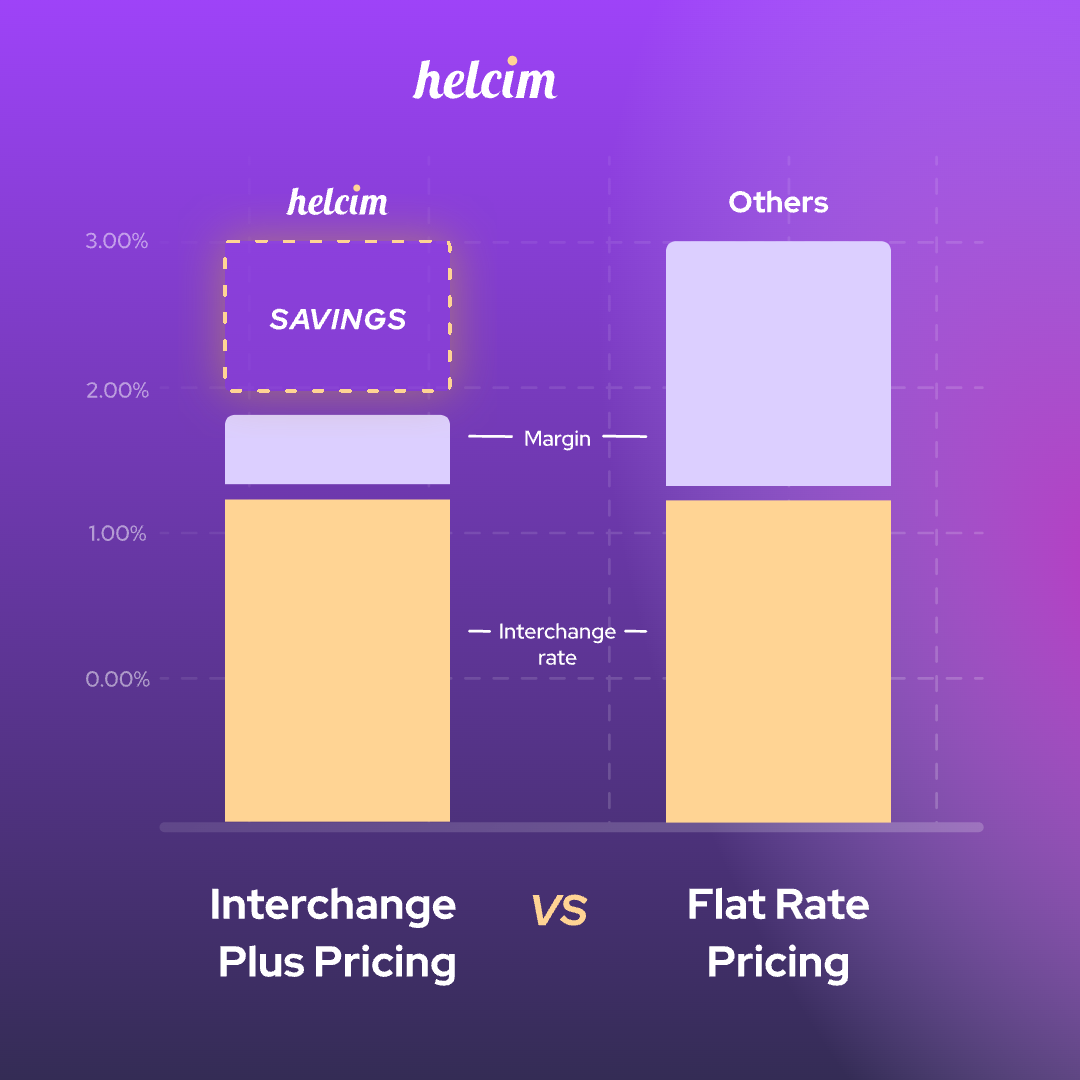
On that same $25,000/month practice, switching to Helcim could mean saving anywhere from $1,500 to $4,500 per year — just on processing fees.
As one clinic owner who beta-tested the extension put it: "Finally, we don't have to choose between our favorite clinic software and fair payment rates. The workflow is seamless — our staff operate exactly as they always have — but now we are saving significantly on every transaction."
What Are the Cheapest Payment Processors That Integrate with DrChrono?
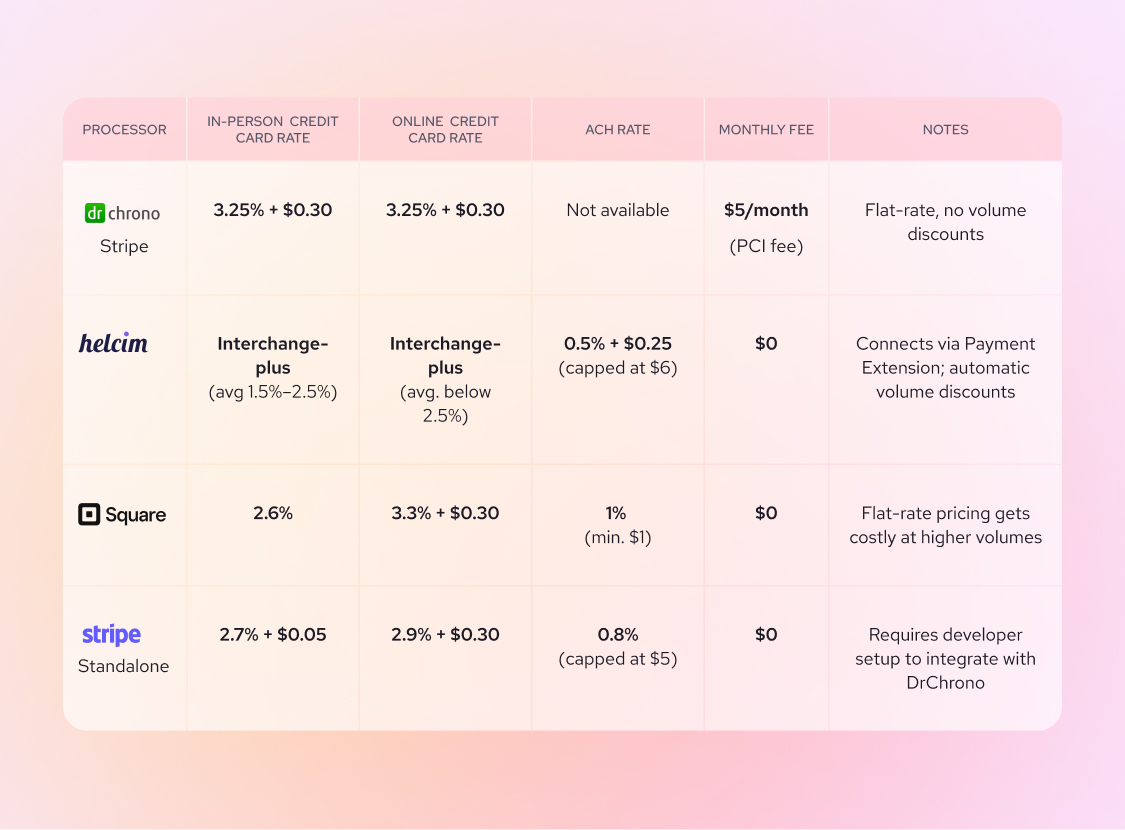
Not every processor that works with DrChrono is created equal. Here's an honest look at how the main DrChrono payment integration options compare:
| PROCESSOR | IN-PERSON CREDIT CARD RATE | ONLINE CREDIT CARD RATE | ACH RATE | MONTHLY FEE | NOTES |
|---|---|---|---|---|---|
| DrChrono Stripe | 3.25% + $0.30 | 3.25% + $0.30 | Not available | $5/month (PCI fee) | Flat-rate, no volume discounts |
| Helcim | Interchange-plus (avg 1.5%–2.5%) | Interchange-plus (avg. below 2.5%) | 0.5% + $0.25 (capped at $6) | $0 | Connects via Payment Extension; automatic volume discounts |
| Square | 2.6% | 3.3% + $0.30 | 1% (min. $1) | $0 | Flat-rate pricing gets costly at higher volumes |
| Stripe Standalone | 2.7% + $0.05 | 2.9% + $0.30 | 0.8% (capped at $5) | $0 | Requires developer setup to integrate with DrChrono |
For practices that process meaningful volume, Helcim's interchange-plus model consistently comes out ahead and the gap widens as your monthly transactions grow, thanks to automatic volume discounts.
How to Pass DrChrono Credit Card Processing Fees on to Patients
What if your effective cost to process credit cards could drop to near zero? With the right setup, it can by passing DrChrono credit card processing fee to patients who choose to pay by credit card.
This is called surcharging for in-person payments or a convenience fee for online payments, and it's legal in most U.S. states and Canadian provinces. The rules vary by location, so it's always worth checking your local regulations but for most practices, this is a completely legitimate and increasingly common approach.
Use Helcim Fee Saver — Online or In-Person
Helcim Fee Saver is Helcim's built-in surcharging tool, and it turns what's normally a compliance headache into a one-toggle setup.
Here's what it looks like in practice for a clinic using the Helcim Payment Extension with DrChrono:
- A patient is ready to pay their $150 copay. Your front desk processes the payment through the Extension as normal.
- If the patient chooses to pay by credit card in-person, Fee Saver automatically adds a surcharge (typically 3%) to the transaction, clearly shown on their receipt before they confirm.
- If the patient pays by ACH or debit instead, no fee is added. Their choice, no surprises.
- Helcim automatically applies the correct surcharge rate for your location (capped at 2.4% in Canada and 3% in the U.S) so you stay compliant with card brand rules without needing to become a legal expert.
The result: your practice processes more credit card payments without absorbing the cost. And because patients always have the option to avoid the fee by choosing ACH or debit, the approach is transparent and fair which matters in a healthcare setting where patient trust is everything.
How do you switch payment processors in DrChrono EHR?
The most seamless way is through the Helcim Payment Extension. Here's how:
- Sign up for a free Helcim account at helcim.com. No contracts, no monthly fees.
- Install the Helcim Payment Extension in Chrome or Edge.
- Connect your Helcim account through the extension prompt.
- Open DrChrono as you normally would and the extension detects invoice amounts automatically.
- Process payments through Helcim without leaving your DrChrono screen.
No migration. No downtime. No learning curve for your team. Just lower fees starting from day one.
Dr. Chen's practice is still running on DrChrono and it always will be. But now, every patient payment is going through Helcim. Her front desk hasn't changed a thing. Her workflows are exactly as they were. She's just keeping more of what her practice earns and that's the whole idea.
Get started with Helcim for free and see how much your practice could save.
Frequently Asked Questions
Does DrChrono offer volume discounts on payment processing?
No. DrChrono's built-in Stripe-powered processing uses flat-rate pricing, which stays at 3.25% + $0.30 regardless of how much you process. Whereas, processors like Helcim automatically reduce your rates as your monthly volume grows meaning the more you process, the more you save.
What's the difference between DrChrono ACH and credit card processing fees?
DrChrono's native payment system doesn't support ACH payments. It's built around card processing at 3.25% + $0.30 per transaction. For practices looking to lower costs on larger patient balances, that's a significant gap. Integrating Helcim via the Payment Extension unlocks ACH at just 0.5% + $0.25 per transaction, capped at $6 which is a fraction of the credit card rate for higher-value payments.
Does DrChrono integrate with other payment processors besides Stripe?
Natively, DrChrono's built-in payment tool runs on Stripe so you don't get to choose a different processor within the platform itself. But Helcim’s Payment Extension changes that. It's a browser-based, no-code integration that connects Helcim's payment processing to DrChrono without replacing your EHR setup or requiring any coding or development work.
Can you negotiate payment processing rates with DrChrono?
In most cases, no. DrChrono's rates are set through their Stripe partnership and aren't negotiable at the practice level. Your best path to lower rates is integrating an alternative processor like Helcim through the Payment Extension, which brings interchange-plus pricing and volume discounts without disrupting your existing workflows.