
























Running a successful mental health practice requires a delicate balance between providing exceptional client care and managing a viable business. While most ERP tools are catered to general healthcare practices, Owl Practice was built with mental health professionals in mind. Owl Practice manages everything from clinical documentation to payment reconciliation, alleviating the administrative strain of running a business. But the administrative burden isn’t the only thing that's being chipped away at. Every time you take a credit card payment through Owl Practice, it costs your practice 2.9% + 30 cents in processing fees. These fees are easy to overlook at first, but they quietly scale alongside your practice, taking a larger bite out of your revenue with every transaction.
How does payment processing in Owl Practice work?
Most specialized ERP and practice management tools, like Owl Practice, have a payment processor in the background that allows businesses to accept payments. In Owl Practice’s case, they use Stripe’s payment function and integrate it directly into Owl Practice’s platform. Although this integration creates a convenient and clean workflow, there are a few downsides to this setup:
- Higher costs to process payments
- Reduced ability to negotiate lower rates when your business scales
Higher costs to process payments
Integrating with a third-party provider means Owl Practice incurs additional costs for providing this feature. To cover these costs, ERP platforms will commonly add it to their monthly platform fee and discreetly pass it on to businesses. Additionally, for the integration to generate revenue for Stripe, the payment processing rates already include their mark-up. What this means is now we’re double-stacking Owl Practice’s costs and Stripe’s margins and these are all paid for by the business.
Reduced ability to negotiate lower rates when your business scales
While scaling a business typically provides the leverage needed to optimize operational costs and unlock preferred pricing, Owl Practice users face the rigid fee structure set by Stripe. Businesses have practically no bargaining power or a leg to stand on when it comes to negotiating their Owl Practice processing rates as Owl Practice themselves don’t have control over the rates. Although the payments industry is known to be quite difficult in negotiating lower rates to begin with, this setup introduces an extra layer of restriction. For rapidly growing or high-volume practices, this limitation represents a significant missed opportunity for cost savings that alternative, more flexible payment processors frequently offer.
A growing practice also depends on a steady flow of new clients, which is why many owners also invest in professional website design for therapists, while also controlling the everyday costs that quietly reduce revenue, such as payment processing fees.
What payment processing fee model does Owl Practice use?
As we saw earlier, Owl Practice integrates Stripe’s payment functionality into their tool, along with Stripe’s flat-rate payment processing model. With a flat-rate model, you’re charged the same percentage in processing fees for each type of transaction.
Owl Practice’s payment processing rates
| Payment types | Processing fee per transaction |
|---|---|
| Canadian credit cards | 2.9% + 30 cents |
| International credit cards | 3.9% + 30 cents |
| ACH (electronic funds transfer) | 1% + 40 cents |
Think of it like going to the local deli to get a sandwich. All of their sandwiches are $15, including the premium slow-cooked beef brisket, but you just want the tuna salad sandwich. Frankly, your sandwich didn’t cost the deli $15 to make, but you’re not going to be able to negotiate a different price. Your overpaying is covering the cost of someone else’s fancy sandwich. That’s exactly how flat-rate pricing works. When a client pays using a basic, no-rewards credit card, the actual wholesale cost to process it is much lower. But since you are locked into a flat 2.9% + 30 cents rate, the difference is pocketed by the payment provider as pure profit. You are stuck paying premium brisket prices for tuna salad cards.
Owl Practice’s flat credit card fees vs Helcim’s interchange-plus
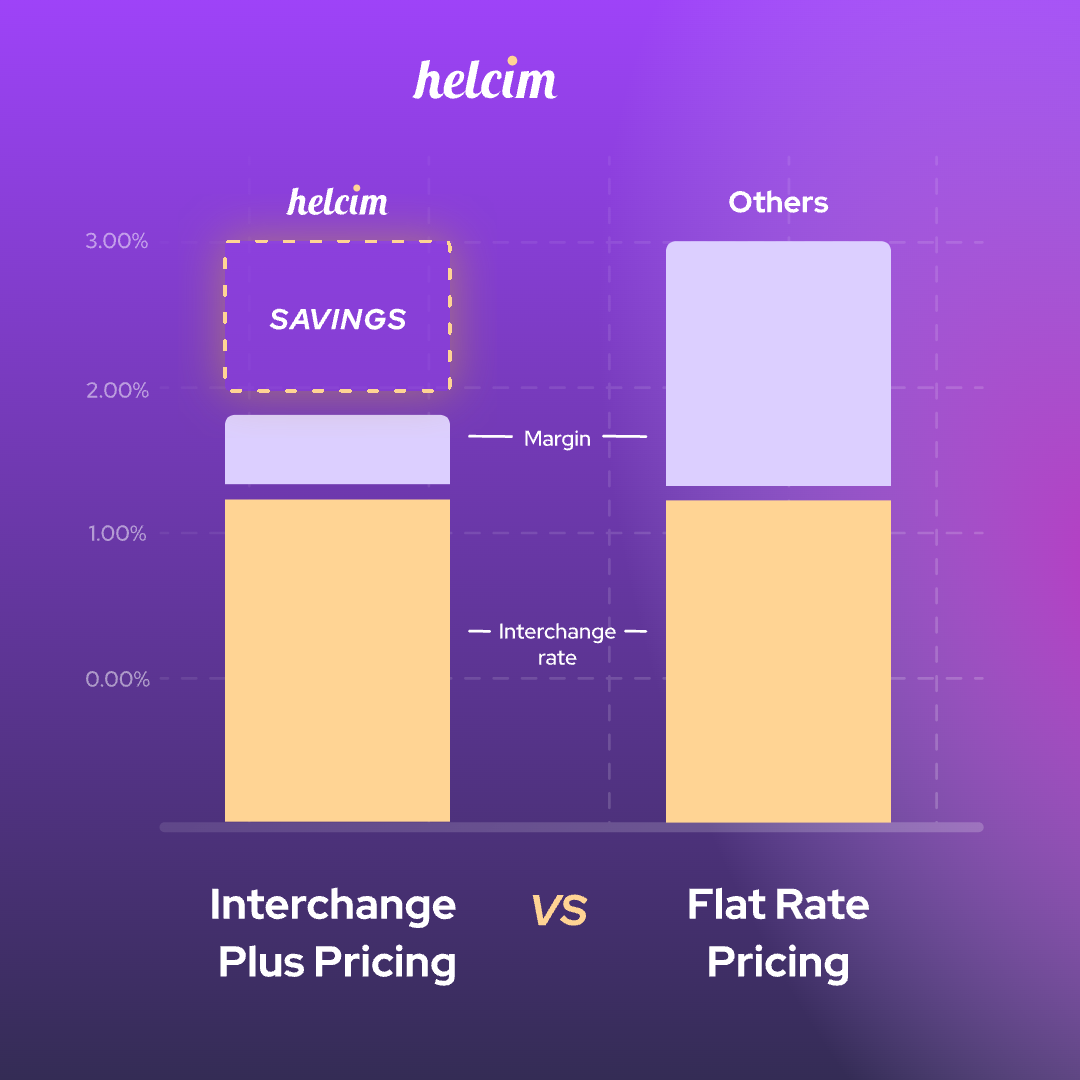
The reality is that with flat-rate pricing models like Owl Practice, more often than not, your payment processing fees are higher than they should be. Payment providers need to set their processing rates high enough to cover the wholesale costs of those premium cards. So, is all this doom and gloom just the cost of doing business? Not necessarily. Though flat-rate pricing is very common, there are other payment providers that use different processing fee models that can help lower your processing fees.
For example, Helcim uses interchange-plus pricing. With interchange-plus pricing, Helcim passes the true cost of each credit card directly to you. Flat rate has its benefits; it's simple, the rate is always the same, the predictability can help you proactively manage your cashflow. Though interchange-plus pricing does take away the predictability of knowing how much the processing fee will be ahead of time, it can bring great savings for your business.
Let’s revisit our deli example: If the deli changed their pricing structure from all sandwiches being $15 to instead charging the cost + a set 30% markup for their sandwiches, now you’re not paying brisket prices for your tuna salad sandwich. This is how interchange-plus pricing works. If the wholesale cost to process the credit card drops for the payment processor, the savings are passed on to you instead of inflating their margins.
How about we put flat-rate vs. interchange-plus pricing into perspective. About half of online Visa card transactions are these basic, no-frill cards. With Helcim, assuming your business processes around $50,000 a month, after interchange rates, card brand fees, and payment provider margins, you effectively pay 1.97% per transaction. That’s 32.76% in savings compared to Owl Practice’s 2.9% flat rate fee. You can visit our Helcim pricing page to get an idea of what your processing rates could be with Helcim’s interchange-plus pricing.
Fee comparison for a $1,000 transaction using Owl Practice’s flat rate vs. Helcim’s interchange-plus pricing
| Payment Type | Owl Practice Fees | Helcim Fees (Average) with Interchange-Plus* | Difference |
|---|---|---|---|
| Online / Card-not-present Canadian credit card (Visa - Consumer) |
$29.30 | $19.70 | $9.60 |
| Online / Card-not-present International credit card (Visa Consumer) US card to CAD account |
$39.30 | $26.50 | $12.80 |
In this example, Helcim’s fees are calculated using a $50,000 monthly processing volume. These rates will decrease as you process more because of Helcim’s volume discounts.
How to reduce Owl Practice payment processing fees
If you’re an Owl Practice advocate and you enjoy their system, there’s a few ways you can continue to use the tool while reducing your spending on payment processing fees:
- Using Owl Practice’s ACH bank payments
- Integrate Helcim with Owl Practice using Helcim Payment Extension to access interchange-plus rates
- Integrate Helcim with Owl Practice to accept in-person payments
Using Owl Practice’s ACH bank payments
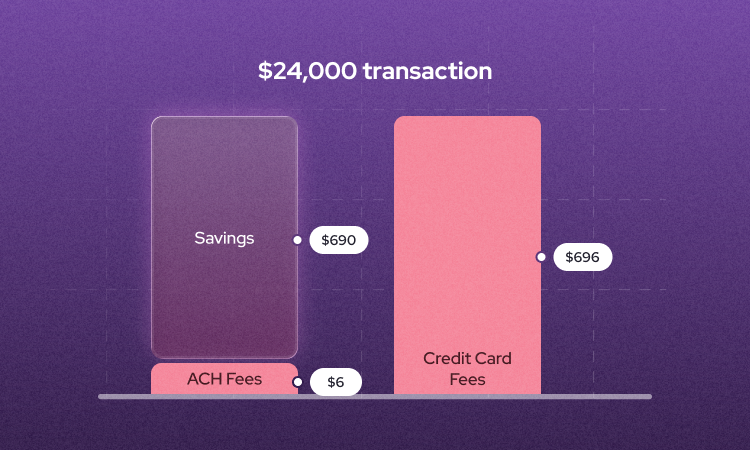
Using ACH payments may sound inconvenient at first, but if you know when to utilize it, it can help you save more than 50% in payment processing fees. As we saw in the rate chart earlier, compared to card transactions which cost around 3% per transaction, ACH payments cost 1% + 40 cents with Owl Practice. Before diving into accepting ACH payments, you’ll want to ask yourself a few questions:
Question 1: Would your clients feel comfortable sharing their banking details? ACH payments require PAD (pre-authorized debit) agreements on file to be able to process payments. Though this information is securely stored and handled by Stripe similar to how they handle card information, some clients may have some hesitations around sharing their banking details with your business.
Question 2: Do you only process one time transactions and don’t have subscriptions or recurring payments? If your clients are expecting to be automatically charged a pre-agreed upon amount at a set cadence, ACH payments are a great way to limit payment issues due to common card issues, such as card expirations or credit card limits being maxed out.
Question 3: Are you comfortable with the longer deposit times of ACH transactions? Compared to Owl Practice’s typical card deposit times of 2-5 business days, ACH transactions take around 5 business days for the deposit to appear in your bank account. If you’re wary of delays on cashflow, you may be better off sticking to card payments.
Of course, you always have the option to offer both card and ACH bank-to-bank transfers to save on fees while providing more payment options for your clients.
Integrate Helcim with Owl Practice using Helcim Payment Extension
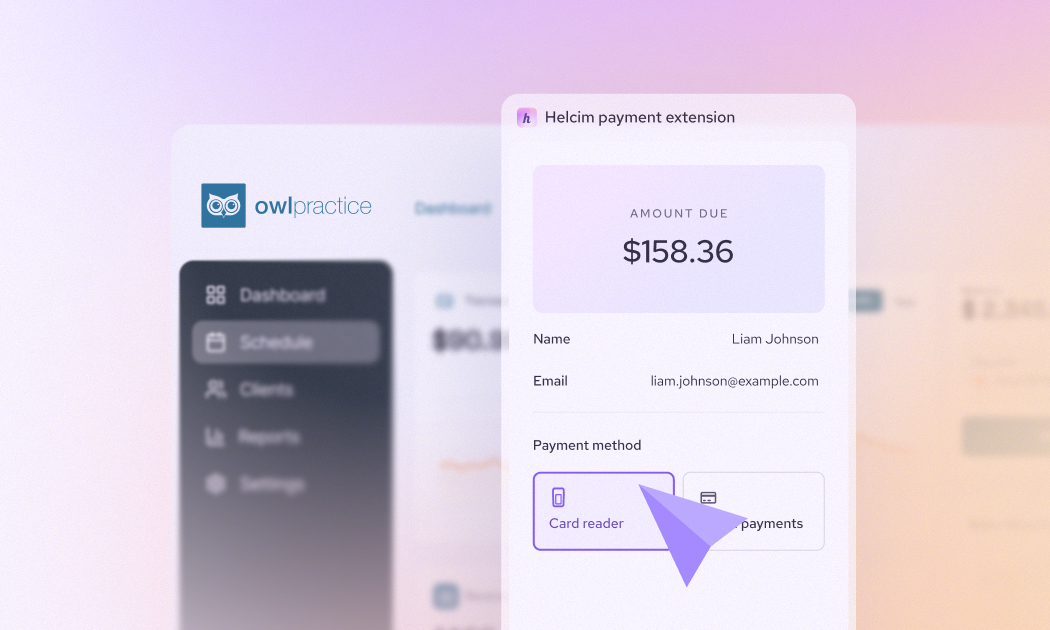
If you want to keep your workflow the same, but can’t say no to a good savings opportunity, Helcim Payment Extension allows you to continue using Owl Practice, while bypassing expensive flat rate processing fees.
Helcim Payment Extension is a no-code web browser extension available in Chrome or Edge that allows you to connect Helcim to Owl Practice, process payments and automatically reconcile invoices while continuing to use Owl Practice for appointments, client data, and billing workflows. When you turn on the browser extension, the tool will automatically recognize invoices created in the Owl Practice platform and you’ll see the Helcim payment module appear on the right hand side of your screen. All the client and payment information will be populated for you, and from there, you can process with the card on file or if you want to accept in-person payments, you can select to pay using the Helcim Smart Terminal or Helcim Card Reader to accept your payments on the spot. No manual data entry or complicated contracts necessary to start saving.
Integrate Helcim with Owl Practice to accept in-person payments
What businesses may not realize is that in-person payments using an on-site card reader can reduce your payment processing fees. Compared to online transactions, face-to-face transactions have significantly lower risk of chargebacks or fraud resulting in lower wholesale costs to process these payments. Though Owl Practice says you can accept in-person payments, their offered solution is to process the invoice payment with the client card on file manually at the time of an appointment. The reality is that this is still considered an online payment and will incur the flat rate of 2.9% + 30 cents per transaction versus with Helcim’s interchange-plus pricing, you’d pay 1.55% for an in-person transaction using a no-frills credit card. Let’s review the chart earlier, but this time with Helcim’s interchange rates for in-person transactions compared to Owl Practice’s manual processing of the saved credit card on file:
Fee comparison for a $1,000 transaction using Owl Practice vs. Helcim’s in-person rates
| Payment Type | Owl Practice Fees | Helcim Fees (Average) with Interchange-Plus* | Difference |
|---|---|---|---|
| In-Person / Card-present Canadian credit card (Visa - Consumer) |
$29.30 | $15.50 | $13.80 |
| In-Person International credit card (Visa Consumer) US card to CAD account |
$39.30 | $22.30 | $17.00 |
In this example, Helcim’s fees are calculated using a $50,000 monthly processing volume. These rates will decrease as you process more because of Helcim’s volume discounts.
You can see just how significant of an impact in-person payments has on lowering your payment processing fees. By integrating Owl Practice with Helcim Payment Extension, Helcim can help you seamlessly accept payments in-person and online, depending on your business and client’s needs.
How to pass Owl Practice payment processing fees to the clients
If you’re looking to really minimize your payment processing fees, with surcharging you can pass the fees on to the clients. The Helcim Payment Extension comes built in with Helcim Fee Saver for in-person payments. If your client chooses to pay with a credit card instead of a debit card, you can pass the processing fees to them.
Pass fees through Helcim Payment Terminal + Helcim Payment Extension Passing on fees for in-person payments is simple with the Helcim Payment Extension and Fee Saver
- Make sure you’ve enabled Fee Saver in your Helcim account
- Go about as usual to bring up the payment in Owl Practice
- You’ll see the Helcim Payment Extension screen appear on the right with all the payment information ready to go
- Select your in-person terminal (Helcim Smart Terminal or Helcim Card Reader) as the payment type. If your client opts to pay with a credit card they will see a surcharge of 2.4% (3.0% in the US) added to their total amount.
This leaves you with no charges on the payment helping you lower your operational costs while offering your clients more ways to pay.
Note: If you are considering using Helcim Fee Saver or other surcharging and convenience fee tools, always make sure to check your local regulations.
Are there any hidden fees with Owl Practice Payments
Owl Practice does a great job in keeping their platform pricing easy to understand. With everything being embedded in their monthly subscription fees, there are no distinct setup, PCI compliance, or cancellation fees. However, some would say that the flat rate pricing model’s lack of visibility on the true cost is similar to a hidden fee as you’re being charged the same set rate even when rates drop.
Additionally, it’s important with tiered pricing structures that you look beyond your current plan so you know what’s included and how the plans change as your practice grows. You don’t want to be caught in a situation where the tool you’ve been relying on suddenly costs more because you need more seats or you’re reaching new business milestones. At Helcim, we believe growth should be celebrated, not penalized which is why we offer volume discounts automatically as your business processes more.
Add-ons are another cost that you may find sneak up on you. For example, if you want faster deposit times than the traditional 2-5 business days, Owl Practice offers Stripe’s Instant Payouts. Speedy same-day deposits can definitely help improve cashflow, but with an additional 1.5% charge on top of your processing fee, it can slow down business growth.
Ready to stop overpaying on your Owl Practice processing fees?
Saving on fees doesn’t mean you have to overhaul your current workflow. With Helcim Payment Extension, we make it easy for you to continue to enjoy the features and benefits of Owl Practice while benefiting from Helcim’s transparent, lower processing fees.
Sign up now or get in touch with our in-house team to see how your practice can start saving with Helcim for a convenient and affordable payments solution.
Frequently asked questions
Does Owl Practice offer volume discounts on payment processing
No. Unfortunately, Owl Practice does not offer any volume discounts. Even as your practice grows, with Owl Practice’s payments you’re locked into the same rates.
Are there different Owl Practice subscription tiers that offer lower payment fees?
No. Owl Practice’s subscription tiers do not affect payment fees. Whether you’re a solo practitioner on Owl Practice’s entry-level tier or a multi-location clinic, the payment processing fees are the same for every tier.
Does Owl Practice integrate with other payment processors besides Stripe?
Owl Practice doesn’t give you an option to integrate with a payment processor other than Stripe directly from within their system. However, by using Helcim Payment Extension you can benefit from Helcim’s transparent fees and savings with a seamless experience. Invoices and payments created in Owl Practice are automatically recognized by the extension allowing you to accept payments without any manual entry or creating duplicate data.
Can you negotiate for lower Owl Practice processing fees?
No. Since Owl Practice is utilizing Stripe’s system, you’re unable to negotiate for lower processing fees. For practices that have the Helcim Payment Extension enabled, you will receive Helcim’s volume discounts automatically–no waiting in queues or having to plead your case. The more you process and grow, the more your fees decrease.